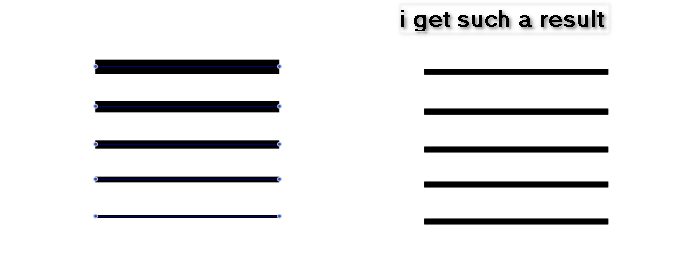
• Is it possible to suppress a Shape Effect via a Shape/Mask Role ?

    8
    1
    1 Votes
    8 Posts
    4k Views
    L
    @Subpath I used displacement effect for this. I will find some time in the next few days to record it. [image: 1754232000916-vs-resized.png] [image: 1754232009466-a-resized.png]
  • Line Width tool options?

    13
    2 Votes
    13 Posts
    6k Views
    VectorStylerV
    @monsterfox said in Line Width tool options?: Could this display function be added? I added this to the backlog
  • Can't save

    5
    1
    0 Votes
    5 Posts
    2k Views
    861475_VctSt8
    @VectorStyler Understood. I will back up that folder regularly. The following data xxx.settings xxx.vstool xxx.vswork may be modified by updates, so even if you back it up, there is no guarantee that it will be 100% inherited.
  • Where to disable the Selection Frame which follows the Shape form ?

    5
    1
    0 Votes
    5 Posts
    2k Views
    S
    @VectorStyler Thank you
  • How to make VS remember last used brush/pen tool colors, widths ...

    9
    1
    1 Votes
    9 Posts
    5k Views
    E
    @VectorStyler thank you for having included that on last release. This saves me a lot of clicks
  • custom toolbar

    3
    2
    2 Votes
    3 Posts
    2k Views
    M
    @VectorStyler [image: 1752937370447-mmexport1752937085027-resized.png] [image: 1752937370110-mmexport1752937080362-resized.png] There are still many functions that don't seem to be in the list of custom toolbars. Maybe the factor you considered is that these are used less frequently. However, the functions of horizontal and vertical average distribution are used quite often, and it's hoped that they can be added to the list.
  • Prevent distorting round corners – how?

    6
    1
    0 Votes
    6 Posts
    3k Views
    RaaskotR
    @VectorStyler Very good, thanks! Yet I think as an user this UI issue is utterly tricky: I'd never guessed to open the (1) Appearance Panel and (2) select Fill-item and then (3) pull the menu to click the (4) Transform Content option without your help I'd expected this in the RM-popup on object instead. Then I could check and compare for object issues. Perhaps with an other name than just "Transform Content" since this also includes the frame? [image: 1752301620606-e1edc3de-27ce-4686-a1b4-65e7f2c6b050-image-resized.png]
  • Syncronization don't appear with other fonts of the same style

    4
    2
    1 Votes
    4 Posts
    2k Views
    VectorStylerV
    @Raaskot Those values (red marker) are part of the Paragraph Styles.
  • Update defined character and paragraph styles, how?

    4
    1
    1 Votes
    4 Posts
    3k Views
    RaaskotR
    @VectorStyler https://www.vectorstyler.com/forum/topic/5269/move-character-and-paragraph-style-panels-to-text-menu
  • Bounding box around text / objects

    8
    1 Votes
    8 Posts
    4k Views
    encartE
    Thanks guys! Next time, instead of asking if a feature is available, I will immediately ask where to look for it.
  • Copy-Paste between applications - maintain object size

    4
    5
    1 Votes
    4 Posts
    2k Views
    VectorStylerV
    @EricP I opened a bug on this. Groups / layers should be copied correctly.
  • Content Crop tool - How does it work?

    2
    1
    1 Votes
    2 Posts
    2k Views
    VectorStylerV
    @Kumr Must be used on images or linked PDF objects
  • New Document Setup

    2
    5
    1 Votes
    2 Posts
    2k Views
    VectorStylerV
    @B-Vs-V When using the select folder, the options are hidden by design. There is an error here with the name for the "preset" list.
  • Commas vs dots in numerics. How?

    5
    1
    1 Votes
    5 Posts
    3k Views
    RaaskotR
    @VectorStyler Same here, cool, thanks
  • having problems printing to manual feed tray

    3
    2
    1 Votes
    3 Posts
    2k Views
    O
    @VectorStyler thank you for looking into it. I did get around it by printing to file and then opening that in Preview and printing from there. Preview prints it just fine. Hopefully one of us will be able to figure out what's going on here! In the meantime, I'm loving VectorStyler. It has a lot of the features I've been missing from my old Illustrator + Astute Graphics workflow. Thanks for producing such a feature-rich drawing program!
  • How should position adjustment in the Repeater work ?

    7
    0 Votes
    7 Posts
    5k Views
    S
    @Li-Xiao Wow, pretty pretty cool. I need still a few more tries to figure out how "Adjust Position" works. It's still unpredictable for me at the moment. By the way, since I used to work as a screen printer for a few years, I'm familiar with moiré patterns that can occur with halftone printing or overlapping Screen folie. Always found them interesting. I had a few ideas after watching your video. One was that if you use red and green dots and some of the old 3D red-green glasses, you might be able to see a 3D effect. But I've also seen many other uses. Again, thank you very much for your help and the insights you've given me and I'm sure other users will be grateful to you for that too.
  • Hide color bar

    3
    1 Votes
    3 Posts
    2k Views
    VectorStylerV
    @Subpath Yes, it is a bug. Must be a recent regression
  • How to keep same overall stroke width on object resize

    8
    1
    0 Votes
    8 Posts
    4k Views
    VectorStylerV
    @Raaskot Clearly a bug, can be replicate here also. It occurs with small shapes where the width is large relative to the shape size. I will fix this ASAP.
  • App won't startup

    4
    1 Votes
    4 Posts
    2k Views
    R
    Thanks VectorStyler, the latest update seems to have fixed whatever the issue was. Cheers!
  • Why does alignment horizontally also alter placement vertically?

    2
    1
    1 Votes
    2 Posts
    2k Views
    VectorStylerV
    @Boldline The alignment Angle seems to be set to -90 degrees. With this, all alignment is considered at a -90 degree rotation.