Affinity Designer Now FREE with All features can be used, except for AI.
-
@Evaelo said in Affinity Designer Now FREE with All features can be used, except for AI.:
Selection constraints are very important.
I need to understand more about this, can you give me some specific examples of how this should work?
-
@VectorStyler
Yes and it seems that managing objects selecting them in VS and then dragging them into a layer is a bit cumbersome → you have to select only their position in the Object list but not the objects themselves and this is counterproductive because in the lister we do not know which entries are for which object as we might select random objects on the canvas to combine into a layer. Anyway…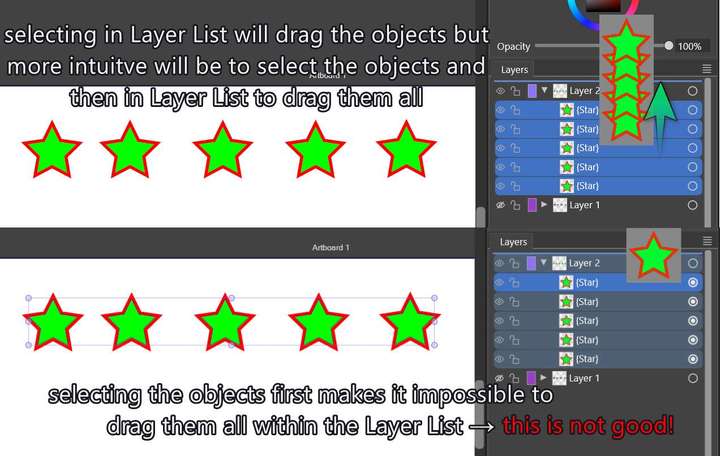 image url)
But hey, I am glad to inform you that in VS if I lock a layer it excludes it from Selection criteria (by fill, stroke, effects)! If you only make it invisible it will still select objects inside matching a selection criteria which might be a bit counter intuitive.
This lock is perfect for that indeed, though I think 'invisibility' should also exclude from selection criteria! So, this is in the face of Affinity!But you know what would be great → to be able to make a layer a reference layer (not movable, an only in a grey color underlay state where we could be snap to its objects or align → like making a grid but with objects instead of straight lines).
-
@Evaelo The default behavior of the Layers panel is similar to Illustrator (has some advantages), but you can keep the on canvas and layers panel selection in sync enabling the "Select Highlighted" and "Highlight Selected" options.
-
@VectorStyler
Fabulous! That is the feature! Many thanks to you VS admin!
-
@VectorStyler
I did it!
Please, follow this thread in the Tutorial forum:
See Through with a shape