Affinity Designer Now FREE with All features can be used, except for AI.
-
Loss leader strategy is a game for the big companies that have deep pockets to finance it. And it doesn’t work through free versions with pro upgrades. VectorStyler is Pro by nature, so that suggestion makes no sense anyway.
Affinity didn’t become free because Canva are great humanitarians whose hearts bleed for the small creators.
-
I bought a licence when Affinity (Suite all three programs) was still only by Serif (now acquired by Canva).
But guess what!? Today I bought a licence for VectorStyler (VS) and it is because it got me that feature of cloning and symbols and many more I have been struggling to do in Affinity (Designer).
I will be testing VS for another feature I need:
I need to mask a part of and object with a dummy object (let's say a square) so that it reveals (makes that part fully transparent) a object under. Imagine you have a line but you need to see what is behind a portion of that line, let's say a square object or any layer under that line. No, not a typical mask, because if you make that rectangle as a mask it will "hide" (mask) all the outside parts of the said line and show the line part within the dummy square.I am a happy new customer to NumericPath and will be supporting the team. Let's see whether VS has the most sought after feature of Adobe Illustrator → the gradient mesh! Because Affinity does not have it currently!
-
@Evaelo said in Affinity Designer Now FREE with All features can be used, except for AI.:
I need to mask a part of and object with a dummy object (let's say a square) so that it reveals (makes that part fully transparent) a object under.
Create a group with that "mask" object and the line, set the group to Isolated mode (Object Options), and then inside the group set the blend mode for the "mask" to Erase (the isolated mode is important).
-
@VectorStyler
Yes, that is similar to how Affinity works. The downside is that with export to pdf or maybe (?) svg or eps this 'erase' effect gets rasterized and… I do not want that to happen.
In short, I need a 'invert mask' behavior. Making a mask with a square (or a shape) is like making it 'reveal' and hides everything outside that mask shape. I want the opposite and want it to be vector crisp upon export to pdf or svg (or other).I have also struggles with isolating a Selection (same: fill, stroke, etc.) to certain layer or why not just a group in Affinity. Such restricted selection is very handy when dealing with repeating patterns or sections where we want to select objects with a criteria (appearance\features) only in that corresponding layer or group! In affinity there is a new button 'Edit within current container' but it seems it does not affect Selection! Such a missed opportunity really.
I will dissect Vector Styler in the following days and will certainly open threads in the forum here… hopefully not getting banned!

-
@Evaelo said in Affinity Designer Now FREE with All features can be used, except for AI.:
In short, I need a 'invert mask' behavior. Making a mask with a square (or a shape) is like making it 'reveal' and hides everything outside that mask shape. I want the opposite and want it to be vector crisp upon export to pdf or svg (or other).
I think this can only be achieved if you create a clipping path by combining the erasure "mask" shape, with a very large rectangle.
I have also struggles with isolating a Selection (same: fill, stroke, etc.) to certain layer or why not just a group in Affinity. Such restricted selection is very handy when dealing with repeating patterns or sections where we want to select objects with a criteria (appearance\features) only in that corresponding layer or group! In affinity there is a new button 'Edit within current container' but it seems it does not affect Selection! Such a missed opportunity really
Isolation of groups should work with double click. In 1.3 there is also a new (hidden) feature: in the Layers panel menu -> Panel Options you can enable Show Isolation (left-bottom) and then the Layers panel will show an isolation knob at the end of each layer / object row, than can be used to isolate to that layer or object.
I will dissect Vector Styler in the following days and will certainly open threads in the forum here
Of course this is welcome
-
@VectorStyler said in Affinity Designer Now FREE with All features can be used, except for AI.:
I think this can only be achieved if you create a clipping path by combining the erasure "mask" shape, with a very large rectangle.
That is the usual method I have been doing for ages within Illustrator and Affinity.
Regarding Selection constraints. I just can double confirm that in Affinity Selection criteria (constraints) is sadly not affected by the state of the layer or in this case Container layer. It does not matter if any Containers are locked or invisible. It will select their objects inside who have the 'same' (fill, stroke, etc.) matching a selected object anywhere else outside the locked\hidden container. Arrrggghhh!

Selection constraints are very important. Isolation could be the answer, for example if we can isolate a layer\group somehow or right click it and choose: exclude from selection and a crossed arrow icon to appear for that group layer. Just an idea maybe.
-
@Evaelo said in Affinity Designer Now FREE with All features can be used, except for AI.:
Selection constraints are very important.
I need to understand more about this, can you give me some specific examples of how this should work?
-
@VectorStyler
Yes and it seems that managing objects selecting them in VS and then dragging them into a layer is a bit cumbersome → you have to select only their position in the Object list but not the objects themselves and this is counterproductive because in the lister we do not know which entries are for which object as we might select random objects on the canvas to combine into a layer. Anyway…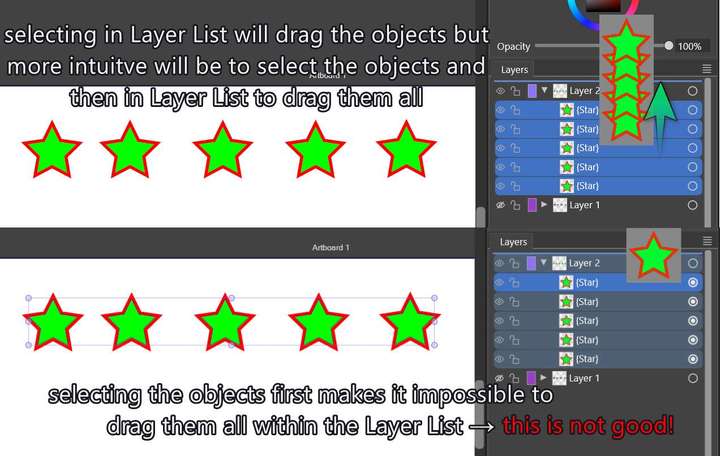 image url)
But hey, I am glad to inform you that in VS if I lock a layer it excludes it from Selection criteria (by fill, stroke, effects)! If you only make it invisible it will still select objects inside matching a selection criteria which might be a bit counter intuitive.
This lock is perfect for that indeed, though I think 'invisibility' should also exclude from selection criteria! So, this is in the face of Affinity!But you know what would be great → to be able to make a layer a reference layer (not movable, an only in a grey color underlay state where we could be snap to its objects or align → like making a grid but with objects instead of straight lines).
-
@Evaelo The default behavior of the Layers panel is similar to Illustrator (has some advantages), but you can keep the on canvas and layers panel selection in sync enabling the "Select Highlighted" and "Highlight Selected" options.
-
@VectorStyler
Fabulous! That is the feature! Many thanks to you VS admin! -
@VectorStyler
I did it!
Please, follow this thread in the Tutorial forum:
See Through with a shape -
@monsterfox I agree with this wholeheartedly. We desperately need VectorStyler tutorials on YouTube. This will also help drive new users to this tool.


