VectorStyler
    • Categories
    • Unread
    • Recent
    • Tags
    • Popular
    • Register
    • Login

    Vertical color bar is not displaying the correct name of the palette

    Scheduled Pinned Locked Moved VectorStyler 1.1 Bugs
    5 Posts 3 Posters 6.2k Views 2 Watching
    Loading More Posts
    • Oldest to Newest
    • Newest to Oldest
    • Most Votes
    Reply
    • Reply as topic
    Log in to reply
    This topic has been deleted. Only users with topic management privileges can see it.
    • BoldlineB Online
      Boldline
      last edited by

      Vertical color bar is not displaying the correct name of the palette installed. When I hover over the top of it, it only says "Palette"
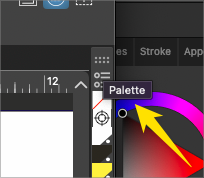
      0_1694296033631_1712161f-db58-4b1b-b67c-e75c4c07a403-BLD 2023-09-09 at 17.45.52.png

      🍎 macOS Tahoe 26.2, Mac mini (M1, 2020), Chip Apple M1, Memory 16 GB
      Cintiq 27QHD Display and LG Ultra HD Display

      b77B VectorStylerV 2 Replies Last reply Reply Quote 1
      • b77B Offline
        b77 @Boldline
        last edited by

        @Boldline I loaded some Pantone palettes here, also Apple's 'Crayons' and
        'Web Safe Colors' palettes, and the tooltip shows the name of the palette.

        Send that (custom?) palette to the developer for testing.

        MacBook Pro (Intel) running Monterey 12.6.4

        BoldlineB 1 Reply Last reply Reply Quote 1
        • BoldlineB Online
          Boldline @b77
          last edited by

          @b77 it is indeed a custom palette. I'll send it over to him for testing. I had not thought of testing it with other existing "native" palettes first. thanks.

          🍎 macOS Tahoe 26.2, Mac mini (M1, 2020), Chip Apple M1, Memory 16 GB
          Cintiq 27QHD Display and LG Ultra HD Display

          1 Reply Last reply Reply Quote 1
          • VectorStylerV Offline
            VectorStyler @Boldline
            last edited by

            @Boldline I will try to replicate this.

            BoldlineB 1 Reply Last reply Reply Quote 0
            • BoldlineB Online
              Boldline @VectorStyler
              last edited by

              @VectorStyler Today I removed the existing custom palette and tried others and came back to the one I had there originally and now they all display correctly.

              🍎 macOS Tahoe 26.2, Mac mini (M1, 2020), Chip Apple M1, Memory 16 GB
              Cintiq 27QHD Display and LG Ultra HD Display

              1 Reply Last reply Reply Quote 1
              • First post
                Last post
