VectorStyler
    • Categories
    • Unread
    • Recent
    • Tags
    • Popular
    • Register
    • Login

    VectorStyler Manual | PDF

    Scheduled Pinned Locked Moved Tutorials
    70 Posts 10 Posters 240.7k Views 9 Watching
    Loading More Posts
    • Oldest to Newest
    • Newest to Oldest
    • Most Votes
    Reply
    • Reply as topic
    Log in to reply
    This topic has been deleted. Only users with topic management privileges can see it.
    • S Offline
      Subpath
      last edited by

      Took a look at the updated PDF manual.
      I am very impressed. Very well done!

      Win 11
      CPU: AMD Ryzen 5 9600X, 6-core.
      GPU: Nvidia Geforce RTX 5070.

      1 Reply Last reply Reply Quote 0
      • J Offline
        Jono
        last edited by

        Thanks, will have a good read. 👍 ☺

        Mac mini (M1, 2020) | Tahoe 26.1 | Wacom Cintiq 16 (1920 x 1080 px)

        1 Reply Last reply Reply Quote 0
        • R Offline
          richbyte @freggern
          last edited by

          @freggern Thank You for making this! 👋

          1 Reply Last reply Reply Quote 0
          • F Offline
            freggern
            last edited by

            Small update of the manual (https://k00.fr/xucgr0j9)

            • Alternative rendering for EULA pages to reduce space (page 50)

            Included changes of the html pages (thx @vectoradmin)

            • New chapters for Repeater (page 1305)
            • Additions! Shortcuts (Win, Mac), Change Colors -> Intensity, Preferences -> Document Editor settings, Layer -> Layer Panel Options, Toolbox -> Symbol Tools, Editpath -> The Trim and Join Tool
            • profileicon.png fixed
            BoldlineB 1 Reply Last reply Reply Quote 1
            • BoldlineB Offline
              Boldline @freggern
              last edited by Boldline

              @freggern Thanks for doing this and for keeping it updated as we go along.
              If I see an error or misspelling in the documentation, should I be alerting both you and @vectoradmin ?

              🍎 macOS Sequoia 15.3, Mac mini (M1, 2020), Chip Apple M1, Memory 16 GB
              Cintiq 27QHD Display and LG Ultra HD Display

              VectorStylerV 1 Reply Last reply Reply Quote 0
              • F Offline
                freggern
                last edited by freggern

                It depends on where the error or misspelling can be found. I only need to know when it happens only in the pdf file. I can do nothing when the misspelling is on the documentation website. I generate the pdf file in 3 steps that I trigger: Crawl the website, generate a latex file with python out of the website files and then generate the pdf file from the latex file. I don't plan to manually fix misspelling or errors that can be found in the website files. I can only fix "errors" that happend in the process of generating the pdf file.
                Like for example on my todo list:

                • & like Canvas & Artboard doesn't show as Canvas & Artboard
                • Color Palette Bar has some not correct rendered images
                • SVG EFFECTS - Diffuse Light has some not correct rendered images
                • Better floating positioning for images
                • Support for intern links in the pdf
                1 Reply Last reply Reply Quote 1
                • VectorStylerV Offline
                  VectorStyler @Boldline
                  last edited by

                  @Boldline Let me know if there are spelling errors in the documentation.
                  You can also post it here.

                  BoldlineB 1 Reply Last reply Reply Quote 1
                  • BoldlineB Offline
                    Boldline @VectorStyler
                    last edited by

                    @vectoradmin no problem - minor one in the "shape paint" section.
                    "Original"
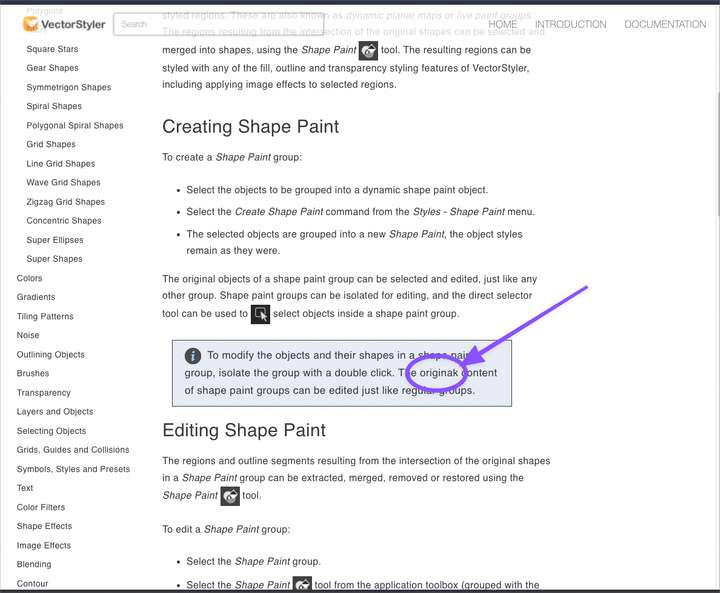
                    0_1641278430754_868c69bd-94be-4453-a707-09ce9fcad8ea-BLD 2022-01-04 at 01.38.20.png

                    🍎 macOS Sequoia 15.3, Mac mini (M1, 2020), Chip Apple M1, Memory 16 GB
                    Cintiq 27QHD Display and LG Ultra HD Display

                    1 Reply Last reply Reply Quote 0
                    • F Offline
                      freggern
                      last edited by

                      @vectoradmin There is a wrong link on the page https://www.vectorstyler.com/documentation/repeater/ unter the overview headline

                      • "Not Found" (404) at link https://www.vectorstyler.com/documentation/repeater/geometry/ (from https://www.vectorstyler.com/documentation/repeater/) => correct link is/repeater/geometries/
                      VectorStylerV 1 Reply Last reply Reply Quote 0
                      • VectorStylerV Offline
                        VectorStyler @freggern
                        last edited by

                        @freggern Should be fixed now!

                        1 Reply Last reply Reply Quote 1
                        • F Offline
                          freggern
                          last edited by

                          New update of the manual (https://k00.fr/xucgr0j9)

                          • Support for internal links (When you click on a link to another chapter, it jumps to the correct chapter of the PDF)
                          • & display now correct as &
                          • Fix rendering of images as part of an HTML p element

                          Included changes of the HTML pages (thx @vectoradmin)

                          • Added! What is new in VectorStyler 1.1
                          • Correct an internal link
                          BoldlineB S 3 Replies Last reply Reply Quote 6
                          • BoldlineB Offline
                            Boldline @freggern
                            last edited by

                            @freggern Love that you've taken on the task to do this - thanks! It keeps getting better all the time

                            🍎 macOS Sequoia 15.3, Mac mini (M1, 2020), Chip Apple M1, Memory 16 GB
                            Cintiq 27QHD Display and LG Ultra HD Display

                            1 Reply Last reply Reply Quote 0
                            • S Offline
                              Subpath @freggern
                              last edited by Subpath

                              @freggern
                              i am also really gratefully for your work 👍 👍 👍

                              Win 11
                              CPU: AMD Ryzen 5 9600X, 6-core.
                              GPU: Nvidia Geforce RTX 5070.

                              1 Reply Last reply Reply Quote 0
                              • BoldlineB Offline
                                Boldline @freggern
                                last edited by

                                @vectorstyler @freggern should we move the PDF file of the documentation over to a pinned thread in the general discussion? This way it's easy to find each time @freggern updates it? Right now it's within an random question and would be harder to go back and find later on.

                                🍎 macOS Sequoia 15.3, Mac mini (M1, 2020), Chip Apple M1, Memory 16 GB
                                Cintiq 27QHD Display and LG Ultra HD Display

                                VectorStylerV 1 Reply Last reply Reply Quote 3
                                • VectorStylerV Offline
                                  VectorStyler @Boldline
                                  last edited by

                                  @Boldline A pinned thread in "Tutorials" or "General Discussion" will do.

                                  1 Reply Last reply Reply Quote 0
                                  • F Offline
                                    freggern
                                    last edited by

                                    @Boldline @vectoradmin I change the first post and rename the thread title. @vectoradmin Feel free to pin the thread.

                                    1 Reply Last reply Reply Quote 1
                                    • F Offline
                                      freggern
                                      last edited by

                                      Is it intentional that the category tutorial is private. So only logined user can see the category or access threads in it?

                                      VectorStylerV 1 Reply Last reply Reply Quote 0
                                      • VectorStylerV Offline
                                        VectorStyler @freggern
                                        last edited by

                                        @freggern Should be fixed now.

                                        1 Reply Last reply Reply Quote 1
                                        • S Offline
                                          Subpath
                                          last edited by Subpath

                                          👍 to both Ideas.
                                          I was also not so happy that the Tutorials could
                                          only be read by registered forum users.
                                          Found interested People unnecessarily excluded.

                                          Win 11
                                          CPU: AMD Ryzen 5 9600X, 6-core.
                                          GPU: Nvidia Geforce RTX 5070.

                                          1 Reply Last reply Reply Quote 0
                                          • F Offline
                                            freggern
                                            last edited by

                                            New update of the manual (https://k00.fr/xucgr0j9)

                                            • tables now support to hide the first column of the modifier-tables (is hidden on the website per CSS-rule)
                                            • column and row now separated by lines
                                            • there was a bug where it was possible that fields get combined.
                                            • redesign the info box
                                            • disable all separator lines
                                            • fix a bug where \ in the text doesn't display correct
                                            • add 1 cm to the textlinewidth

                                            Included changes of the HTML pages (thx @vectoradmin)

                                            • Updated some images like color palette and layer panel
                                            • Add shortcuts
                                            1 Reply Last reply Reply Quote 7
                                            • First post
                                              Last post
