Bug Report & Improvement Request: Space/Dash Menu Mapping and ZENKAKU Space
-
ver. 1.3.022
I hope you are doing well. I am writing to share some feedback and report an issue regarding the space and dash input menu in VectorStyler.Currently, the characters inserted from this menu do not match their UI names, and the Unicode assignments need correction. Could you please check if there might be a mix-up somewhere? I suspect this issue stems from the following three factors:
-
Naming mix-up between "Quarter" and "Quad":
Could it be that you originally intended to implement "EM Quarter Space" (1/4 Em) and "EN Quarter Space" (1/4 En), but they were mistakenly labeled using the word "Quad" in the UI?
In typography, a "Quad" strictly means a full 1-Em or 1-En space. This wording mix-up likely caused the internal mapping to shift.
(Please note: "EM Quarter Space" and "EN Quarter Space" are essential for Japanese DTP. Please keep these items, but simply rename them from "Quad" to "Quarter" and assign the correct 1/4 widths). -
EM and EN inversion:
In the background mapping, the values and concepts for EM (full-width) and EN (half-width) appear to be inverted. -
Menu ordering:
The current list order is a bit difficult to navigate. Sorting the items strictly by character width would make it much more intuitive for DTP users and help organize the Unicode mapping properly.
Regarding the connection between "EM Space" and "ZENKAKU Space":
In Japanese typography, an "EM Space" is exactly the same width as the standard Japanese "ZENKAKU Space" (Ideographic Space:U+3000).
Currently, entering the ZENKAKU Space directly from a standard Japanese keyboard does not function in VectorStyler. Because of this keyboard issue, Japanese users rely heavily on the menu to insert full-width spaces. Therefore, ensuring the EM Space menu mapping is perfectly accurate is crucial for our workflow.To resolve these issues and improve the overall UX, please update the mapping and menu order based on the correct values below:
[Correct Unicode and Suggested Menu Order]
- Dashes (Short to Long) -
Figure Dash:
U+2012
En Dash:U+2013
Em Dash:U+2014
Horizontal Bar:U+2015- Spaces (Wide to Narrow) -
EM Space:
U+2003(Width equivalent to ZENKAKU SpaceU+3000)
EN Space:U+2002
Three-Per-Em Space:U+2004
EM Quarter Space:U+2005
EN Quarter Space: (Please assign 1/8 EM width / half of EM Quarter)
Six-Per-Em Space:U+2006Additionally, from what I can see, the following items currently appear to be mapped correctly, but please double-check them just to be sure:
Figure Dash
Horizontal Bar
Third Space (Three-Per-Em Space):U+2004
Quarter Space (Four-Per-Em Space):U+2005
Sixth Space (Six-Per-Em Space):U+2006I believe adjusting these points will greatly enhance VectorStyler's accuracy as a professional layout tool. Thank you as always for your hard work!
Best regards,
-
-
@861475_VctSt Uploaded a fix for this, must be installed manually (no version increment)
-
Where was it uploaded?
-
@861475_VctSt It is the normal download page for version 1.3:
https://www.vectorstyler.com/updatepage/ -
Subject:
Confirmations and Improvement Suggestions for Update 1.3.022Here are my confirmations and some suggestions for improvement regarding update 1.3.022.
- "Quad" Naming and Japanese Localization Fixes
In my previous message, I shared my guess regarding the "Quad" naming in the menu, but I might have overthought it.
In the era of Japanese letterpress printing, a "Quad" was pronounced as "KUWATA". It referred to a spacing material used to fill gaps, which essentially meant a "ZENKAKU (full-width) space". However, this term is rarely used in modern Japanese printing environments today.
Given this background, I would like to propose the following corrections for the Japanese localization of the menu. Please also refer to the attached visual reference image
(menue.jpg).
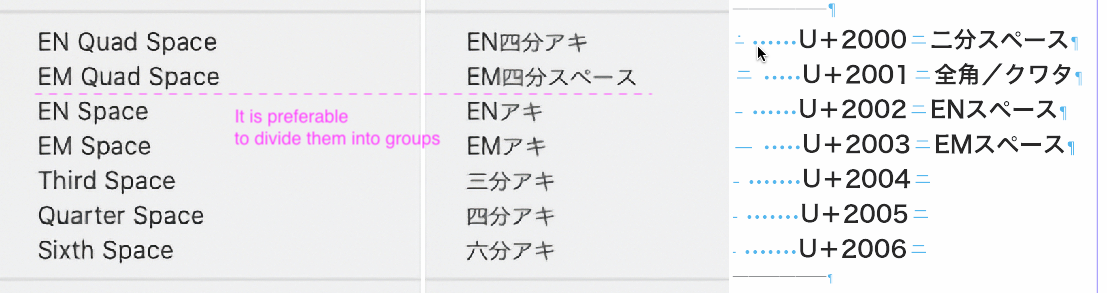
- (U+2000): "二分スペース"
- (U+2001): "全角/クワタ"
Letterpress experts might have different opinions, but considering its practicality as a modern DTP tool, I believe the names proposed above (and shown in the image) are the most intuitive and optimal for current users.
-
Suggestion for Menu Grouping
Regarding the menu structure, I recommend inserting a separator line to group the items inherited from the letterpress era (such as U+2001) separately from the items of the digital era (such as U+2002). (Please refer to the suggested layout on the right side of menue.jpg). This visual separation will make the menu much easier for users to understand. -
Chronic Issue with Space Character Input via Japanese Keyboard
There is a chronic bug regarding space input from the keyboard when using the Japanese input method (Kana-Kanji conversion / IME). Normally, the following standard codes should be inputted depending on the key operation, but currently, VectorStyler inputs a completely different space character.
- When typing a Half-width space key:
U+0020(U+100001 false) - When typing a Full-width space key:
U+3000(U+100001 false)
Resolving this keyboard input issue will drastically improve the usability for Japanese users. Thank you as always for your great work!
Best regards,
- "Quad" Naming and Japanese Localization Fixes
-
@861475_VctSt I added this to the backlog
-
@861475_VctSt said in Bug Report & Improvement Request: Space/Dash Menu Mapping and ZENKAKU Space:
Chronic Issue with Space Character Input via Japanese Keyboard
There is a chronic bug regarding space input from the keyboard when using the Japanese input method (Kana-Kanji conversion / IME). Normally, the following standard codes should be inputted depending on the key operation, but currently, VectorStyler inputs a completely different space character.When typing a Half-width space key: U+0020 (U+100001 false)
When typing a Full-width space key: U+3000 (U+100001 false)What font is selected when typing these with the IME input method?
-
I used "Hiragino Sans GB" hoping it would be a versatile choice to easily share the test results, but as you rightly suspected, it is an OS system font. I apologize for overcomplicating the matter.
I have run the test again using other standard fonts typically used in Japanese DTP.
As a result, the inputted code wasU+0020, and it successfully displayed as a HANKAKU (half-width) space on the screen.To be honest, this space-related behavior is a chronic issue in VectorStyler. I have actually mentioned it in another post in the past.
However, out of concern that it might be a complex issue affecting the core architecture of the software, I have refrained from pressing the matter too strongly, treating it as a niche request specific to East Asian users. -
@861475_VctSt said in Bug Report & Improvement Request: Space/Dash Menu Mapping and ZENKAKU Space:
However, out of concern that it might be a complex issue affecting the core architecture of the software,
It is not a complex issue: the only thing needed is that the font has the half width space and that I know how to input that.
The technical part is easy, I just need help with the Japanese part
-
I have put together a summary of the most basic typing operations that every Japanese user does naturally.
Here are the fundamental rules for how Japanese Mac users differentiate between typing a "Half-width space (U+0020)" and a "ZENKAKU (Full-width) space (U+3000)":-
To input a Half-width space:
First, press the "英数 (Alphanumeric)" key, and then press the "Space" key.
As a result, a "Half-width space (U+0020)" is inputted. -
To input a ZENKAKU (Full-width) space:
First, press the "カナ (KANA)" key, and then press the "Space" key.
As a result, a "ZENKAKU space (U+3000)" is inputted.
Currently in VectorStyler, it seems that when we perform these key operations, the software does not correctly receive the
U+3000orU+0020sent by the OS, and instead converts it into a different, unintended space character. I believe this is the root of the problem.Does this explanation help solve the puzzle for the implementation? Please let me know if you need any other information about the Japanese environment!
Best regards,
-
-
@861475_VctSt said in Bug Report & Improvement Request: Space/Dash Menu Mapping and ZENKAKU Space:
Does this explanation help solve the puzzle for the implementation?
Yes, this helps a lot!
Please let me know if you need any other information about the Japanese environment!
What input method is selected in the MacOS menu (right side of the screen), when using Japanese input with your keyboard?
I only have international physical keyboard, and I try to replicate this with the "Japanese - Kana" input method:
With regular "Space" key I get U+0020
With regular "Option+Space" key I get U+3000I will try to find a Japanese keyboard
-
And one more thing:
Create a vstyler file with the following:
- a shape text with some text and the "Half-width space (U+0020)" as VectorStyler inputs it
- other shape text with some text and the "ZENKAKU space (U+3000)" as VectorStyler inputs it
and send me the file.
I want to check what action character codes are input
-
This post is deleted! -
@VectorStyler said in Bug Report & Improvement Request: Space/Dash Menu Mapping and ZENKAKU Space:
I have sent it via email.
However, I do not think this is the result you were hoping for. After all, this is precisely the heart of the problem.
other shape text with some text and the "ZENKAKU space (U+3000)" as VectorStyler inputs it

I attempted the input using a total of four different methods, including this one.
I hope at least one of them proves helpful to you. -
@861475_VctSt Got it!
-
ver. 1.3.022–1.3.023: Handled via email correspondence.
ver. 1.3.024
Follow-up report regarding two issues.
I will refrain from offering my own analysis of the causes (as I am not a programmer).
Note: The character code identification is based on the VS glyph palette.- Localization: Translation error
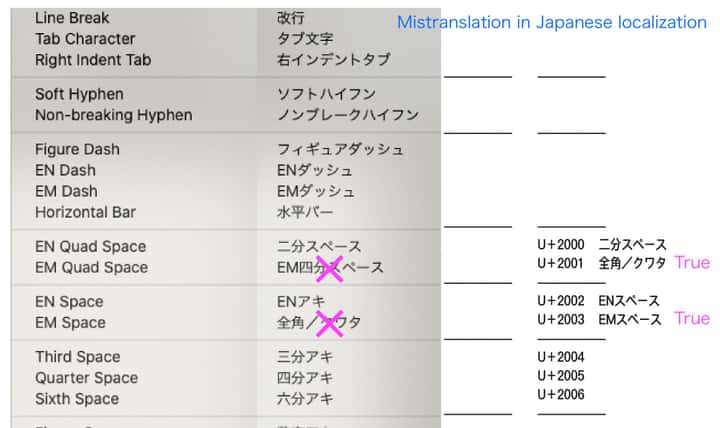
- Space character input
u3000 (ZENKAKU Space; Ideographic-Space): Input result is U+2003.
u0020 (HANKAKU-Space; Space): Input result displays as u100001 (Supplementary Private Use Area-B).
-
@861475_VctSt I will try to thix these.
Can you send me the translation errors as text, not image? Thanks!
-
I’m prone to making mistakes myself, so I’ll double-check everything and send it to you later.
-
Ver. 1.3.027
In my previous posts, I reported multiple issues together that should ideally be addressed separately. To avoid confusion, please let me organize the current situation.
The two issues I raised are as follows:A) Text > Insert Character: Japanese localization (translation) errors
B) Spaces during Japanese (Kana-Kanji conversion) input: Issues with half-width and full-width space input[Current Status]
A) Resolved (ver. 1.3.026) - Thank you for fixing this.
B) Unresolved (ver. 1.3.027)Additionally, regarding the character insertion from the menu (A), a new issue, "Issue A-1", has been found. The details are as follows:
[Details of Issue B (Unresolved)]
Current Bug:- When typing a half-width space on the keyboard, it does not become half-width. When checking the Glyph palette, it shows an abnormal code of "U+100001".
- When typing a full-width space on the keyboard, it visually appears as full-width, but the Glyph palette shows it as "U+2003 (EM Space)".
Expected Result:
- Half-width space = Space (U+0020)
- Full-width space = Ideographic Space (U+3000)
[Details of Issue A-1 (New)]
When inserting a space from the menu, the visual result on the screen is fine, but checking it in the VS Glyph palette reveals that the internal code seems incorrect.Current Bug:
- En Space: Displayed as "U+0000"
- Em Space (Kuwata): Displayed as "U+0000"
Expected Result:
- En Space = U+2000
- Em Space (Kuwata) = U+2001
[Proposal for Future Development]
Since I am not a programmer, I can only report the results I see on the screen. I have provided materials so far, but I assume that providing information solely from a user level might not be enough to reach a fundamental solution.If digging deeper into the specific requirements of the Japanese environment risks causing regressions or degrading other features, and becomes an obstacle to the overall development of VectorStyler, I believe it is a reasonable option to put this complex issue (such as the U+3000 problem) on hold for now and treat it as a "Known Issue".
However, even in that case, there is one top priority that I would like you to fix at the very least.
That is problem [Issue B - 1].
If we can just correctly input a standard "half-width space (U+0020)" from the keyboard, we will be able to proceed with our work for the time being.This is a proposal meant to avoid hindering the overall development progress of VectorStyler. Please consider this in light of the current situation.
-
@861475_VctSt Added some diagnostic for analyzing these issues.
More info in email.

