VectorStyler
    • Categories
    • Unread
    • Recent
    • Tags
    • Popular
    • Register
    • Login

    Queries Regarding VectorStyler 1.3

    Scheduled Pinned Locked Moved Questions and Support
    59 Posts 6 Posters 11.5k Views 4 Watching
    Loading More Posts
    • Oldest to Newest
    • Newest to Oldest
    • Most Votes
    Reply
    • Reply as topic
    Log in to reply
    This topic has been deleted. Only users with topic management privileges can see it.
    • VectorStylerV Offline
      VectorStyler @monsterfox
      last edited by

      @monsterfox said in Queries Regarding VectorStyler 1.3:

      @VectorStyler Will a halftone effect with dot merging be added to the halftone panel in the future?

      In the case of the first image of this thread:
      The problem is not with dot merging, but with the shape of the halftone. Those halftones (first image) are created in postscript as images. So this exact case will not be added to the halftone panel.

      The second image from this thread might be possible, I have this in the backlog and will try to add it as soon as possible.

      M 1 Reply Last reply Reply Quote 0
      • M Offline
        monsterfox @VectorStyler
        last edited by

        @VectorStyler After upgrading to version 1.3, the program's running speed has been significantly improved compared to version 1.2, but occasional lag issues still occur. This file is a typical example—the extremely large number of nodes in the graphic causes lag when moving objects. I have tested the object-moving function in several programs: Adobe Illustrator runs without any lag; older versions of CorelDRAW have slight lag, while the newer versions suffer from noticeable lag. My primary program at present is FreeHand 9. Despite being released over two decades ago, it still ranks among the most smooth-performing software and shows no lag at all when moving this object. Finally, I tested Inkscape, which has a reputation for lagging. I expected it to be extremely sluggish, but surprisingly, its object-moving speed is even faster than that of VectorStyler.

        Therefore, I’m curious about why such lag persists despite the upgrades to both my hardware and software. Could it be that VectorStyler’s lag is attributed to its display enhancement features, while FreeHand 9, which lacks such features, runs faster?
        0_1766243159919_卡.zip

        VectorStylerV 2 Replies Last reply Reply Quote 2
        • VectorStylerV Offline
          VectorStyler @monsterfox
          last edited by

          @monsterfox I will add this to the backlog, but not sure if performance can be improved much.

          The time is spent on rendering those outlines.

          M 1 Reply Last reply Reply Quote 0
          • M Offline
            monsterfox @VectorStyler
            last edited by

            @VectorStyler Is it possible to add a view mode similar to FreeHand’s—one that removes image quality enhancements and prioritizes speed? The existing pixel mode also lags, and sometimes it’s even more laggy than the normal view mode.

            VectorStylerV 1 Reply Last reply Reply Quote 1
            • VectorStylerV Offline
              VectorStyler @monsterfox
              last edited by

              @monsterfox said in Queries Regarding VectorStyler 1.3:

              @VectorStyler Is it possible to add a view mode similar to FreeHand’s—one that removes image quality enhancements and prioritizes speed? The existing pixel mode also lags, and sometimes it’s even more laggy than the normal view mode.

              I will think of something before the 1.4 release.

              M 1 Reply Last reply Reply Quote 0
              • M Offline
                monsterfox @VectorStyler
                last edited by

                @VectorStyler Version 1.3 is already quite robust, and it will only grow more powerful with additional features in the future. I’m used to working efficiently by setting up shortcuts and frequently-used shortcut icons. I’ve already configured and put to use almost all the shortcut keys within the reach of my left hand, but I’ve found that they’re still not enough. Just out of curiosity, can the spacebar function as a modifier key? I know no other programs have implemented this, but I have a feeling it’s technically feasible.

                VectorStylerV 1 Reply Last reply Reply Quote 1
                • VectorStylerV Offline
                  VectorStyler @monsterfox
                  last edited by

                  @monsterfox said in Queries Regarding VectorStyler 1.3:

                  Just out of curiosity, can the spacebar function as a modifier key?

                  In Windows these keys that input text can cause issues when held down. In these cases, maybe the best is to press/release to flip an option, but that will conflict with shortcuts.

                  1 Reply Last reply Reply Quote 0
                  • VectorStylerV Offline
                    VectorStyler @monsterfox
                    last edited by

                    @monsterfox said in Queries Regarding VectorStyler 1.3:

                    but occasional lag issues still occur.

                    The new build contains some stoke rendering speed improvements, let me know if this is better on your machine also.

                    M 2 Replies Last reply Reply Quote 0
                    • M Offline
                      monsterfox @VectorStyler
                      last edited by

                      @VectorStyler I tested the file I provided, but it still lags. It seems that the improvement is not significant.

                      1 Reply Last reply Reply Quote 0
                      • M Offline
                        monsterfox @VectorStyler
                        last edited by

                        @VectorStyler Following LIXIAO's suggestion today, I turned off the "Show Nodes on Hover" option under Preferences > Selection, then tested moving objects. There was still some lag, but it was noticeably faster than before.

                        1 Reply Last reply Reply Quote 1
                        • M Offline
                          monsterfox @VectorStyler
                          last edited by

                          @VectorStyler I encountered a halftone graphic similar to the one in Floor 13 of this thread again today. I know that the repeater function has been enhanced in previous versions, but I'm not sure if such graphics can be created now. If it is supported, could you provide a video demonstration?

                          VectorStylerV 1 Reply Last reply Reply Quote 0
                          • VectorStylerV Offline
                            VectorStyler @monsterfox
                            last edited by

                            @monsterfox Which graphics is that ?

                            M 1 Reply Last reply Reply Quote 0
                            • M Offline
                              monsterfox @VectorStyler
                              last edited by

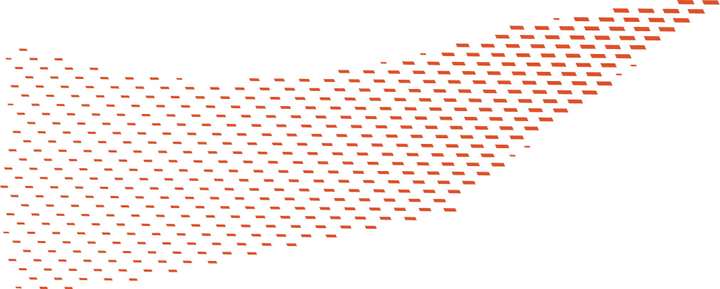
                              @VectorStyler The original image is a print on a piece of material, which is quite blurry, but the general effect is like this. The difference is that the smallest shapes are rectangles with no tilt at all, while the largest ones are tilted.

                              It’s easy to create a single strip using the blend effect, but repeating this process and ensuring global coordination is rather cumbersome. If the repeater could support tilt adjustments for both the smallest and largest shapes, this kind of graphic could be created. If possible, please add the rotation adjustment function as well.1_1768732123855_mmexport1768731576081.jpg 0_1768732123842_mmexport1768731564823.jpg

                              VectorStylerV S 2 Replies Last reply Reply Quote 1
                              • VectorStylerV Offline
                                VectorStyler @monsterfox
                                last edited by

                                @monsterfox said in Queries Regarding VectorStyler 1.3:

                                he difference is that the smallest shapes are rectangles with no tilt at all, while the largest ones are tilted.

                                This can be done with a number variable for the tilt amount and then controlling the variable using the backdrop intensity as a repeater adjustment

                                M E 3 Replies Last reply Reply Quote 0
                                • S Offline
                                  Subpath @monsterfox
                                  last edited by Subpath

                                  @monsterfox

                                  not sure if i understand you right
                                  dont know what the tilt mean

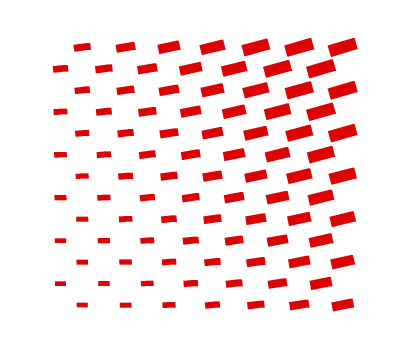
                                  mean you something like this ?

                                  0_1768738327039_Repeater.png

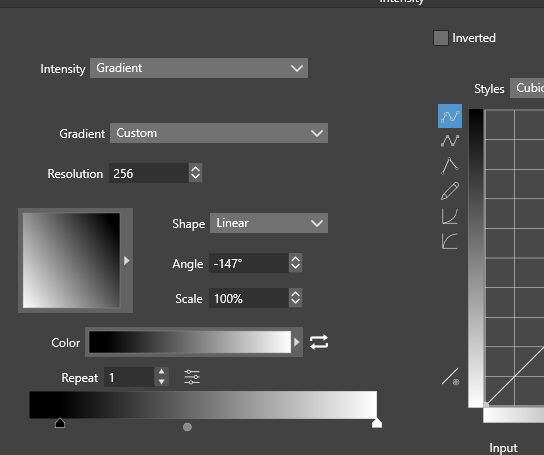
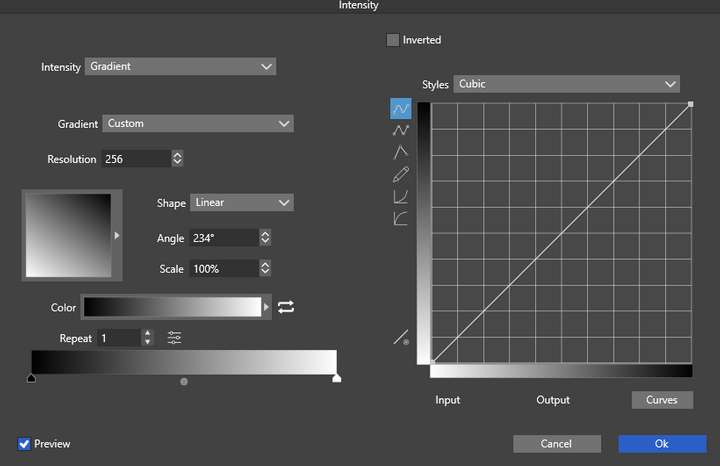
                                  then repeater > addional options > Adjustment Geometrys > Edit Adjustment
                                  may be a way
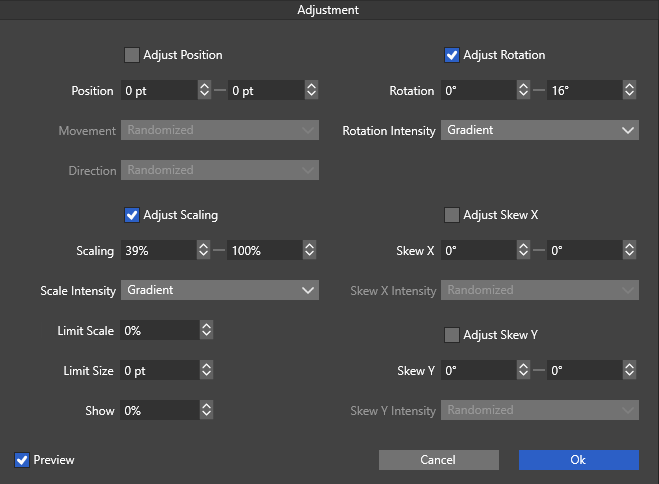
                                  0_1768738525164_Adjustment.png
                                  .
                                  .
                                  0_1768738648677_gradient.png

                                  Win 11
                                  CPU: AMD Ryzen 5 9600X, 6-core.
                                  GPU: Nvidia Geforce RTX 5070.

                                  M 1 Reply Last reply Reply Quote 0
                                  • M Offline
                                    monsterfox @Subpath
                                    last edited by

                                    @Subpath The effect is very similar to the one in your image above, but yours looks more like rotation rather than tilt.

                                    S 1 Reply Last reply Reply Quote 0
                                    • M Offline
                                      monsterfox @VectorStyler
                                      last edited by

                                      @VectorStyler Could you provide an operation demonstration,Thank you。

                                      1 Reply Last reply Reply Quote 0
                                      • S Offline
                                        Subpath @monsterfox
                                        last edited by

                                        @monsterfox

                                        ok,
                                        had a closer look at your pic
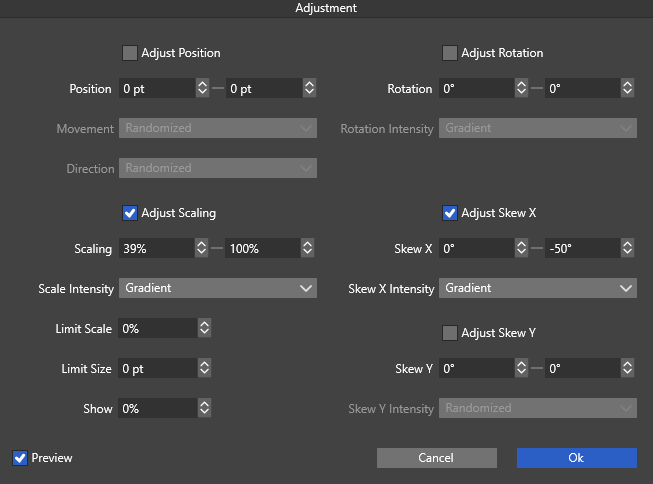
                                        seems that Tilt is the same like "Skew" in Repeater
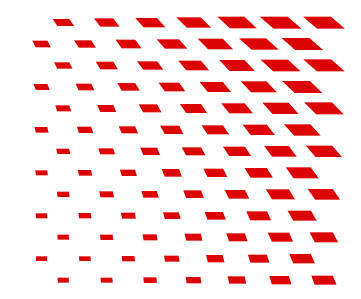
                                        0_1768745500481_skew-x.png
                                        .
                                        .
                                        0_1768745548410_adjustment skew.png
                                        .
                                        .
                                        0_1768745588579_Gradient Skew.png

                                        Win 11
                                        CPU: AMD Ryzen 5 9600X, 6-core.
                                        GPU: Nvidia Geforce RTX 5070.

                                        1 Reply Last reply Reply Quote 0
                                        • S Offline
                                          Subpath
                                          last edited by

                                          forgot the repeater settings
                                          here the pic
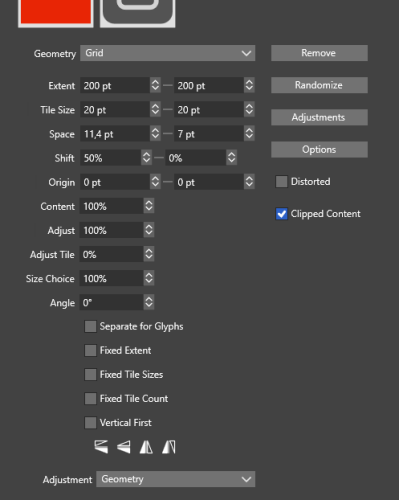
                                          0_1768745836676_Repeater Setting-Skew.png

                                          Win 11
                                          CPU: AMD Ryzen 5 9600X, 6-core.
                                          GPU: Nvidia Geforce RTX 5070.

                                          M 1 Reply Last reply Reply Quote 0
                                          • M Offline
                                            monsterfox @Subpath
                                            last edited by

                                            @Subpath Thanks! The effect of your image is quite similar. I'll test out the details tomorrow. There are still plenty of advanced features of the repeater that I haven't mastered yet, so I need to spend some time exploring them.

                                            S 1 Reply Last reply Reply Quote 1
                                            • First post
                                              Last post