VectorStyler
    • Categories
    • Unread
    • Recent
    • Tags
    • Popular
    • Register
    • Login

    How to configure the image tracer?
    Scheduled Pinned Locked Moved Questions and Support
    18 Posts 4 Posters 1.8k Views 4 Watching
    Loading More Posts
    • Oldest to Newest
    • Newest to Oldest
    • Most Votes
    Reply
    • Reply as topic
    Log in to reply
    This topic has been deleted. Only users with topic management privileges can see it.
    • RaaskotR Offline
      Raaskot
      last edited by Raaskot

      I have a hard time to configure the tracer to do something useful. There is a plethora of VS settings and cannot detect which ones to get a proper result. Tried to find documentation on VS homepage on the subject but couldn't.

      I've attached a test file:
      0_1765708461389_vs-imagetrace.zip

      What would one choose of settings in VS to achieve a result like the one from https://vectormagic.com:
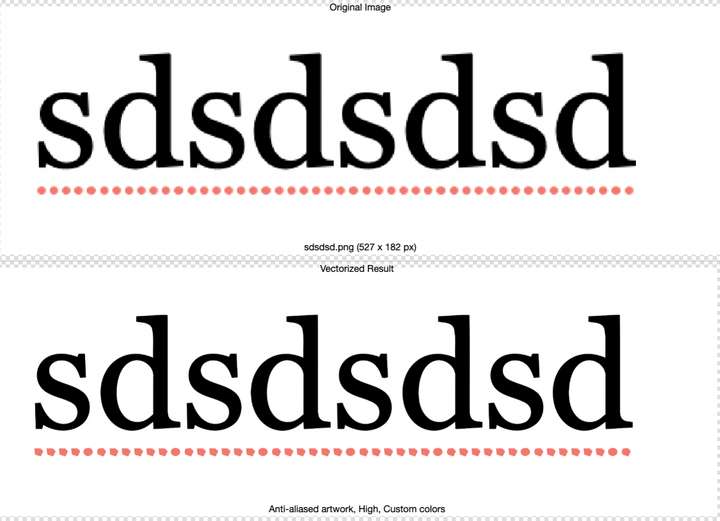
      0_1765707993346_acc75de3-739f-4c8a-8266-23037ba343e4-image.png

      VectorStylerV 1 Reply Last reply Reply Quote 1
      • VectorStylerV Offline
        VectorStyler @Raaskot
        last edited by

        @Raaskot With that resolution VS cannot achieve this trace quality. It needs a higher resolution image.

        RaaskotR 1 Reply Last reply Reply Quote 0
        • RaaskotR Offline
          Raaskot @VectorStyler
          last edited by

          @VectorStyler
          Thanks. I think it a better quality should be achieved. The resolution is the same for the test in Vectormagic. Too bad if one have to license 3rd part vectorizer to make this.

          Do you have a link to a tracing guide in the documentation?

          VectorStylerV S 2 Replies Last reply Reply Quote 2
          • VectorStylerV Offline
            VectorStyler @Raaskot
            last edited by

            @Raaskot

            https://vectorstyler.com/documentation/shapes/tracing/

            M 1 Reply Last reply Reply Quote 1
            • S Offline
              Subpath @Raaskot
              last edited by Subpath

              @Raaskot

              I think it's not that easy to achieve better tracing quality
              inside of vector graphics app.

              Vector Magic seems to have been specifically designed for tracing.

              Incidentally, one of the best image tracing programs I've ever used
              was this one. I haven't seen anything that comes close.
              And I'm not easily impressed.

              https://www.vectorstyler.com/forum/topic/3101/ai-vectorizer

              Win 11
              CPU: AMD Ryzen 5 9600X, 6-core.
              GPU: Nvidia Geforce RTX 5070.

              1 Reply Last reply Reply Quote 1
              • M Offline
                marce @VectorStyler
                last edited by

                @VectorStyler Hi! following the thread. I made some testing, im not figuring which preset is the more accurated vectorizing text of well defined shapes. I typed the same that Raaskot, and saved as high res image, but cant get an accurate trace of it.0_1765729210017_letras.jpg
                The closer trace of this image is using the "photographic" preset, but it has some distortions on it:
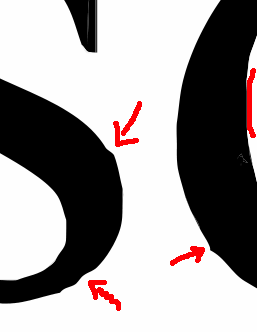
                0_1765729303849_b6c9c851-1855-426d-847e-84f3853a8ce4-image.png

                Im interested. I see lot of options in the trace "more options" but feel a little lost. Documentations states that the best is to use presets. Im costumed -im sorry to compare with other software, i know is not nice, but i feel could help- inkscape tracing that by default gives accuracy that can easily be softened or not. In the screenshot is shown results without smooth.
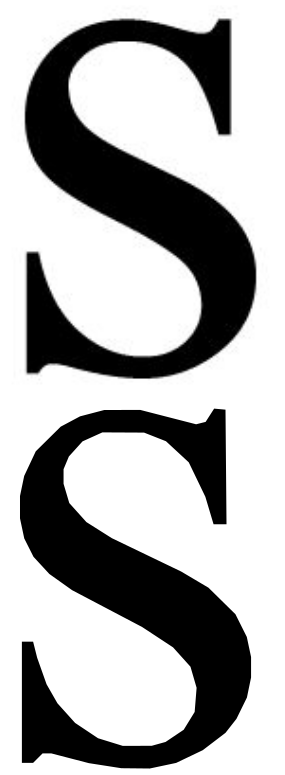
                0_1765729686985_dc9fef1b-dc78-4326-ac04-a45517396c37-image.png
                0_1765729702680_bc7a7ab3-5afd-4c49-85a8-e213f0a7645a-image.png
                In this result you got a single shape easily editable by the nodes, that you can simplify easily, or smooth.
                Im not quite sure how this can be achieved with VS trace, that looks powerfull, but a little bit complex to me.

                Ryzen 9 3900X on Asus prime x570-p
                Memory 48gb ddr4
                Nvidia gtx 970 on an Asus strix, 4gb gddr5
                NVMe CT100p 1TB

                1 Reply Last reply Reply Quote 2
                • S Offline
                  Subpath
                  last edited by Subpath

                  @Raaskot , @marce

                  Back in the days, I would trace such bitmaps by hand.
                  I used also the Corel Image Tracer, but it wasn't always helpful.

                  One way I see to potentially alleviate the problem is to use an image
                  upscaler, which allows for a higher resolution and might therefore produce
                  better results in VS.

                  Here's a very good, free one.
                  https://www.vectorstyler.com/forum/topic/3033/upscayl-win-mac-free-open-source-upscaler/7

                  Win 11
                  CPU: AMD Ryzen 5 9600X, 6-core.
                  GPU: Nvidia Geforce RTX 5070.

                  M 1 Reply Last reply Reply Quote 1
                  • M Offline
                    marce @Subpath
                    last edited by

                    @Subpath Well, i used a very high res image, you say it will improve using something so big?

                    Ryzen 9 3900X on Asus prime x570-p
                    Memory 48gb ddr4
                    Nvidia gtx 970 on an Asus strix, 4gb gddr5
                    NVMe CT100p 1TB

                    S 1 Reply Last reply Reply Quote 0
                    • S Offline
                      Subpath @marce
                      last edited by

                      @marce

                      Well, I don't know the Resolution.
                      But whether it brings an improvement can easily be determined by trying it out.

                      Win 11
                      CPU: AMD Ryzen 5 9600X, 6-core.
                      GPU: Nvidia Geforce RTX 5070.

                      M 1 Reply Last reply Reply Quote 0
                      • M Offline
                        marce @Subpath
                        last edited by marce

                        @Subpath said in How to configure the image tracer?:

                        @marce

                        Well, I don't know the Resolution.
                        But whether it brings an improvement can easily be determined by trying it out.

                        Hi Subpath. I made a test. With low res image to high res. It is here. Even the results are better, always is added some distortion:

                        https://icedrive.net/s/ZF5TyWig1T56gW32TFW1C792WkRV
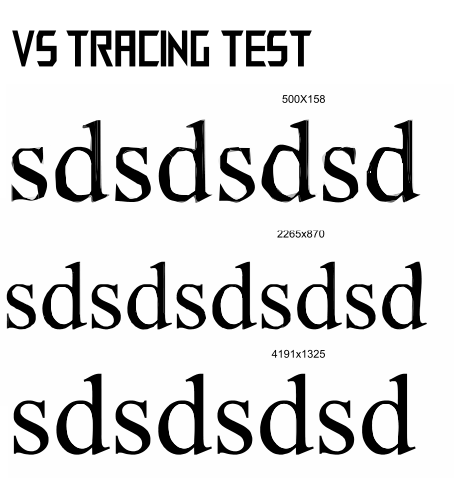
                        0_1765737368857_5902ac77-3235-442c-a684-5c2c5d088459-image.png

                        Ryzen 9 3900X on Asus prime x570-p
                        Memory 48gb ddr4
                        Nvidia gtx 970 on an Asus strix, 4gb gddr5
                        NVMe CT100p 1TB

                        M 1 Reply Last reply Reply Quote 0
                        • M Offline
                          marce @marce
                          last edited by marce

                          @marce said in How to configure the image tracer?:

                          @Subpath said in How to configure the image tracer?:

                          @marce

                          Well, I don't know the Resolution.
                          But whether it brings an improvement can easily be determined by trying it out.

                          Hi Subpath. I made a test. With low res image to high res. It is here. Even the results are better, always is added some distortion:

                          https://icedrive.net/s/ZF5TyWig1T56gW32TFW1C792WkRV

                          I made the same test with inkscape to take some reference. The accuracy improves a little with higher rest, but is not so dependent as can be seen here:

                          https://icedrive.net/s/kDgWzBfiXwVWwXNAVABPFwCNwG7G
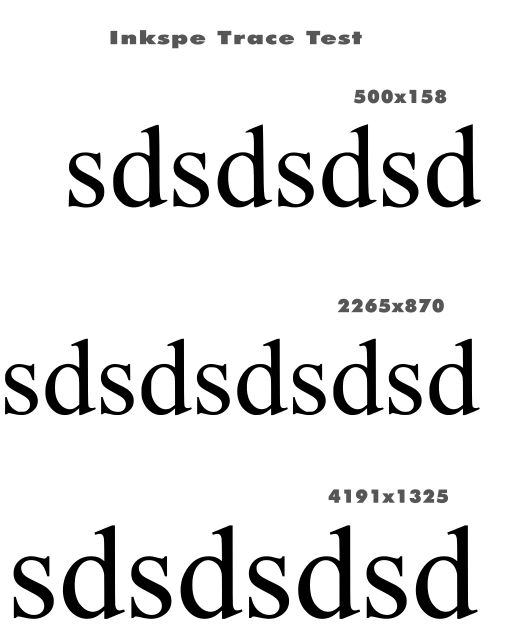
                          0_1765737430786_03038178-bc17-4900-a6c5-1c0e8969f75e-image.png

                          Ryzen 9 3900X on Asus prime x570-p
                          Memory 48gb ddr4
                          Nvidia gtx 970 on an Asus strix, 4gb gddr5
                          NVMe CT100p 1TB

                          S 1 Reply Last reply Reply Quote 0
                          • S Offline
                            Subpath @marce
                            last edited by Subpath

                            @marce

                            Well, when I talk about better resolution, I mean the difference between the
                            left and the right side. Significantly less jagged edges.

                            The part on the right is magnified 4x using Upscayler.
                            Which can magnify up to 16x.
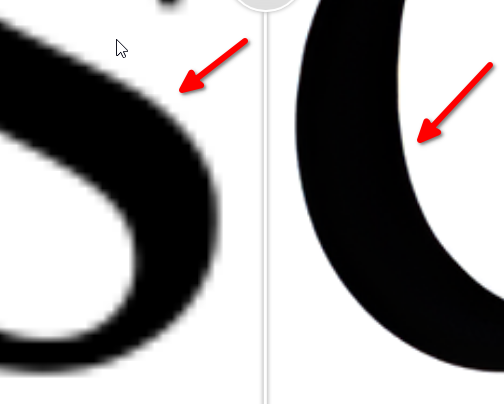
                            0_1765740368121_Unterschied.png
                            .
                            .
                            .
                            Here's my tracing result from Corel Tracer based on
                            the 4x magnified image. I choose "Logo" as the tracing mode.
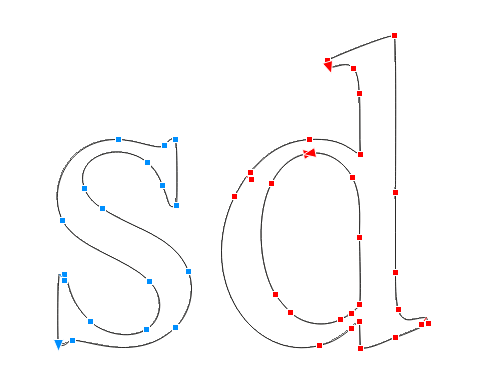
                            0_1765740411959_corel Tracer.png
                            .
                            .
                            .
                            By the way, since "sd" is repeated, I only enlarged and traced those
                            two letters.

                            0_1765740573625_sd_upscayl_4x_upscayl-standard-4x.png

                            Win 11
                            CPU: AMD Ryzen 5 9600X, 6-core.
                            GPU: Nvidia Geforce RTX 5070.

                            M 1 Reply Last reply Reply Quote 0
                            • M Offline
                              marce @Subpath
                              last edited by marce

                              @Subpath Nice results in Corel. Minimum amount of Nodes, and a very editable shape. In inkscape -i take it as reference, since their trace module is very good imho- this is are the results of the very low image you shared:
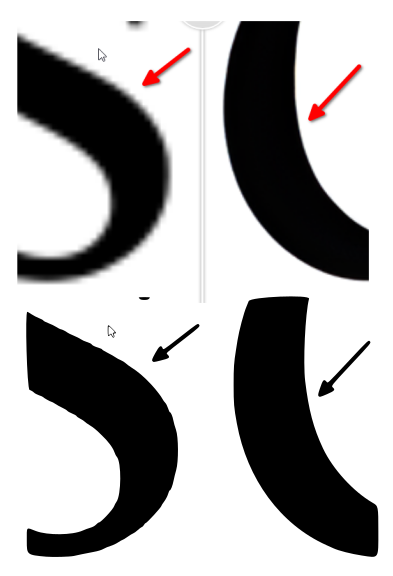
                              0_1765742689021_6dc862d4-ef8c-45b7-a775-15dd4d52def2-image.png
                              Must said, are very good, taking account of the low res source.
                              Using the good res last image you uploaded, tweaking the smooth corners and optimize, i got similar results in inkscape to Corel:
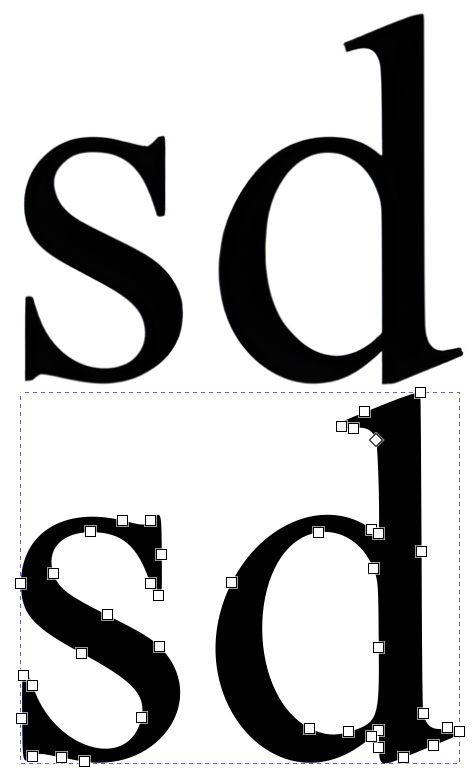
                              0_1765742844428_f78e40d3-1534-45b5-ba58-dbe56c7cd3a7-image.png

                              So, i believe that really is not necessary so high res images as source, but some kind of optimization of the trace process in VS.

                              Ryzen 9 3900X on Asus prime x570-p
                              Memory 48gb ddr4
                              Nvidia gtx 970 on an Asus strix, 4gb gddr5
                              NVMe CT100p 1TB

                              S 1 Reply Last reply Reply Quote 1
                              • S Offline
                                Subpath @marce
                                last edited by

                                @marce

                                I would say you need both.
                                High resolution, to me, means the smoothest possible contours,
                                as jagged outlines negatively affect the result of a tracing.

                                I haven't spent much time with VS Tracer yet. But I think the results
                                may also be improved by adjusting the settings a bit.

                                Win 11
                                CPU: AMD Ryzen 5 9600X, 6-core.
                                GPU: Nvidia Geforce RTX 5070.

                                M 1 Reply Last reply Reply Quote 0
                                • M Offline
                                  marce @Subpath
                                  last edited by marce

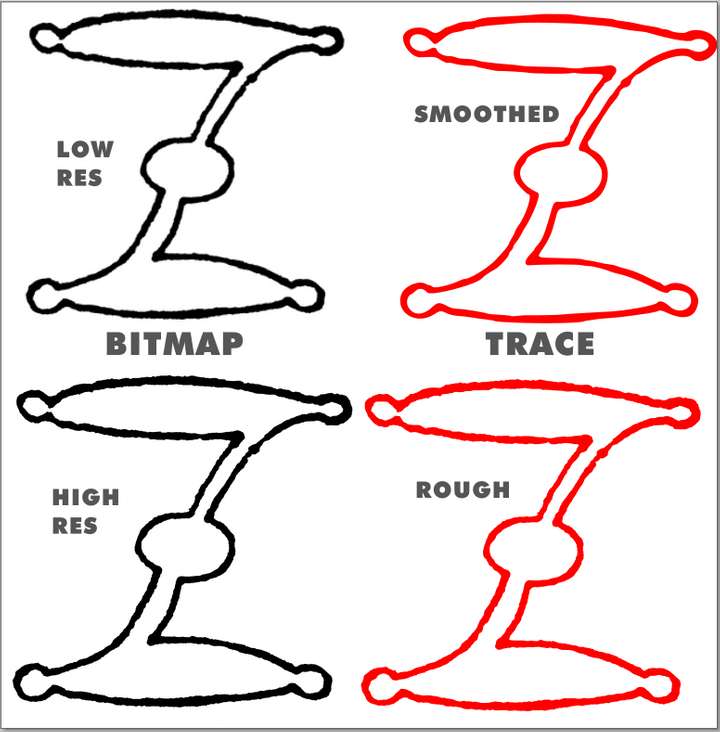
                                  @Subpath Well, low res images are better in some cases. Look in the sample below. This is an old scanned Capital letter β€”from etc.usf.edu. The original source is very rough. In the case you want to conserve the original roughnes is ok to use the High Res image. But if you want a smooth and flowing drawing, a low res will make the trick. The first Z at the right, in red, is a nice result, and it comes from the low res image. The High res trace result is exact, but not what i want, that is, a kind of vectorizing photo retouching.
                                  0_1765745188743_8450fda1-b2b7-4a5a-8bbf-6bcb6c75cfcb-image.png
                                  This both results are using the same settings, in inkscape, but the change is the resolution of the source image.

                                  Ryzen 9 3900X on Asus prime x570-p
                                  Memory 48gb ddr4
                                  Nvidia gtx 970 on an Asus strix, 4gb gddr5
                                  NVMe CT100p 1TB

                                  S 1 Reply Last reply Reply Quote 1
                                  • S Offline
                                    Subpath @marce
                                    last edited by Subpath

                                    @marce

                                    Well, that's due to the smoothing algorithm of the vector tracer. I think a slightly
                                    better result could perhaps be achieved with the high-resolution version using
                                    slightly different settings for smoothing.

                                    I would have vectorized the template you created here by tracing a simple line
                                    in the middle of the contour (Corel Trace has a mode for this) and then
                                    assigning an appropriate line weight.

                                    I've created a lot of bitmap traces professionally (in digital printing).
                                    Many by hand, because the trace results were too poor. I can't recall a
                                    single instance where I would have preferred a low-resolution bitmap
                                    version if I had the choice.

                                    Win 11
                                    CPU: AMD Ryzen 5 9600X, 6-core.
                                    GPU: Nvidia Geforce RTX 5070.

                                    1 Reply Last reply Reply Quote 0
                                    • RaaskotR Offline
                                      Raaskot
                                      last edited by Raaskot

                                      @VectorStyler
                                      @marce
                                      @Subpath

                                      Just to let you know, that I appreciate your input a lot. It gave me some ideas what to try out ie. using upscalers.

                                      I gave up Inkscape for VS back then (mainly due to supported color profiles and more familiar UI), but remember that the autotracer performed quite nicely.

                                      Thanks😊

                                      S 1 Reply Last reply Reply Quote 3
                                      • S Offline
                                        Subpath @Raaskot
                                        last edited by Subpath

                                        @Raaskot

                                        your always welcome
                                        nice to hear that this ideas was helpful

                                        Win 11
                                        CPU: AMD Ryzen 5 9600X, 6-core.
                                        GPU: Nvidia Geforce RTX 5070.

                                        1 Reply Last reply Reply Quote 2
                                        • First post
                                          Last post