VectorStyler
    • Categories
    • Unread
    • Recent
    • Tags
    • Popular
    • Register
    • Login

    How to configure the image tracer?
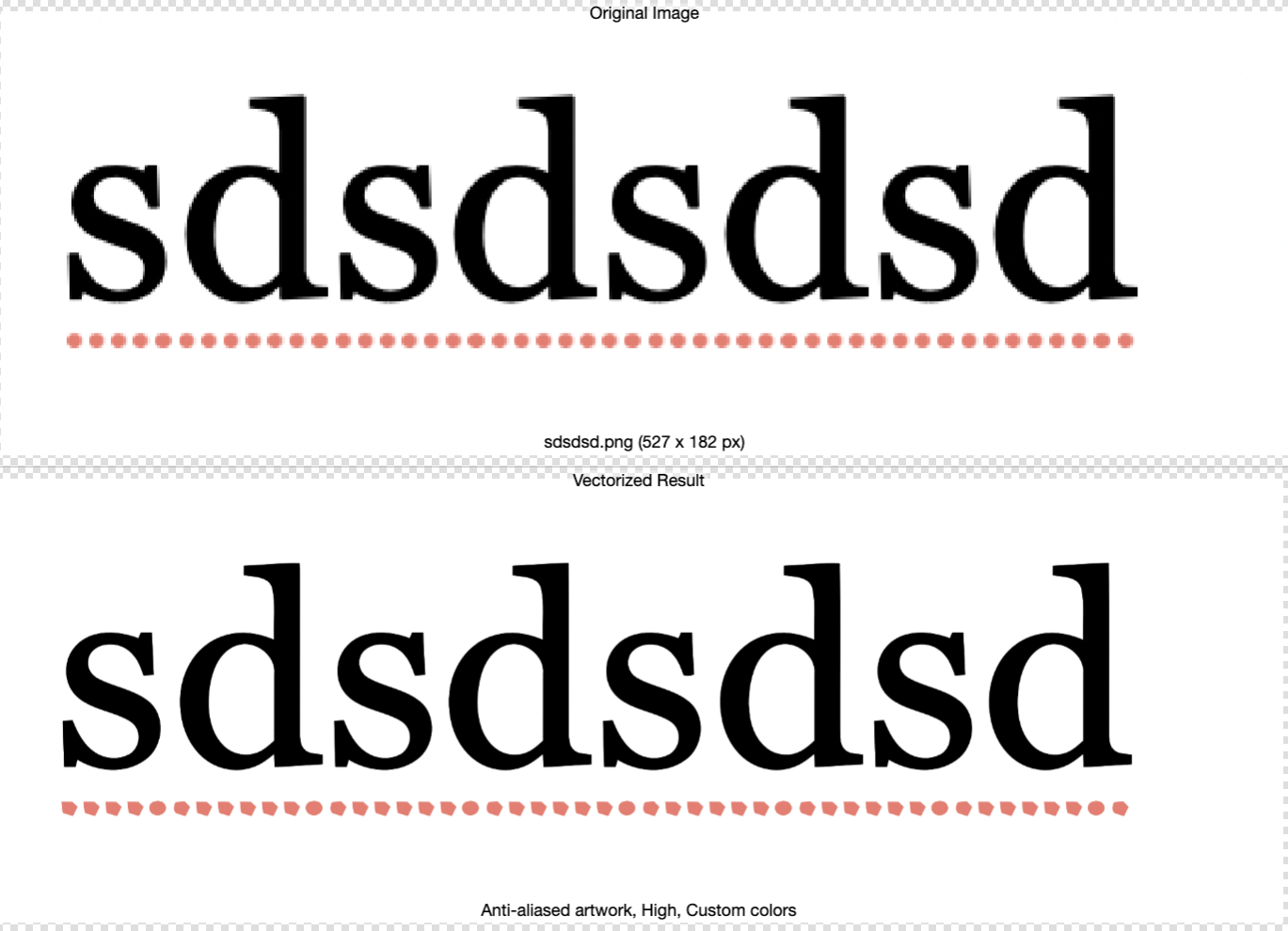
    Scheduled Pinned Locked Moved Questions and Support
    18 Posts 4 Posters 1.8k Views 4 Watching
    Loading More Posts
    • Oldest to Newest
    • Newest to Oldest
    • Most Votes
    Reply
    • Reply as topic
    Log in to reply
    This topic has been deleted. Only users with topic management privileges can see it.
    • M Offline
      marce @Subpath
      last edited by

      @Subpath Well, i used a very high res image, you say it will improve using something so big?

      Ryzen 9 3900X on Asus prime x570-p
      Memory 48gb ddr4
      Nvidia gtx 970 on an Asus strix, 4gb gddr5
      NVMe CT100p 1TB

      S 1 Reply Last reply Reply Quote 0
      • S Offline
        Subpath @marce
        last edited by

        @marce

        Well, I don't know the Resolution.
        But whether it brings an improvement can easily be determined by trying it out.

        Win 11
        CPU: AMD Ryzen 5 9600X, 6-core.
        GPU: Nvidia Geforce RTX 5070.

        M 1 Reply Last reply Reply Quote 0
        • M Offline
          marce @Subpath
          last edited by marce

          @Subpath said in How to configure the image tracer?:

          @marce

          Well, I don't know the Resolution.
          But whether it brings an improvement can easily be determined by trying it out.

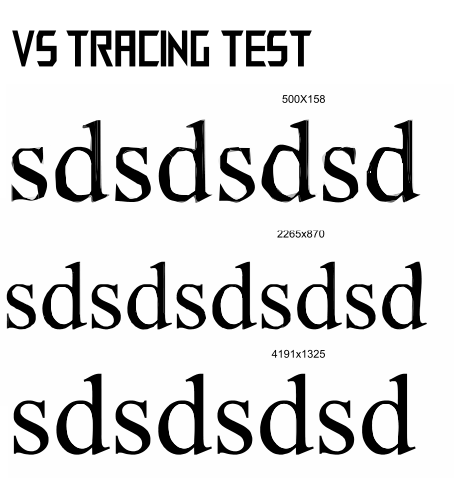
          Hi Subpath. I made a test. With low res image to high res. It is here. Even the results are better, always is added some distortion:

          https://icedrive.net/s/ZF5TyWig1T56gW32TFW1C792WkRV
          0_1765737368857_5902ac77-3235-442c-a684-5c2c5d088459-image.png

          Ryzen 9 3900X on Asus prime x570-p
          Memory 48gb ddr4
          Nvidia gtx 970 on an Asus strix, 4gb gddr5
          NVMe CT100p 1TB

          M 1 Reply Last reply Reply Quote 0
          • M Offline
            marce @marce
            last edited by marce

            @marce said in How to configure the image tracer?:

            @Subpath said in How to configure the image tracer?:

            @marce

            Well, I don't know the Resolution.
            But whether it brings an improvement can easily be determined by trying it out.

            Hi Subpath. I made a test. With low res image to high res. It is here. Even the results are better, always is added some distortion:

            https://icedrive.net/s/ZF5TyWig1T56gW32TFW1C792WkRV

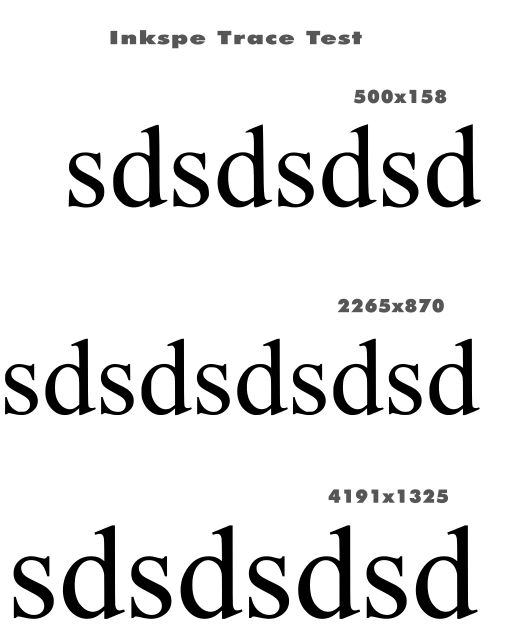
            I made the same test with inkscape to take some reference. The accuracy improves a little with higher rest, but is not so dependent as can be seen here:

            https://icedrive.net/s/kDgWzBfiXwVWwXNAVABPFwCNwG7G
            0_1765737430786_03038178-bc17-4900-a6c5-1c0e8969f75e-image.png

            Ryzen 9 3900X on Asus prime x570-p
            Memory 48gb ddr4
            Nvidia gtx 970 on an Asus strix, 4gb gddr5
            NVMe CT100p 1TB

            S 1 Reply Last reply Reply Quote 0
            • S Offline
              Subpath @marce
              last edited by Subpath

              @marce

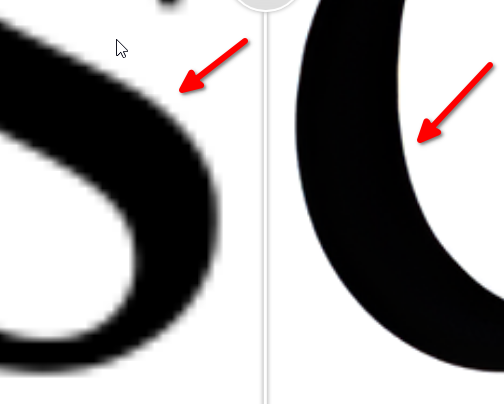
              Well, when I talk about better resolution, I mean the difference between the
              left and the right side. Significantly less jagged edges.

              The part on the right is magnified 4x using Upscayler.
              Which can magnify up to 16x.
              0_1765740368121_Unterschied.png
              .
              .
              .
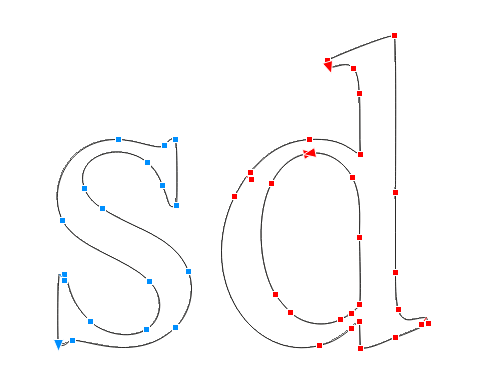
              Here's my tracing result from Corel Tracer based on
              the 4x magnified image. I choose "Logo" as the tracing mode.
              0_1765740411959_corel Tracer.png
              .
              .
              .
              By the way, since "sd" is repeated, I only enlarged and traced those
              two letters.

              0_1765740573625_sd_upscayl_4x_upscayl-standard-4x.png

              Win 11
              CPU: AMD Ryzen 5 9600X, 6-core.
              GPU: Nvidia Geforce RTX 5070.

              M 1 Reply Last reply Reply Quote 0
              • M Offline
                marce @Subpath
                last edited by marce

                @Subpath Nice results in Corel. Minimum amount of Nodes, and a very editable shape. In inkscape -i take it as reference, since their trace module is very good imho- this is are the results of the very low image you shared:
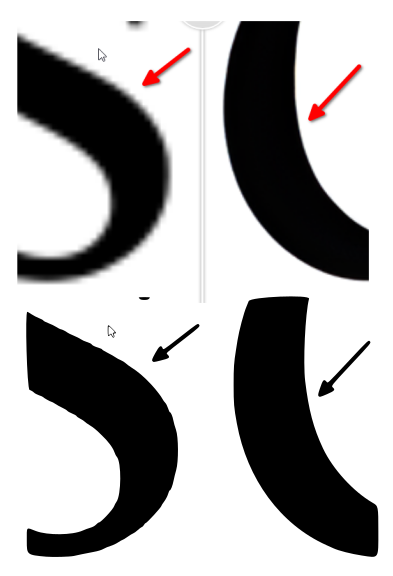
                0_1765742689021_6dc862d4-ef8c-45b7-a775-15dd4d52def2-image.png
                Must said, are very good, taking account of the low res source.
                Using the good res last image you uploaded, tweaking the smooth corners and optimize, i got similar results in inkscape to Corel:
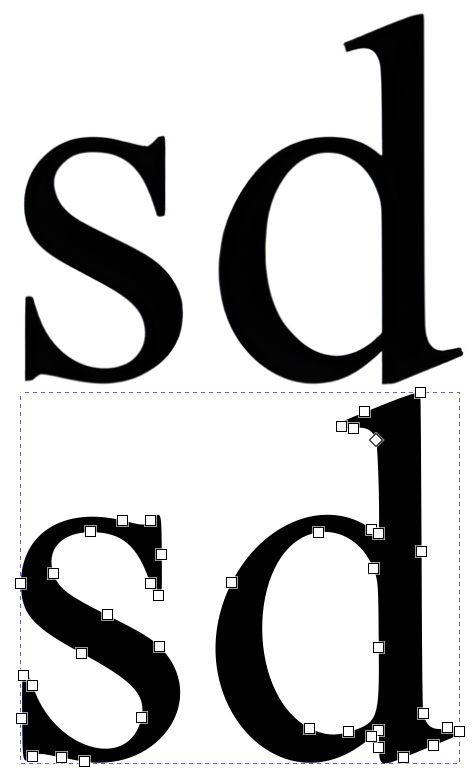
                0_1765742844428_f78e40d3-1534-45b5-ba58-dbe56c7cd3a7-image.png

                So, i believe that really is not necessary so high res images as source, but some kind of optimization of the trace process in VS.

                Ryzen 9 3900X on Asus prime x570-p
                Memory 48gb ddr4
                Nvidia gtx 970 on an Asus strix, 4gb gddr5
                NVMe CT100p 1TB

                S 1 Reply Last reply Reply Quote 1
                • S Offline
                  Subpath @marce
                  last edited by

                  @marce

                  I would say you need both.
                  High resolution, to me, means the smoothest possible contours,
                  as jagged outlines negatively affect the result of a tracing.

                  I haven't spent much time with VS Tracer yet. But I think the results
                  may also be improved by adjusting the settings a bit.

                  Win 11
                  CPU: AMD Ryzen 5 9600X, 6-core.
                  GPU: Nvidia Geforce RTX 5070.

                  M 1 Reply Last reply Reply Quote 0
                  • M Offline
                    marce @Subpath
                    last edited by marce

                    @Subpath Well, low res images are better in some cases. Look in the sample below. This is an old scanned Capital letter β€”from etc.usf.edu. The original source is very rough. In the case you want to conserve the original roughnes is ok to use the High Res image. But if you want a smooth and flowing drawing, a low res will make the trick. The first Z at the right, in red, is a nice result, and it comes from the low res image. The High res trace result is exact, but not what i want, that is, a kind of vectorizing photo retouching.
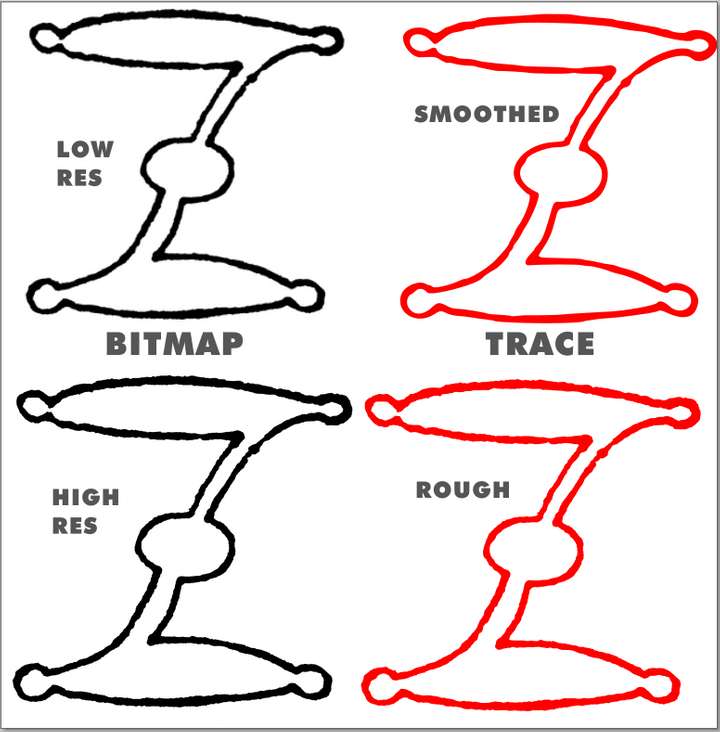
                    0_1765745188743_8450fda1-b2b7-4a5a-8bbf-6bcb6c75cfcb-image.png
                    This both results are using the same settings, in inkscape, but the change is the resolution of the source image.

                    Ryzen 9 3900X on Asus prime x570-p
                    Memory 48gb ddr4
                    Nvidia gtx 970 on an Asus strix, 4gb gddr5
                    NVMe CT100p 1TB

                    S 1 Reply Last reply Reply Quote 1
                    • S Offline
                      Subpath @marce
                      last edited by Subpath

                      @marce

                      Well, that's due to the smoothing algorithm of the vector tracer. I think a slightly
                      better result could perhaps be achieved with the high-resolution version using
                      slightly different settings for smoothing.

                      I would have vectorized the template you created here by tracing a simple line
                      in the middle of the contour (Corel Trace has a mode for this) and then
                      assigning an appropriate line weight.

                      I've created a lot of bitmap traces professionally (in digital printing).
                      Many by hand, because the trace results were too poor. I can't recall a
                      single instance where I would have preferred a low-resolution bitmap
                      version if I had the choice.

                      Win 11
                      CPU: AMD Ryzen 5 9600X, 6-core.
                      GPU: Nvidia Geforce RTX 5070.

                      1 Reply Last reply Reply Quote 0
                      • RaaskotR Offline
                        Raaskot
                        last edited by Raaskot

                        @VectorStyler
                        @marce
                        @Subpath

                        Just to let you know, that I appreciate your input a lot. It gave me some ideas what to try out ie. using upscalers.

                        I gave up Inkscape for VS back then (mainly due to supported color profiles and more familiar UI), but remember that the autotracer performed quite nicely.

                        Thanks😊

                        S 1 Reply Last reply Reply Quote 3
                        • S Offline
                          Subpath @Raaskot
                          last edited by Subpath

                          @Raaskot

                          your always welcome
                          nice to hear that this ideas was helpful

                          Win 11
                          CPU: AMD Ryzen 5 9600X, 6-core.
                          GPU: Nvidia Geforce RTX 5070.

                          1 Reply Last reply Reply Quote 2
                          • First post
                            Last post