VectorStyler
    • Categories
    • Unread
    • Recent
    • Tags
    • Popular
    • Register
    • Login

    3D Help

    Scheduled Pinned Locked Moved Questions and Support
    27 Posts 5 Posters 35.1k Views 3 Watching
    Loading More Posts
    • Oldest to Newest
    • Newest to Oldest
    • Most Votes
    Reply
    • Reply as topic
    Log in to reply
    This topic has been deleted. Only users with topic management privileges can see it.
    • IgullI Offline
      Igull @Subpath
      last edited by

      @Subpath said in 3D Help:

      could you post some pics of the Results you like to have ?

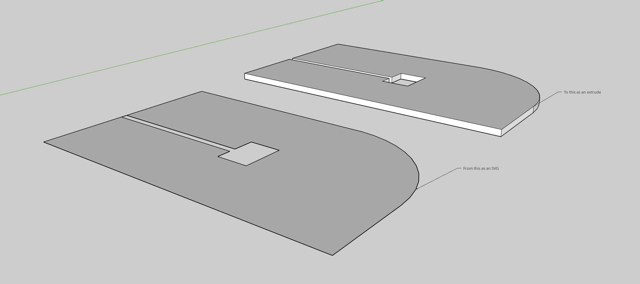
      0_1685907931801_extrude 3.jpg

      Essentially, they are all a simple flat plate extrude from an object. They don't need shading or shadow.

      Neil

      iMac 27" 2015 Catalina 32Gb, MacBook Pro 13" 2016 Monterey 8Gb, Mac Mini M2 2023 8Gb

      1 Reply Last reply Reply Quote 0
      • IgullI Offline
        Igull @b77
        last edited by

        @b77 said in 3D Help:

        @Igull Blender might be too complex for what you need, but it can
        do it, and it's free:

        Yes, as I said in the intro Blender is far too complex for this situation. 🙂 🙂 🙂

        It's also far too involved an application to do this - tinkercad is the level I am looking for, otherwise, I'm just going to end up using Fusion 360 or Onshape and be done 🙂

        The actual output file from the extrude can just be a bit image JPG/PNG whatever as it's going in a simple print document, it doesn't require to be vector.

        Thanks

        Neil

        iMac 27" 2015 Catalina 32Gb, MacBook Pro 13" 2016 Monterey 8Gb, Mac Mini M2 2023 8Gb

        b77B 1 Reply Last reply Reply Quote 0
        • b77B Offline
          b77 @Igull
          last edited by

          @Igull Got it, I thought you needed SVG export.

          MacBook Pro (Intel) running Monterey 12.6.4

          1 Reply Last reply Reply Quote 0
          • S Offline
            Subpath
            last edited by Subpath

            @Igull

            ok, thanks for the info

            I mentioned quit a while ago in the general section a small 3D tool
            that can import and extrude .SVG files. But unfortunately it is only
            for Windows. (mentioned it because Windows user of VS may be interested)

            Here is the link
            https://www.vectorstyler.com/forum/topic/1238/tip-simple-opensource-text-sgvs-to-3d-object-generator
            .
            .
            You mentioned something like parsing .SVGs. I know that SVGs, are just .xml text files.

            Have you ever thought about a script that parses your SVG file and then creates individual
            object SVG files from them?

            For example, using a script to filter out each shape part from the grouped version and then copy it
            between a header and end part to create .SVGs with only one shape this way.
            .
            .
            I also made a Test in VS where i create some Shapes and then exported them
            once ungrouped and once grouped as SVG files. After that I compared the xml
            texts, the only difference I found was that in the grouped version there is one
            <g> </g> more than in the ungrouped SVG.

            So you could also try to remove this <g> </g> to get ungrouped objects

            Win 11
            CPU: AMD Ryzen 5 9600X, 6-core.
            GPU: Nvidia Geforce RTX 5070.

            IgullI 1 Reply Last reply Reply Quote 0
            • BoldlineB Online
              Boldline
              last edited by

              @b77 even if he didn’t need the blender information I appreciate that you posted that because it shows me what can be done

              🍎 macOS Sequoia 15.3, Mac mini (M1, 2020), Chip Apple M1, Memory 16 GB
              Cintiq 27QHD Display and LG Ultra HD Display

              1 Reply Last reply Reply Quote 1
              • S Offline
                Subpath
                last edited by Subpath

                @Igull

                Another strange Solution 🙂

                You might look around to see if you can buy an older inexpensive
                version of Coreldraw for the Mac.

                Coreldraw had even in the older versions an Extrusion Tool.

                Here is a video from my 2020 version
                not much has changed since.
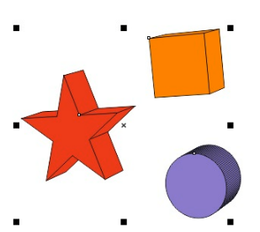
                0_1685916764124_Extrusion.png

                Win 11
                CPU: AMD Ryzen 5 9600X, 6-core.
                GPU: Nvidia Geforce RTX 5070.

                BoldlineB IgullI 2 Replies Last reply Reply Quote 0
                • BoldlineB Online
                  Boldline @Subpath
                  last edited by

                  @Subpath said in 3D Help:

                  Coreldraw had even in the older versions an Extrusion Tool.

                  I don't know when it fits on the VS roadmap plans, but an extrusion tool has been requested

                  🍎 macOS Sequoia 15.3, Mac mini (M1, 2020), Chip Apple M1, Memory 16 GB
                  Cintiq 27QHD Display and LG Ultra HD Display

                  1 Reply Last reply Reply Quote 0
                  • F Offline
                    fde101 Global Moderator
                    last edited by

                    If you really want an alternative you could try something like Cheetah3D ($99), but while it is a simpler package than Blender I personally find it a bit more complicated to use, at least for this particular use case.

                    There are other choices but you will pay far more for them than you could possibly hope to gain in any kind of time savings.

                    It is fairly simple to do what you are asking to do in Blender, and worth taking the time to learn the basics of that very powerful tool, so I would also push you in that direction.

                    A tutorial that may be helpful: https://devforum.roblox.com/t/converting-svgs-to-meshes/884514

                    Note that only the first four steps in that tutorial are relevant to what you are asking to do.

                    1 Reply Last reply Reply Quote 3
                    • S Offline
                      Subpath
                      last edited by Subpath

                      @Igull

                      I made a test with .SVG files, to create a single Shape SVG
                      from an SVG with grouped shapes.
                      By manually copying Text from the xml contend between them.
                      (which could be also done by a script)
                      .
                      .
                      For this I created one Shape in VS and exported it
                      as .SVG to get a file with only one object.

                      I manually then replaced the <path ..... id=""/> Part
                      ( which holds the Information for the Shape)
                      with a Shape Part from a .SVG with grouped Shapes.

                      Worked so far except for the fact that the Shape
                      is placed next to the artboard.

                      SVG contend with grouped shapes
                      0_1685957483551_grouped shapes.png
                      .
                      .
                      The SVG File with only one shape
                      0_1685957524652_orginal SVG with one Shape.png
                      .
                      .
                      The Shape above replaced with this Circle Shape from the grouped SVG File
                      (only using copy and paste parts from the SVG (xml Text))
                      its placed beside the Artboard, but it works
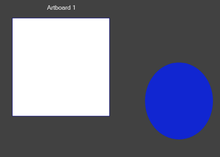
                      0_1685957644841_new SVG with replaced Shape.png

                      Win 11
                      CPU: AMD Ryzen 5 9600X, 6-core.
                      GPU: Nvidia Geforce RTX 5070.

                      1 Reply Last reply Reply Quote 0
                      • F Offline
                        fde101 Global Moderator
                        last edited by fde101

                        Actually, if you save it as a PDF instead of an SVG you can do this sort of thing in Art Text (https://text.design/art-text/).

                        IgullI S 2 Replies Last reply Reply Quote 0
                        • IgullI Offline
                          Igull @Subpath
                          last edited by

                          @Subpath said in 3D Help:

                          Have you ever thought about a script that parses your SVG file and then creates individual
                          object SVG files from them?

                          I hadn't, but that could certainly be an option to at least produce individual part files. It would be a lot simpler if something like Tinkercad would just import the SVG and be able to manipulate the parts individually 🙂

                          Thanks

                          Neil

                          iMac 27" 2015 Catalina 32Gb, MacBook Pro 13" 2016 Monterey 8Gb, Mac Mini M2 2023 8Gb

                          1 Reply Last reply Reply Quote 0
                          • IgullI Offline
                            Igull @Subpath
                            last edited by

                            @Subpath said in 3D Help:

                            Another strange Solution

                            Yes, I suppose I could do that too, but I have a Fusion 360 and an Onshape licence which can do pretty much anything in 3D - I was just looking for an easy way out with a 'one trick pony':-)

                            Neil

                            iMac 27" 2015 Catalina 32Gb, MacBook Pro 13" 2016 Monterey 8Gb, Mac Mini M2 2023 8Gb

                            S 1 Reply Last reply Reply Quote 0
                            • IgullI Offline
                              Igull @fde101
                              last edited by

                              @fde101 said in 3D Help:

                              Actually, if you save it as a PDF instead of an SVG you can do this sort of thing in Art Text (https://text.design/art-text/).

                              Mmmm, I bought Amadine from BeLight before I found VS - and really quite liked it - albeit a bit lightweight in the features department. I've just downloaded the trial version of their Art Text (supposedly full-featured), but I don't see any way to import a PDF - or anything else for that matter ?? You can certainly create 3D text extrusions and can do some rough vector drawing within, but importing or opening other file formats seems to be missing ??

                              Thanks

                              Neil

                              iMac 27" 2015 Catalina 32Gb, MacBook Pro 13" 2016 Monterey 8Gb, Mac Mini M2 2023 8Gb

                              S F 2 Replies Last reply Reply Quote 0
                              • S Offline
                                Subpath @fde101
                                last edited by

                                @fde101 said in 3D Help:

                                Actually, if you save it as a PDF instead of an SVG you can do this sort of thing in Art Text (https://text.design/art-text/).

                                could you then extrude shapes from that PDF
                                in Art Text ?

                                I also thought about "Art Text 4" but I thought it could
                                only extrude Shapes and Letters from a .TTF font file.

                                But there are online converters that can convert a
                                .SVG to a .TTF file

                                Win 11
                                CPU: AMD Ryzen 5 9600X, 6-core.
                                GPU: Nvidia Geforce RTX 5070.

                                1 Reply Last reply Reply Quote 0
                                • S Offline
                                  Subpath @Igull
                                  last edited by Subpath

                                  @Igull said in 3D Help:

                                  've just downloaded the trial version of their Art Text (supposedly full-featured), but I don't see any way to import a PDF - or anything else for that matter

                                  @Igull

                                  I think the way to go with "Art Text" is to convert your .SVG File
                                  first to a .TTF File via an free Online Converter

                                  I have Amadine on my iPad, love it 🙂

                                  Win 11
                                  CPU: AMD Ryzen 5 9600X, 6-core.
                                  GPU: Nvidia Geforce RTX 5070.

                                  1 Reply Last reply Reply Quote 0
                                  • S Offline
                                    Subpath @Igull
                                    last edited by

                                    @Igull said in 3D Help:

                                    @Subpath said in 3D Help:

                                    Another strange Solution

                                    Yes, I suppose I could do that too, but I have a Fusion 360 and an Onshape licence which can do pretty much anything in 3D - I was just looking for an easy way out with a 'one trick pony':-)

                                    Neil

                                    Understandable 🙂
                                    But its a bit harder for Mac User.
                                    On PC there are a few more Options

                                    Here a Extrusion from Magix Graphics Designer
                                    which also has such a Tool build in (PC only)
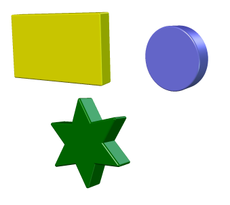
                                    0_1685974495077_Magix-Extrusion.png

                                    Win 11
                                    CPU: AMD Ryzen 5 9600X, 6-core.
                                    GPU: Nvidia Geforce RTX 5070.

                                    IgullI 1 Reply Last reply Reply Quote 1
                                    • IgullI Offline
                                      Igull @Subpath
                                      last edited by

                                      @Subpath said in 3D Help:

                                      On PC there are a few more Options

                                      You're rubbing my nose in it 🙂 🙂 🙂

                                      iMac 27" 2015 Catalina 32Gb, MacBook Pro 13" 2016 Monterey 8Gb, Mac Mini M2 2023 8Gb

                                      S 1 Reply Last reply Reply Quote 1
                                      • BoldlineB Online
                                        Boldline
                                        last edited by

                                        This is not directly related, but I've been giving thought over time to how to best create the 3D wrap around look with a vector path. I was thinking of it in terms of a dedicated shape like the existing oval and rectangle shapes, but now I'm thinking the best way to create those will be when basic 3D extrude is (hopefully) added to VS

                                        0_1685975559387_5932f189-cd44-4ee0-8eac-3fb7d41d5356-BLD 2023-06-05 at 10.24.01@2x.png

                                        🍎 macOS Sequoia 15.3, Mac mini (M1, 2020), Chip Apple M1, Memory 16 GB
                                        Cintiq 27QHD Display and LG Ultra HD Display

                                        S 1 Reply Last reply Reply Quote 1
                                        • S Offline
                                          Subpath @Igull
                                          last edited by

                                          @Igull said in 3D Help:

                                          @Subpath said in 3D Help:

                                          On PC there are a few more Options

                                          You're rubbing my nose in it 🙂 🙂 🙂

                                          I probably should not have done that 🙂

                                          Win 11
                                          CPU: AMD Ryzen 5 9600X, 6-core.
                                          GPU: Nvidia Geforce RTX 5070.

                                          1 Reply Last reply Reply Quote 0
                                          • S Offline
                                            Subpath @Boldline
                                            last edited by Subpath

                                            @Boldline

                                            In Corel you could take any Form/ Shape
                                            (even grouped) and extrude it
                                            in Magix Graphics Designer too

                                            The result in Magix is only a Bitmap
                                            but it has more lightning, beveling options

                                            In Corel it stay as a Vector Object where you could
                                            break apart the parts and reuse them as vector objects
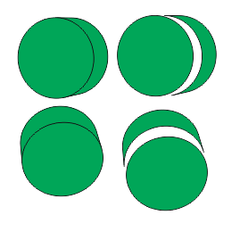
                                            0_1685977652751_Corel Extrude.png

                                            Win 11
                                            CPU: AMD Ryzen 5 9600X, 6-core.
                                            GPU: Nvidia Geforce RTX 5070.

                                            1 Reply Last reply Reply Quote 1
                                            • First post
                                              Last post