VectorStyler
    • Categories
    • Unread
    • Recent
    • Tags
    • Popular
    • Register
    • Login

    Can Scaling stokes and effects be on by default? Can we make it easier to switch all child sublayers by editing the setting at the parent level?
    Scheduled Pinned Locked Moved Questions and Support
    25 Posts 6 Posters 33.4k Views 6 Watching
    Loading More Posts
    • Oldest to Newest
    • Newest to Oldest
    • Most Votes
    Reply
    • Reply as topic
    Log in to reply
    This topic has been deleted. Only users with topic management privileges can see it.
    • Devil DinosaurD Offline
      Devil Dinosaur
      last edited by

      I agree with @Boldline since the only specific case when I need to keep the same stroke value all the time is technical drawings (such as die-cuts, blueprints). I can duplicate lines and shapes then transform their sizes without changing the stroke width.

      The rest of the time I find it more practical to have a stroke that immediately adjust to the size of the shape.

      Fred.
      MacBook Pro (M1) - MacOs Sonoma 14

      b77B 1 Reply Last reply Reply Quote 1
      • b77B Offline
        b77 @Devil Dinosaur
        last edited by b77

        Is there any vector graphics app that has this stroke scaling behavior as the default mode of operation?

        MacBook Pro (Intel) running Monterey 12.6.4

        BoldlineB S 2 Replies Last reply Reply Quote 0
        • BoldlineB Offline
          Boldline @b77
          last edited by

          @b77 I'm not sure how Adobe CC Illustrator works now, but CS6 had them off by default.

          🍎 macOS Sequoia 15.3, Mac mini (M1, 2020), Chip Apple M1, Memory 16 GB
          Cintiq 27QHD Display and LG Ultra HD Display

          VectorStylerV 1 Reply Last reply Reply Quote 0
          • VectorStylerV Offline
            VectorStyler @Boldline
            last edited by

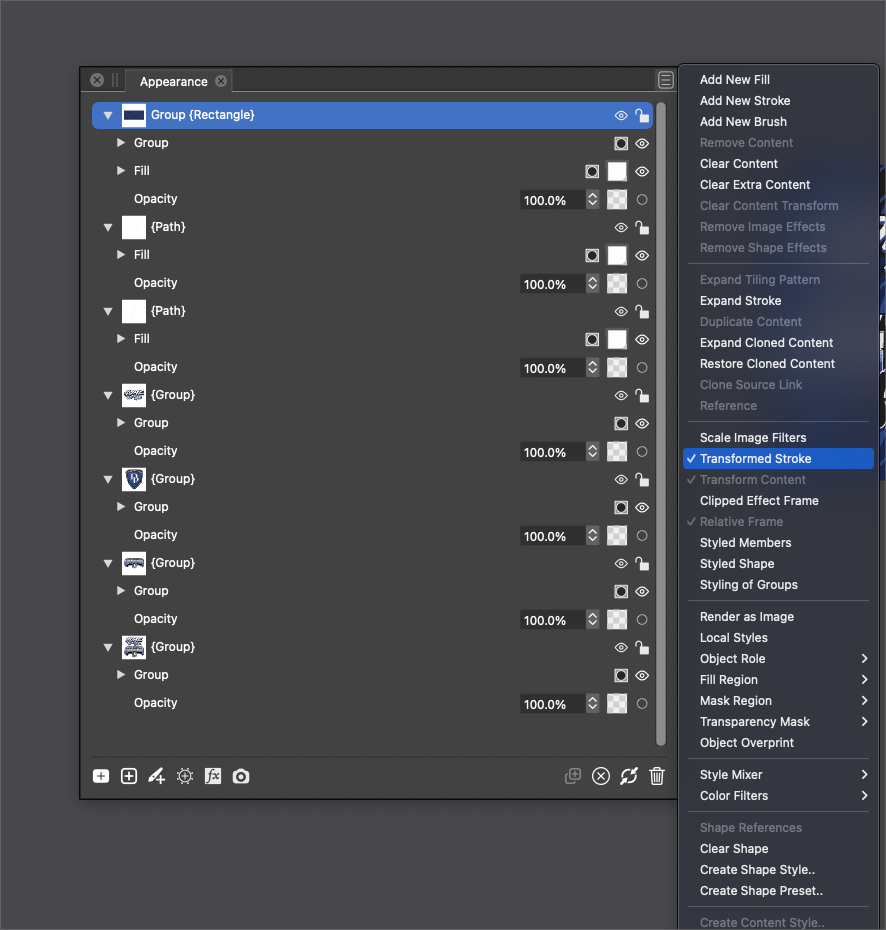
            @Boldline One thing: if you enable "Transformed Stroke" in the options of the top layer, then all objects inside will have transformed stroke.

            1 Reply Last reply Reply Quote 1
            • S Offline
              Subpath @b77
              last edited by

              @b77

              Magix Graphics Designer have a Toogle in the Context Bar
              once set Strokes will be scaled even if you close and restart
              the Program

              i had also a quick look in CorelDraw and Affinity Designer

              in CorelDraw I found a toggle in the object properties panel
              where you can set this per object (of course also per group)
              -- but I guess there is also a general toggle

              In Affinity Designer there is a toggle in the Stroke panel
              Once set, it will scale the stroke of all newly created objects/shapes

              Win 11
              CPU: AMD Ryzen 5 9600X, 6-core.
              GPU: Nvidia Geforce RTX 5070.

              b77B 1 Reply Last reply Reply Quote 1
              • b77B Offline
                b77 @Subpath
                last edited by b77

                @Subpath I'm all for an easily accessible toggle for this, but not for being the default mode of operation.

                Is AI, CDR, AD and Magix Xara like this by default?

                (Rhetorical question, btw). 🙂

                MacBook Pro (Intel) running Monterey 12.6.4

                BoldlineB S 2 Replies Last reply Reply Quote 1
                • BoldlineB Offline
                  Boldline @b77
                  last edited by

                  @b77 Perhaps Illustrator had things set to the novice user by default? I never had to worry about switching the strokes to scale with the object in the years I used Illustrator - but then again other things like winding path were not something that needed adjusting either

                  🍎 macOS Sequoia 15.3, Mac mini (M1, 2020), Chip Apple M1, Memory 16 GB
                  Cintiq 27QHD Display and LG Ultra HD Display

                  b77B 1 Reply Last reply Reply Quote 0
                  • b77B Offline
                    b77 @Boldline
                    last edited by b77

                    @Boldline I have no idea if it was the novices or avoiding unwanted stroke differences you need to fix afterwards, or both, but I guess you enabled the 'Scale Strokes & Effects' option in AI's Preferences > General and forgot about it. That's why you didn't have to worry about if afterwards. 🙂

                    IMO it's best to have a setting for this in Preferences AND an easily accessible toggle in the Transform or Stroke panel.

                    MacBook Pro (Intel) running Monterey 12.6.4

                    BoldlineB 1 Reply Last reply Reply Quote 2
                    • BoldlineB Offline
                      Boldline @b77
                      last edited by

                      @b77 said in Can Scaling stokes and effects be on by default? Can we make it easier to switch all child sublayers by editing the setting at the parent level?:

                      I guess you enabled the 'Scale Strokes & Effects' option in AI's Preferences > General and forgot about it. That's why you didn't have to worry about if afterwards.

                      It's very possible 🙂

                      🍎 macOS Sequoia 15.3, Mac mini (M1, 2020), Chip Apple M1, Memory 16 GB
                      Cintiq 27QHD Display and LG Ultra HD Display

                      DazmondoD 1 Reply Last reply Reply Quote 1
                      • S Offline
                        Subpath @b77
                        last edited by Subpath

                        @b77 said in Can Scaling stokes and effects be on by default? Can we make it easier to switch all child sublayers by editing the setting at the parent level?:

                        @Subpath I'm all for an easily accessible toggle for this, but not for being the default mode of operation.

                        Is AI, CDR, AD and Magix Xara like this by default?

                        (Rhetorical question, btw). 🙂

                        Do not know it for AI because I do not use Illustrator
                        (You may remember, I don't like the user interface and the handling 🙂
                        .
                        .
                        To answer your question:
                        I would say CDR and AD definitely not.
                        .

                        Magix Xara also not, in a new installation.
                        But as I wrote, once set it stays active even if you restart the program, until you turn it off again.
                        The Toogle is as I wrote in the Contex Bar and very easy to reach.
                        Here a Pic:
                        0_1658589316344_Stroke-scaling.png
                        .

                        I have no particular need for it, so I can live with a toggle
                        .
                        .
                        But unfortunately I have to honestly say that the VectorStyler method of scaling strokes is,
                        in my eyes, the most unsual I came across
                        ( maybe because of the roles and styles ? )
                        ( I dont like it and haven't found, until this time, any beauty in it yet, that's why I don't use it )

                        in every other vector graphics program that i know, it is so much more seamless and easier.

                        Win 11
                        CPU: AMD Ryzen 5 9600X, 6-core.
                        GPU: Nvidia Geforce RTX 5070.

                        BoldlineB 1 Reply Last reply Reply Quote 0
                        • BoldlineB Offline
                          Boldline @Subpath
                          last edited by

                          @Subpath said in Can Scaling stokes and effects be on by default? Can we make it easier to switch all child sublayers by editing the setting at the parent level?:

                          in every other vector graphics program that i know, it is so much more seamless and easier.

                          I'd be interested to hear what you feel would improve it and make it more of a seamless process - also what do you do instead of scaling in VS?

                          🍎 macOS Sequoia 15.3, Mac mini (M1, 2020), Chip Apple M1, Memory 16 GB
                          Cintiq 27QHD Display and LG Ultra HD Display

                          VectorStylerV S 2 Replies Last reply Reply Quote 1
                          • VectorStylerV Offline
                            VectorStyler @Boldline
                            last edited by

                            @Boldline There is also a "Transformed Stroke" option in Document Setup. This will affect newly created objects.

                            1 Reply Last reply Reply Quote 2
                            • S Offline
                              Subpath @Boldline
                              last edited by Subpath

                              @Boldline

                              As i only play with graphics and try out the ideas that go around in my head.
                              ( Dont work no longer as a professional )
                              .
                              For this i use the programs that have the tools that can help me with the realization.
                              .

                              Short note and praise for VS:
                              Since VS has so many useful and interesting tools by the way, I try most ideas in VS
                              since I bought a copy. (I think that says a lot)
                              .

                              I don't really have a need for scaled strokes if I need it,
                              I just set a different stroke width

                              If I really need it I would try to copy my design into AD, CDR or Magic Graphics Designer
                              and get it done there. (or maybe solve it via the outline effects ?).

                              @Boldline
                              ...I'd be interested to hear what you feel would improve it and make it more of a seamless process...

                              As i dont really know the Concept behind it, why it should or must work this way
                              (never saw something like this before)
                              i can not say how to streamline it
                              ( toggle could be a first start ? )

                              Win 11
                              CPU: AMD Ryzen 5 9600X, 6-core.
                              GPU: Nvidia Geforce RTX 5070.

                              BoldlineB 1 Reply Last reply Reply Quote 0
                              • BoldlineB Offline
                                Boldline @Subpath
                                last edited by

                                @Subpath said in Can Scaling stokes and effects be on by default? Can we make it easier to switch all child sublayers by editing the setting at the parent level?:

                                I don't really have a need for scaled strokes if I need it,
                                I just set a different stroke width

                                Maybe we are thinking of two different things? I'm talking about designing something at one size and then needing to group it and scale it up - the entire design element with fills and strokes included and wanting them to all stay relative in size to one another in the process.

                                🍎 macOS Sequoia 15.3, Mac mini (M1, 2020), Chip Apple M1, Memory 16 GB
                                Cintiq 27QHD Display and LG Ultra HD Display

                                S 1 Reply Last reply Reply Quote 0
                                • S Offline
                                  Subpath @Boldline
                                  last edited by Subpath

                                  @Boldline said in Can Scaling stokes and effects be on by default? Can we make it easier to switch all child sublayers by editing the setting at the parent level?:

                                  @Subpath said in Can Scaling stokes and effects be on by default? Can we make it easier to switch all child sublayers by editing the setting at the parent level?:

                                  I don't really have a need for scaled strokes if I need it,
                                  I just set a different stroke width

                                  Maybe we are thinking of two different things? I'm talking about designing something at one size and then needing to group it and scale it up - the entire design element with fills and strokes included and wanting them to all stay relative in size to one another in the process.

                                  well, dont think that we talk about different things. That you like to scale your entire design elements
                                  in relative in size to one another, is very clear to me.
                                  But i cant help you out in this case.
                                  .
                                  Edited:
                                  (well you mentioned yet effect scaling and i wrote only about stroke scaling )

                                  i just wrote that i am not in need of this kind of scaling in VS and i dont like
                                  to used it in VS. So if i need some different stroke width
                                  i just set it.

                                  Win 11
                                  CPU: AMD Ryzen 5 9600X, 6-core.
                                  GPU: Nvidia Geforce RTX 5070.

                                  1 Reply Last reply Reply Quote 0
                                  • DazmondoD Offline
                                    Dazmondo @Boldline
                                    last edited by

                                    @b77 said in Can Scaling stokes and effects be on by default? Can we make it easier to switch all child sublayers by editing the setting at the parent level?:

                                    A sticky button would be really handy for this as 90% of the time I need strokes to scale

                                    VectorStylerV 1 Reply Last reply Reply Quote 1
                                    • VectorStylerV Offline
                                      VectorStyler @Dazmondo
                                      last edited by

                                      @Dazmondo When creating new documents, enable the "Transformed Stroke" option in the Document Setup -> General view.

                                      DazmondoD 1 Reply Last reply Reply Quote 1
                                      • DazmondoD Offline
                                        Dazmondo @VectorStyler
                                        last edited by

                                        @Dazmondo When creating new documents, enable the "Transformed Stroke" option in the Document Setup -> General view.

                                        Doesn't work for me - the strokes only scale when grouped ????? or if scale image filters is ticked

                                        b77B 1 Reply Last reply Reply Quote 0
                                        • b77B Offline
                                          b77 @Dazmondo
                                          last edited by

                                          @VectorStyler It looks like it doesn't work for parametric shapes (smart shapes). Easily fixable, I guess.
                                          @Dazmondo Convert them to curves and this works as expected.

                                          MacBook Pro (Intel) running Monterey 12.6.4

                                          VectorStylerV 1 Reply Last reply Reply Quote 0
                                          • VectorStylerV Offline
                                            VectorStyler @b77
                                            last edited by

                                            @b77 said in Can Scaling stokes and effects be on by default? Can we make it easier to switch all child sublayers by editing the setting at the parent level?:

                                            @VectorStyler It looks like it doesn't work for parametric shapes (smart shapes). Easily fixable, I guess.

                                            @Dazmondo Yes, a few parametric shapes are not "scaled" (rectangle, ellipse).
                                            An other way to go around this is to disable the Direct Shape Transformation option in Preferences -> Editing Options 2 (bottom-right corner).

                                            DazmondoD 1 Reply Last reply Reply Quote 0
                                            • First post
                                              Last post
