VectorStyler
    • Categories
    • Unread
    • Recent
    • Tags
    • Popular
    • Register
    • Login

    [1.4.002] Searching for fonts by name does not work

    Scheduled Pinned Locked Moved Bugs in VectorStyler
    10 Posts 4 Posters 50 Views 3 Watching
    Loading More Posts
    • Oldest to Newest
    • Newest to Oldest
    • Most Votes
    Reply
    • Reply as topic
    Log in to reply
    This topic has been deleted. Only users with topic management privileges can see it.
    • encartE Offline
      encart
      last edited by encart

      Regardless of the name I enter or the directory I search in, the search returns no results.
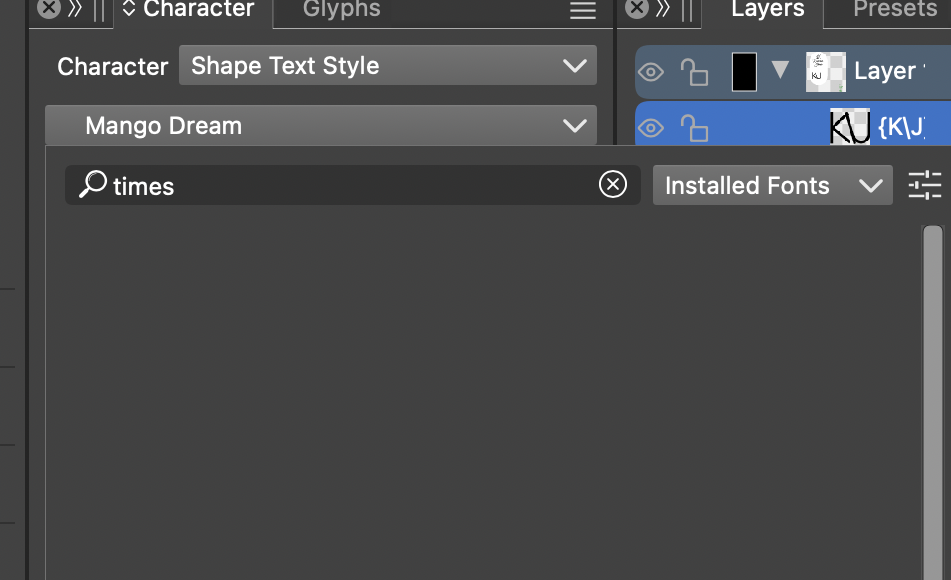
      781dad77-322b-456e-bb2b-5fc99ed44db6-Screenshot 2026-11-26 at 15.55.01.png

      MacBook Air M4 24Gb, Tahoe 26.3.1

      BoldlineB VectorStylerV 2 Replies Last reply Reply Quote 1
      • BoldlineB Offline
        Boldline @encart
        last edited by

        @encart It's working correctly on my Tahoe 26.6.2 macbook running VS 1.4.002
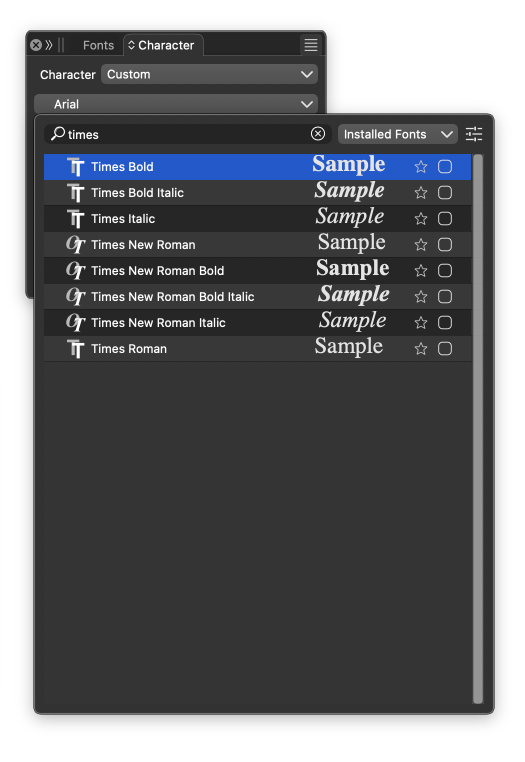
        600caa21-6f1d-473d-8886-09879311b383-CleanShot 2026-11-26 at 11.10.17 AM.png

        🍎 macOS Tahoe 26.2, Mac mini (M1, 2020), Chip Apple M1, Memory 16 GB
        Cintiq 27QHD Display and LG Ultra HD Display

        1 Reply Last reply Reply Quote 0
        • VectorStylerV Offline
          VectorStyler @encart
          last edited by

          @encart Send me your workspace and settings files.

          1 Reply Last reply Reply Quote 0
          • M Offline
            marce
            last edited by

            Here dont work either.
            https://icedrive.net/s/3vGbQwNgZX6FSPuRg99kWzYZYtCy

            Ryzen 9 3900X on Asus prime x570-p
            Memory 48gb ddr4
            Nvidia gtx 970 on an Asus strix, 4gb gddr5
            NVMe CT100p 1TB

            VectorStylerV 1 Reply Last reply Reply Quote 1
            • VectorStylerV Offline
              VectorStyler @marce
              last edited by

              @marce Send me the contents of the /resources folder, containing the settings and workspace

              on Windows the folder can be found: https://www.vectorstyler.com/documentation/introduction/troubleshooting/

              M 1 Reply Last reply Reply Quote 1
              • M Offline
                marce @VectorStyler
                last edited by

                @VectorStyler Here it is:
                resources.zip

                Ryzen 9 3900X on Asus prime x570-p
                Memory 48gb ddr4
                Nvidia gtx 970 on an Asus strix, 4gb gddr5
                NVMe CT100p 1TB

                VectorStylerV 1 Reply Last reply Reply Quote 1
                • VectorStylerV Offline
                  VectorStyler @marce
                  last edited by

                  @marce Can be replicated.
                  There is a settings that should not be there, I removed it.

                  "fontlistsearchmatchingmode" is not used and should not be in the settings file.

                  You can copy this settings file over the one in the /resources folder:

                  settings.xml

                  M 1 Reply Last reply Reply Quote 1
                  • M Offline
                    marce @VectorStyler
                    last edited by

                    @VectorStyler Hi! My resources folder dont have a "settings.xml" file. Only one called "configure.xml"
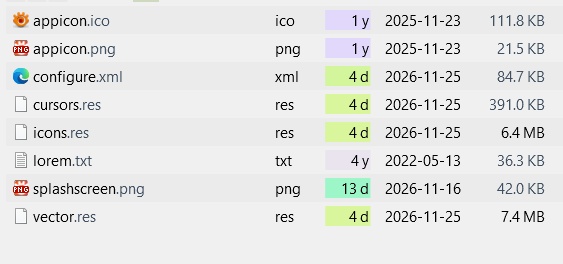
                    fb4dc4d5-a041-48da-95e8-41c7a363b7d2-image.png

                    Ryzen 9 3900X on Asus prime x570-p
                    Memory 48gb ddr4
                    Nvidia gtx 970 on an Asus strix, 4gb gddr5
                    NVMe CT100p 1TB

                    VectorStylerV 1 Reply Last reply Reply Quote 1
                    • VectorStylerV Offline
                      VectorStyler @marce
                      last edited by

                      @marce Not that one. The one described in features https://www.vectorstyler.com/documentation/introduction/troubleshooting/

                      M 1 Reply Last reply Reply Quote 0
                      • M Offline
                        marce @VectorStyler
                        last edited by

                        @VectorStyler said in [1.4.002] Searching for fonts by name does not work:

                        @marce Not that one. The one described in features https://www.vectorstyler.com/documentation/introduction/troubleshooting/

                        Ok. Now it works without problem, appear to be. Thanks the fix!

                        Ryzen 9 3900X on Asus prime x570-p
                        Memory 48gb ddr4
                        Nvidia gtx 970 on an Asus strix, 4gb gddr5
                        NVMe CT100p 1TB

                        1 Reply Last reply Reply Quote 1
                        • First post
                          Last post