VectorStyler
    • Categories
    • Unread
    • Recent
    • Tags
    • Popular
    • Register
    • Login

    Right-click to copy or paste in the panel text field does not work

    Scheduled Pinned Locked Moved Features and Ideas
    12 Posts 3 Posters 73 Views 2 Watching
    Loading More Posts
    • Oldest to Newest
    • Newest to Oldest
    • Most Votes
    Reply
    • Reply as topic
    Log in to reply
    This topic has been deleted. Only users with topic management privileges can see it.
    • W Offline
      William Kansepa
      last edited by

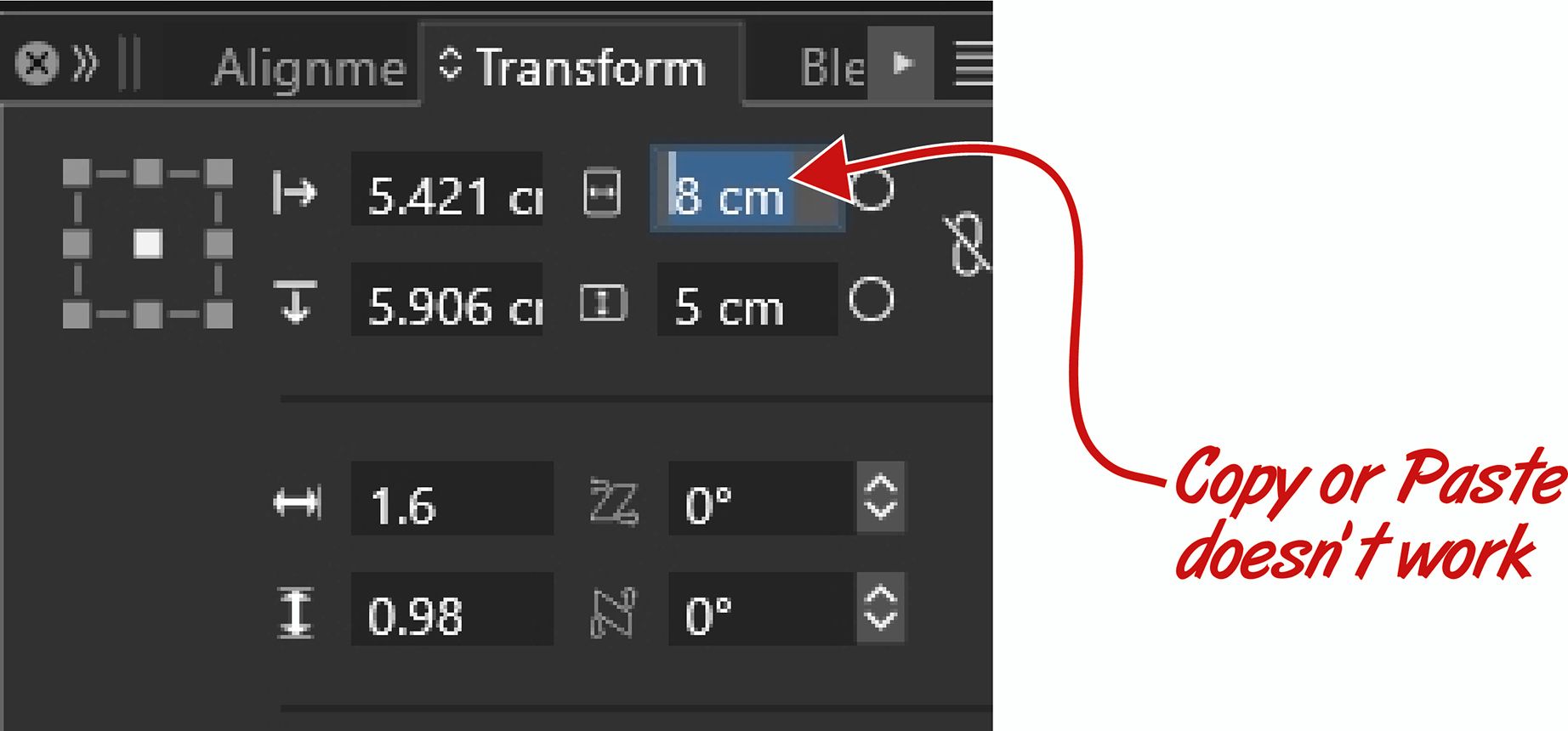
      It's intuitive to copy or paste values in the panel text fields, but this method doesn't work in VS.

      Refer to example panel image attached.

      Could you please look into that?
      Panel02.jpg

      HP•Windows 11 Pro•11th Gen Intel(R) Core(TM) i7-1165G7 @ 2.80GHz 2.70 GHz• RAM: 16.0 GB (DDR4)

      VectorStylerV 1 Reply Last reply Reply Quote 1
      • VectorStylerV Offline
        VectorStyler @William Kansepa
        last edited by

        @William-Kansepa I will try to add this

        1 Reply Last reply Reply Quote 0
        • W Offline
          William Kansepa
          last edited by

          @VectorStyler thank you for update 1.3.020!
          However, this issue is still not resolved...

          HP•Windows 11 Pro•11th Gen Intel(R) Core(TM) i7-1165G7 @ 2.80GHz 2.70 GHz• RAM: 16.0 GB (DDR4)

          VectorStylerV 2 Replies Last reply Reply Quote 1
          • VectorStylerV Offline
            VectorStyler @William Kansepa
            last edited by

            @William-Kansepa It might be that only works on the mac, I will open a bug for this.

            1 Reply Last reply Reply Quote 0
            • VectorStylerV Offline
              VectorStyler @William Kansepa
              last edited by

              @William-Kansepa said in Right-click to copy or paste in the panel text field does not work:

              @VectorStyler thank you for update 1.3.020!
              However, this issue is still not resolved...

              I tested this on windows, and when right clicking the field, the number is copied.

              W 1 Reply Last reply Reply Quote 0
              • W Offline
                William Kansepa @VectorStyler
                last edited by

                @VectorStyler said in Right-click to copy or paste in the panel text field does not work:

                I tested this on windows, and when right clicking the field, the number is copied.

                Here it's still a challenge for me... Maybe there's a setting which I am missing?
                Anyone else experiencing this?

                HP•Windows 11 Pro•11th Gen Intel(R) Core(TM) i7-1165G7 @ 2.80GHz 2.70 GHz• RAM: 16.0 GB (DDR4)

                VectorStylerV 2 Replies Last reply Reply Quote 1
                • VectorStylerV Offline
                  VectorStyler @William Kansepa
                  last edited by

                  @William-Kansepa No settings is needed.
                  In the number field, is there anything selected when you right click?
                  (if nothing is selected, it should copy the whole text)

                  1 Reply Last reply Reply Quote 0
                  • VectorStylerV Offline
                    VectorStyler @William Kansepa
                    last edited by

                    @William-Kansepa
                    Could also be a mouse / input device type issue.
                    What kind of mouse you use for this?

                    W 1 Reply Last reply Reply Quote 0
                    • W Offline
                      William Kansepa @VectorStyler
                      last edited by

                      @VectorStyler said in Right-click to copy or paste in the panel text field does not work:

                      @William-Kansepa
                      Could also be a mouse / input device type issue.
                      What kind of mouse you use for this?

                      I am using a simple HP mouse.
                      I am not facing this kind of challenge in other software...

                      HP•Windows 11 Pro•11th Gen Intel(R) Core(TM) i7-1165G7 @ 2.80GHz 2.70 GHz• RAM: 16.0 GB (DDR4)

                      L 1 Reply Last reply Reply Quote 0
                      • L Offline
                        Li Xiao @William Kansepa
                        last edited by

                        @William-Kansepa I tried it on two different PCs, and it works fine on both.

                        W 1 Reply Last reply Reply Quote 0
                        • W Offline
                          William Kansepa @Li Xiao
                          last edited by

                          @Li-Xiao said in Right-click to copy or paste in the panel text field does not work:

                          @William-Kansepa I tried it on two different PCs, and it works fine on both.

                          @Li-Xiao, Thank you for your response. I think I will have to try another mouse and hopefully I will achieve the desired result.

                          HP•Windows 11 Pro•11th Gen Intel(R) Core(TM) i7-1165G7 @ 2.80GHz 2.70 GHz• RAM: 16.0 GB (DDR4)

                          L 1 Reply Last reply Reply Quote 0
                          • L Offline
                            Li Xiao @William Kansepa
                            last edited by

                            @William-Kansepa You're welcome! Could it be a settings issue? A while back, importing AI generated images made VS crash on two Win PCs, but Mac was totally fine. It went back to normal after I reset it to default settings.

                            1 Reply Last reply Reply Quote 1
                            • First post
                              Last post