Bug List for Version 1.3
-
@monsterfox said in Bug List for Version 1.3:

When using the Path Offset effect, an error occurs when modifying the offset parameter in the Width Panel: for example, if you input 2mm, the actual offset is only 1mm. This error arises because the Width Tool and the Contour Path Tool adopt the same offset mode (offset on both sides).
I will try to replicate this.
-
Gradients no longer work. Updated to v1.3.004 64bit, Windows 10 Pro.
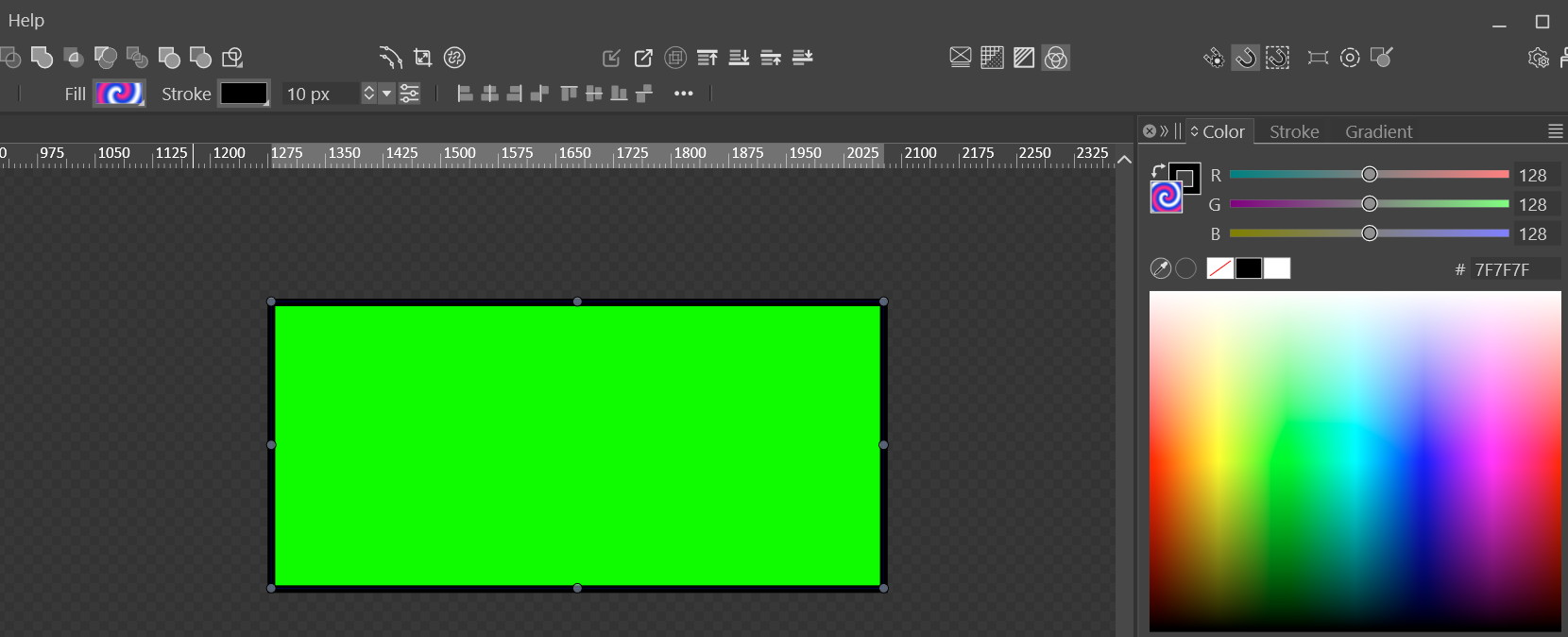
I just checked that only the 'Noise' type of gradient actually worked. Really odd… so most likely we got a bug.
-
@Evaelo Send me that file and Il will try to replicate it here.
In Settings -> Performance, try Software for the Compute engine.
-
@VectorStyler
As you command:
0_1766926041465_Gradient is broken.vstyler -
@VectorStyler https://youtu.be/Ax06GN5JwRg?feature=shared[0_1766927882644_合.vstyler](/forum/assets/uploads/files/1766927888679-合.vstyler)

16.File Vulnerability Compilation & Fix Requests1. When multiple objects are selected and the Move Transform tool is used with the Transform Each option enabled, an error occurs: the sorting order of the graphics becomes chaotic instead of arranging from large to small.
2. Text input is unavailable within the file.
3. The Stroke Tool fails to work, and the corresponding stroke panel is also non-functional.
4. There are numerous broken paths in the file. If all graphics are selected and the Join Overlapping Nodes function is applied, some graphics will be duplicated in their original positions.
5. When two shapes are merged with overlapping areas, converting the merged shape to a rectangle will result in an unexpected positional offset of the generated rectangle.We sincerely hope these issues can be fixed in subsequent updates.
-
@monsterfox I added these to the backlog.
-
@monsterfox said in Bug List for Version 1.3:
the sorting order of the graphics becomes chaotic instead of arranging from large to small.
The sorting order is the order of selection. In case of box selection, this is the stacking order of objects.
-
@monsterfox said in Bug List for Version 1.3:
Text input is unavailable within the file.
The text in the file was converted to curves
-
@VectorStyler 17,When selecting multiple objects by holding down the Shift key, clicking on an empty area will deselect all objects .
-
@monsterfox said in Bug List for Version 1.3:
When selecting multiple objects by holding down the Shift key, clicking on an empty area will deselect all objects .
I will fix this
-
@VectorStyler In 2025.12.11.23:33 the error of incorrect scaling when importing the two DXF files contained in the compressed package I provided into the program has not been fixed yet. It is hoped that this issue can be resolved.
-
@VectorStyler Fixed a bug in sizing imported SVGs(I tested those two files, and the error still exists. It still needs to be fixed.)If you import these two files into Illustrator and VS respectively, you'll see the difference. The size in AI is correct.
-
@monsterfox said in Bug List for Version 1.3:
In 2025.12.11.23:33 the error of incorrect scaling when importing the two DXF files contained in the compressed package I provided into the program has not been fixed yet.
I tested with those two files, both in VectorStyler and Illustrator 2026 and the sizes are the same
-
@monsterfox said in Bug List for Version 1.3:
If you import these two files into Illustrator and VS respectively
Can you reupload these two SVG files, I'm not sure if I tested with the same.
-
@VectorStyler picture.dxf.zip Both files become smaller after import, so the size is not correct. Also, if you use the drag-and-drop method, one of the files cannot perform this operation. Please test it again.
-
@monsterfox Also send me a VectorStyler file with these files imported (I want to check the result of importing as it happens for you).
-
These are the VS files I get with importing the DXF files:
In Adobe Illustrator 2026:
the "22.dxf" file imports and has the same size as in VS: width 223.8 pt, height 208 pt
Illustrator cannot import or open the "Picture.DXF.dxf" file -
-
@monsterfox The VS document is in MM the Illustrator in PT
78.96 mm is about 223.83 pt
-
@VectorStyler No, both of my software are set to MM as the unit.

