VectorStyler
    • Categories
    • Unread
    • Recent
    • Tags
    • Popular
    • Register
    • Login

    Non-destructiveness vs new (visible) reality

    Scheduled Pinned Locked Moved Questions and Support
    20 Posts 3 Posters 13.1k Views 3 Watching
    Loading More Posts
    • Oldest to Newest
    • Newest to Oldest
    • Most Votes
    Reply
    • Reply as topic
    Log in to reply
    This topic has been deleted. Only users with topic management privileges can see it.
    • AyoA Offline
      Ayo
      last edited by Ayo

      Yes ok... but

      Scaling rectangle
      That works manually but what if I want to enter the scaling factor numerically?

      Scaling text 1
      In a group (which is necessary for text frame scaling) this does not work. Get 50% readout

      Scaling text 2
      Works for point size as long as it stays in a group but what if I ungroup it again I get 24pt readout again

      VectorStylerV 1 Reply Last reply Reply Quote 1
      • VectorStylerV Offline
        VectorStyler @Ayo
        last edited by

        @Ayo said in Non-destructiveness vs new (visible) reality:

        Scaling rectangle
        That works manually but what if I want to enter the scaling factor numerically?

        yes, this will create a non-destructive scaling, which allows for the editing of the scaling factor.

        Scaling text 1
        In a group (which is necessary for text frame scaling) this does not work. Get 50% readout

        I will test with text frames more.

        Scaling text 2
        Works for point size as long as it stays in a group but what if I ungroup it again I get 24pt readout again

        I will also test this.

        AyoA 1 Reply Last reply Reply Quote 1
        • AyoA Offline
          Ayo @VectorStyler
          last edited by

          @VectorStyler
          Thanks for the answers but not a solution for me yet. In summary the feature request remains very simple.
          A global setting/option toggle, for both manual and numerical editing, that asks:

          Transformations: destructive or non-destructive.
          Non-destructive > keep the initial original spec values
          Destructive > gives new spec values ​​after transformation

          Although the feature request is very simple in words, I guess that realisation is very difficult because it looks like VS is built entirely around the non-destructiveness concept.

          VectorStylerV 1 Reply Last reply Reply Quote 1
          • VectorStylerV Offline
            VectorStyler @Ayo
            last edited by

            @Ayo said in Non-destructiveness vs new (visible) reality:

            Destructive > gives new spec values ​​after transformation

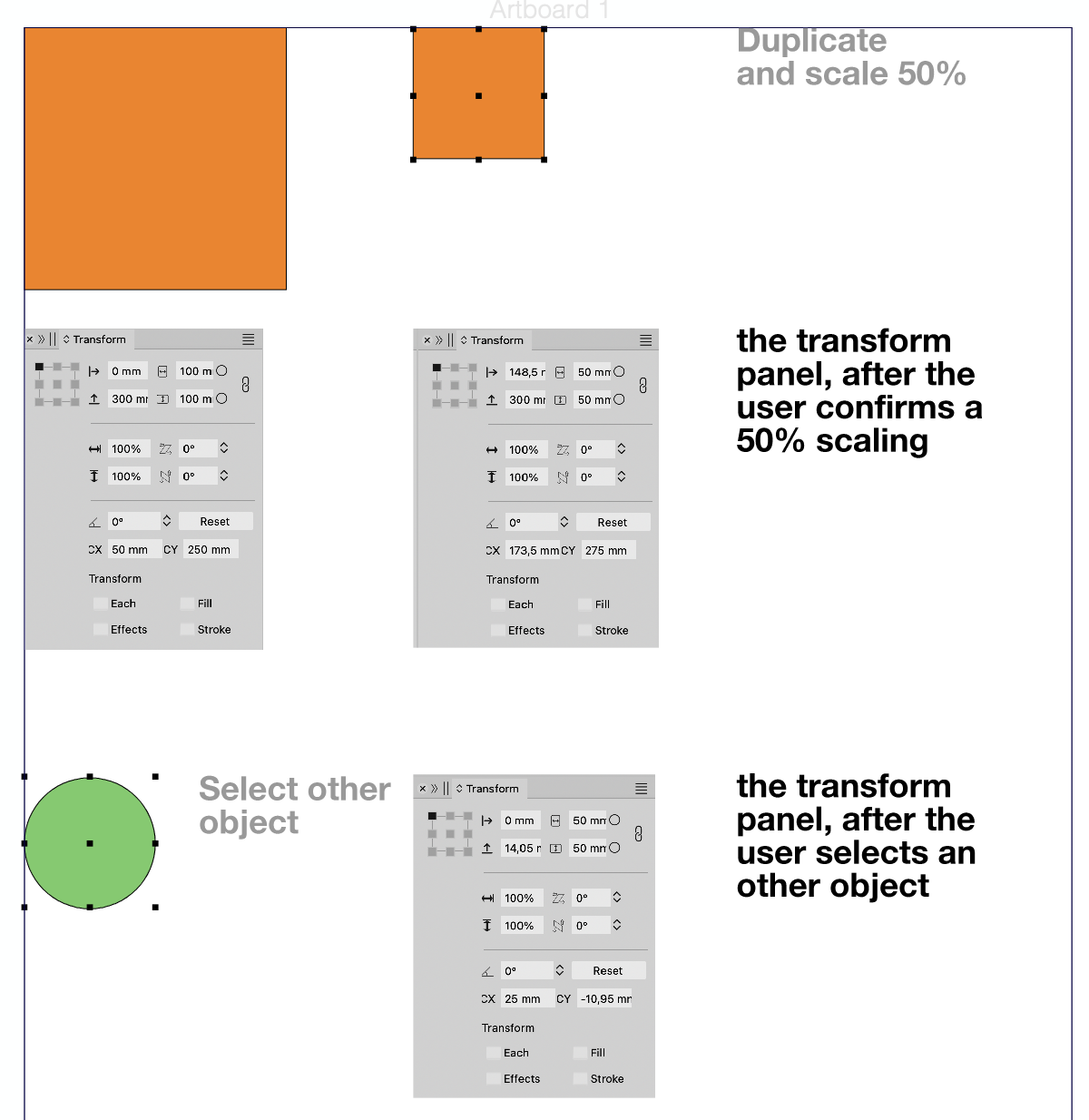
            Question: what will be shown in the transform panel, after the user confirms a 50% scaling?
            And what is shown after the user selects an other object?

            AyoA 1 Reply Last reply Reply Quote 0
            • AyoA Offline
              Ayo @VectorStyler
              last edited by

              @VectorStyler

              This...
              0_1741182125992_73bc4350-24a2-4937-83f4-4b91434a7d07-image.png

              1 Reply Last reply Reply Quote 1
              • AyoA Offline
                Ayo @Ayo
                last edited by

                @Ayo said in Non-destructiveness vs new (visible) reality:

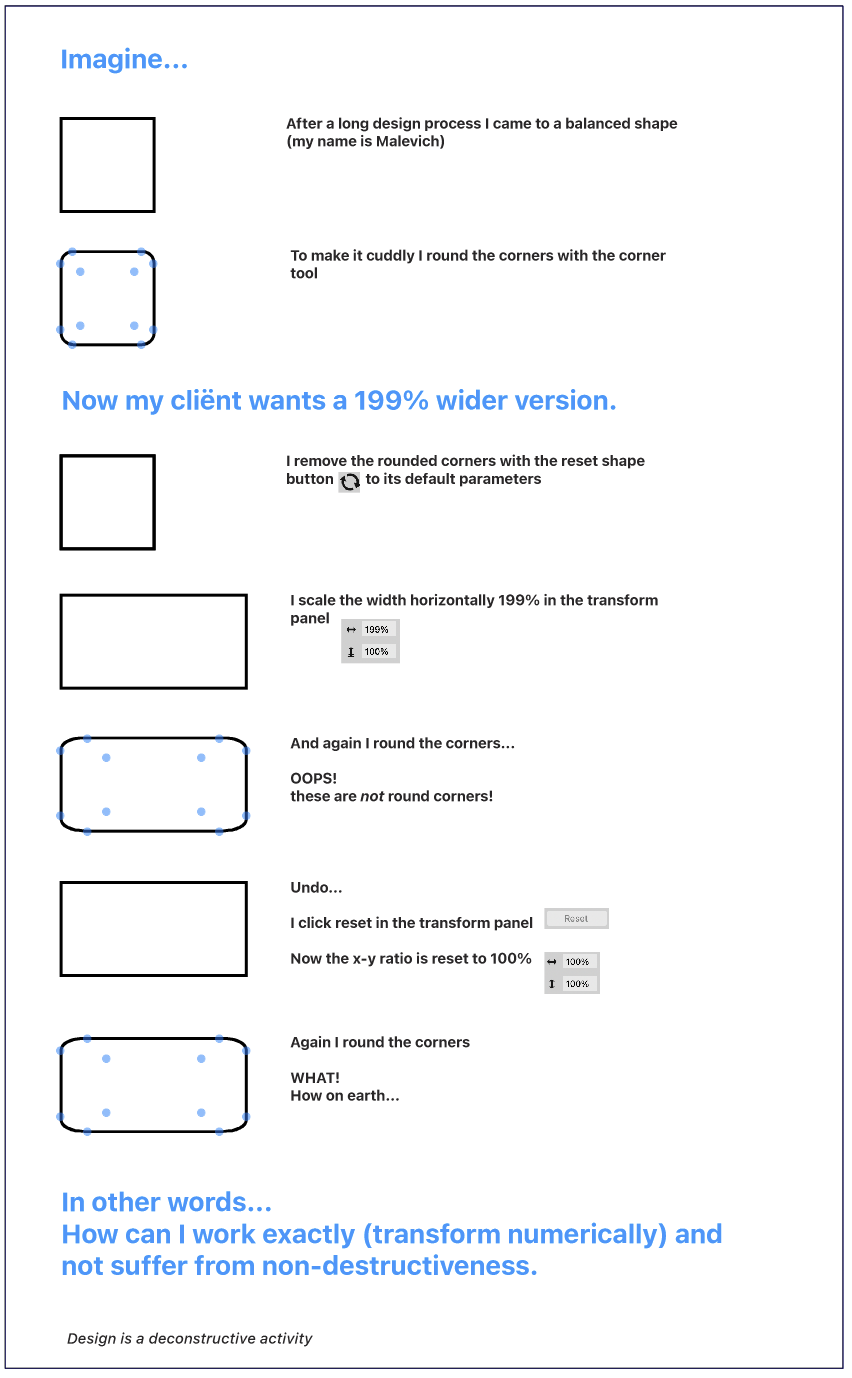
                Is there, or is it possible to create a global option that shows scaled/transformed objects and text after transformation the new (visible) specifications?

                Another example I've come across that may illustrate my problem well ...
                0_1742504910500_37c698c6-eae8-44c0-9b97-80557bb49c34-image.png

                VectorStylerV 1 Reply Last reply Reply Quote 1
                • VectorStylerV Offline
                  VectorStyler @Ayo
                  last edited by

                  @Ayo In this case, you need to convert to curves first.
                  I can try to find a solution for rounding of scaled objects, but it will not work well for other than rectangular shapes.

                  S 1 Reply Last reply Reply Quote 0
                  • S Offline
                    Subpath @VectorStyler
                    last edited by

                    @VectorStyler

                    Whats curious to me if i do that transformation
                    with "Object > Transform > Transform" the Corner
                    stay round

                    Here a Video

                    Win 11
                    CPU: AMD Ryzen 5 9600X, 6-core.
                    GPU: Nvidia Geforce RTX 5070.

                    AyoA VectorStylerV 2 Replies Last reply Reply Quote 1
                    • AyoA Offline
                      Ayo @Subpath
                      last edited by

                      @Subpath said in Non-destructiveness vs new (visible) reality:

                      curious

                      Indeed! Good research. Nice!

                      I like the behavior of the "Object > Transform Panel" better than the "Window > Transform Panel" It's just a pity that the "Window > Transform Panel" doesn't work as a side panel and is not dockable.

                      What is the difference according to the developer and aren't the two panels confusing?

                      S 1 Reply Last reply Reply Quote 0
                      • VectorStylerV Offline
                        VectorStyler @Subpath
                        last edited by

                        @Subpath In some cases, when the parametric shape attributes can be changes then the corner can stay round after scaling.

                        In VS, the corner is a shape attribute and it is applied before effects or transforms.
                        This causes the corner scaling when scaling a shape (in some cases).

                        AyoA 1 Reply Last reply Reply Quote 0
                        • AyoA Offline
                          Ayo @VectorStyler
                          last edited by

                          @VectorStyler
                          "I in some cases" is quite vague if I may say so...

                          VectorStylerV 1 Reply Last reply Reply Quote 1
                          • VectorStylerV Offline
                            VectorStyler @Ayo
                            last edited by

                            @Ayo Yes, it depends if we are scaling it with the transform tool, or transform panel.
                            Also: it can be changed with a settings.

                            AyoA 1 Reply Last reply Reply Quote 0
                            • AyoA Offline
                              Ayo @VectorStyler
                              last edited by

                              @VectorStyler
                              Euh, send me on a wild goose chase

                              1 Reply Last reply Reply Quote 1
                              • S Offline
                                Subpath @Ayo
                                last edited by Subpath

                                @Ayo said in Non-destructiveness vs new (visible) reality:

                                aren't the two panels confusing

                                Not in my point of view, because the "Object > Transform > Transform"
                                Panel offers more options and the other Transform panel are
                                for more simple transformations.

                                Win 11
                                CPU: AMD Ryzen 5 9600X, 6-core.
                                GPU: Nvidia Geforce RTX 5070.

                                AyoA 1 Reply Last reply Reply Quote 0
                                • AyoA Offline
                                  Ayo @Subpath
                                  last edited by

                                  @Subpath
                                  I am not specifically concerned with more or less functionality, but with the difference in behavior with the same functionality.


                                  1 Reply Last reply Reply Quote 1
                                  • First post
                                    Last post