VectorStyler
    • Categories
    • Unread
    • Recent
    • Tags
    • Popular
    • Register
    • Login

    Appearance Panel>Opacity not responding to scroll wheel

    Scheduled Pinned Locked Moved Bugs in VectorStyler
    5 Posts 2 Posters 4.8k Views 2 Watching
    Loading More Posts
    • Oldest to Newest
    • Newest to Oldest
    • Most Votes
    Reply
    • Reply as topic
    Log in to reply
    This topic has been deleted. Only users with topic management privileges can see it.
    • debraspicherD Offline
      debraspicher
      last edited by

      A couple of things:

      1. When using scroll wheel over the opacity field in the appearance panel, it is not working until the field is fully activated.

      2. Also, this variant of the opacity field allows the input of decimals. Strangely enough, when going to scroll wheel over the Opacity field in the Color panel, it "rounds up" with the scroll wheel once and then ignores scroll wheel input after. Just an interesting inconsistency there.

      I uploaded video in case that last bit was confusing:

      Video (has audio): https://1drv.ms/v/s!AuWHX0h5bAoRiqgMDAbV5wvXD3JuDw?e=TvxWYg

      Windows 11 Build 26200.7171 (25H2)
      AMD Ryzen 7 9700X with Gigabyte X870E Aorus Pro Ice
      32GB RAM @ 6000MHz
      PNY NVIDIA RTX 5070 Ti 16GB; Display 1: 4K @150%; Display 2: 4K @200%
      Wacom Intuos Pro L (2025); Wacom Intuos Pro M; Epson ET-8550; Siser Romeo

      1 Reply Last reply Reply Quote 1
      • debraspicherD Offline
        debraspicher
        last edited by

        Ooh, Corner property in the Contextual Toolbar doesn't respond to the scroll wheel either. Could that also be changed? That's an important one especially as the input defaults to a scrollbar fly out...

        Windows 11 Build 26200.7171 (25H2)
        AMD Ryzen 7 9700X with Gigabyte X870E Aorus Pro Ice
        32GB RAM @ 6000MHz
        PNY NVIDIA RTX 5070 Ti 16GB; Display 1: 4K @150%; Display 2: 4K @200%
        Wacom Intuos Pro L (2025); Wacom Intuos Pro M; Epson ET-8550; Siser Romeo

        VectorStylerV 1 Reply Last reply Reply Quote 0
        • VectorStylerV Offline
          VectorStyler @debraspicher
          last edited by

          @debraspicher said in Appearance Panel>Opacity not responding to scroll wheel:

          Corner property in the Contextual Toolbar doesn't respond to the scroll wheel either. Could

          All scroll wheel use in the contextual panel is disabled, to avoid modifying these inadvertently (has been requested long ago).

          I will check the other things.

          debraspicherD 1 Reply Last reply Reply Quote 1
          • debraspicherD Offline
            debraspicher @VectorStyler
            last edited by debraspicher

            @VectorStyler Yeah definitely I'm accustomed to the latter where I can easily move things around in the top area as-needed. I can see why some people may want that turned off as a default, though.

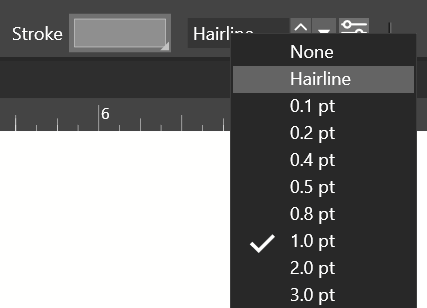
            May I suggest to move the slider so that when it is popped out, the knob/slider portion is just below the mouse cursor (provided there is space). That might be a decent enough compromise that increases usability of those knobs. VS already does something like this with other controls in that area such as the dropdowns:

            Affinity:
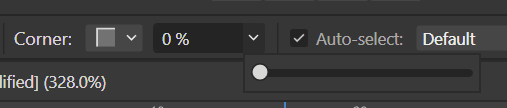
            0_1733295911801_febc6b6d-c880-4912-adb0-c6ac2e35e349-image.png

            VS: 0_1733295935571_467df9c4-fb50-4c45-ab7d-fe5787a3a9a5-image.png

            Stroke dropdown:
            0_1733296075404_5a3ceb1f-3599-4dae-9e59-1873bb55e3c4-image.png

            Edit: The slider bar is on the long side, but I can see why with the level of precision available there (and that has been a good thing in my experience when working in inches)... another observation as for what slows things down is when using the slider, it's very precise... but because I can't use scroll wheel at all, it's very difficult to work in increments. It almost always requires I use direct input. So I think that's the reason it feels like that function would feel missing.

            Windows 11 Build 26200.7171 (25H2)
            AMD Ryzen 7 9700X with Gigabyte X870E Aorus Pro Ice
            32GB RAM @ 6000MHz
            PNY NVIDIA RTX 5070 Ti 16GB; Display 1: 4K @150%; Display 2: 4K @200%
            Wacom Intuos Pro L (2025); Wacom Intuos Pro M; Epson ET-8550; Siser Romeo

            VectorStylerV 1 Reply Last reply Reply Quote 1
            • VectorStylerV Offline
              VectorStyler @debraspicher
              last edited by

              @debraspicher said in Appearance Panel>Opacity not responding to scroll wheel:

              May I suggest to move the slider so that when it is popped out, the knob/slider portion is just below the mouse cursor (provided there is space).

              I will try to add this.

              1 Reply Last reply Reply Quote 1
              • First post
                Last post