VectorStyler
    • Categories
    • Unread
    • Recent
    • Tags
    • Popular
    • Register
    • Login

    Odd Menu Jitter...

    Scheduled Pinned Locked Moved Bugs in VectorStyler
    6 Posts 2 Posters 6.9k Views 2 Watching
    Loading More Posts
    • Oldest to Newest
    • Newest to Oldest
    • Most Votes
    Reply
    • Reply as topic
    Log in to reply
    This topic has been deleted. Only users with topic management privileges can see it.
    • debraspicherD Offline
      debraspicher
      last edited by

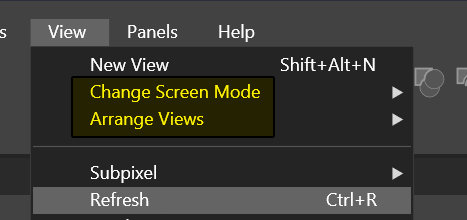
      This is the third time this has happened, always in the same spot in the View menu and usually when scrolling up the same two items. The cursor "hangs" and flips back and forth between two menus vigorously and then releases back to the user.

      This is the spot it always occurs and it is when moving cursors upwards through the items, it hangs once it gets to "Change Screen Mode" it seems like:
      0_1715655511865_menu-screen.jpg

      Video of the behavior (with annotations): https://1drv.ms/v/s!AuWHX0h5bAoRifsBIRzNqsAaWCrsaw?e=tVqXB6

      I annotated the behavior of the cursor in the video right before the cursor hang, just in case it is related somehow.

      Windows 11 Build 26200.7171 (25H2)
      AMD Ryzen 7 9700X with Gigabyte X870E Aorus Pro Ice
      32GB RAM @ 6000MHz
      PNY NVIDIA RTX 5070 Ti 16GB; Display 1: 4K @150%; Display 2: 4K @200%
      Wacom Intuos Pro L (2025); Wacom Intuos Pro M; Epson ET-8550; Siser Romeo

      VectorStylerV 1 Reply Last reply Reply Quote 1
      • VectorStylerV Offline
        VectorStyler @debraspicher
        last edited by

        @debraspicher I opened a bug on this and will try to fix it ASAP.

        debraspicherD 1 Reply Last reply Reply Quote 1
        • debraspicherD Offline
          debraspicher @VectorStyler
          last edited by

          @VectorStyler Thank you. It doesn't happen very often at all. I didn't know if it would be easy to reproduce, if at all.

          Windows 11 Build 26200.7171 (25H2)
          AMD Ryzen 7 9700X with Gigabyte X870E Aorus Pro Ice
          32GB RAM @ 6000MHz
          PNY NVIDIA RTX 5070 Ti 16GB; Display 1: 4K @150%; Display 2: 4K @200%
          Wacom Intuos Pro L (2025); Wacom Intuos Pro M; Epson ET-8550; Siser Romeo

          1 Reply Last reply Reply Quote 1
          • debraspicherD Offline
            debraspicher
            last edited by

            Menu jitter is back and it's much more common now. It's widespread in most menus (even panel menus) and happens in a randomized manner. It's now possible to "hang out" in-between menus and it allows for a flipping back and forth of items to remain... it's hard to record it on screen because of the way mouse activity is picked up in OBS so I recorded with a camera... it's still trying to smooth out the jitteriness, but you get the idea: https://1drv.ms/v/s!AuWHX0h5bAoRiqFU4geG-P_HSiCwhw?e=lI1MzZ

            This happens everywhere occasionally once going through menus, sometimes multiple times... once those options are "run over", it doesn't seem to occur anymore until closing and remaining idle from that menu for a bit.

            It's not problematic for using the program because if I passover an item, everything is usable. It's only when I pause in finely defined specific areas, and then leave the cursor there, that it will behave this way.

            Windows 11 Build 26200.7171 (25H2)
            AMD Ryzen 7 9700X with Gigabyte X870E Aorus Pro Ice
            32GB RAM @ 6000MHz
            PNY NVIDIA RTX 5070 Ti 16GB; Display 1: 4K @150%; Display 2: 4K @200%
            Wacom Intuos Pro L (2025); Wacom Intuos Pro M; Epson ET-8550; Siser Romeo

            VectorStylerV 1 Reply Last reply Reply Quote 1
            • VectorStylerV Offline
              VectorStyler @debraspicher
              last edited by

              @debraspicher Yes, this might be a regression caused by "deselecting" when hovering over inactive (our outside of) menus.

              I will reopen this issue and will try to improve it.

              debraspicherD 1 Reply Last reply Reply Quote 1
              • debraspicherD Offline
                debraspicher @VectorStyler
                last edited by

                @VectorStyler I think that is when I started observing it, also. Sorry, it gets busy so I can't always make the needed report. Usually it is easier on the spot but kept in mind if I can't get to it yet.


                Windows 11 Build 26200.7171 (25H2)
                AMD Ryzen 7 9700X with Gigabyte X870E Aorus Pro Ice
                32GB RAM @ 6000MHz
                PNY NVIDIA RTX 5070 Ti 16GB; Display 1: 4K @150%; Display 2: 4K @200%
                Wacom Intuos Pro L (2025); Wacom Intuos Pro M; Epson ET-8550; Siser Romeo

                1 Reply Last reply Reply Quote 1
                • First post
                  Last post