VectorStyler
    • Categories
    • Unread
    • Recent
    • Tags
    • Popular
    • Register
    • Login

    Issue with the interface

    Scheduled Pinned Locked Moved Resolved 1.2 bugs
    30 Posts 4 Posters 48.1k Views 3 Watching
    Loading More Posts
    • Oldest to Newest
    • Newest to Oldest
    • Most Votes
    Reply
    • Reply as topic
    Log in to reply
    This topic has been deleted. Only users with topic management privileges can see it.
    • B Offline
      B-Vs-V
      last edited by B-Vs-V

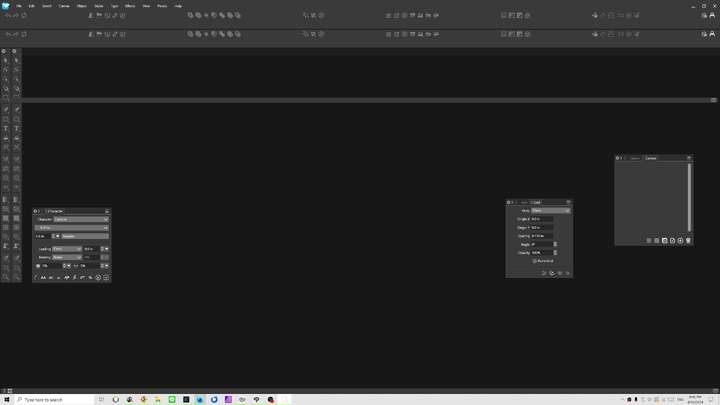
      I know that without being able to reproduce it, it won't be very useful to mention it, but I lost my interface again when I reopened VS. I'd already had this problem with version 1.1: no toolbar and almost no panels.

      W11 Pro 25H2 - 12th Gen Intel(R) i7-12700K 3.61 GHz - RAM 64 Go - NVIDIA GF GTX 4070 Ti - Intuos - Dell UP3216Q / Eizo ColorEdge
      W11 Pro 25H2 - 12th Gen Intel(R) i7-12700KF 3.60 GHz -RAM 64 Go - NVIDIA GF GTX 3080 - IntuosPro- ProArt PA329C

      VectorStylerV BoldlineB 2 Replies Last reply Reply Quote 0
      • VectorStylerV Offline
        VectorStyler @B-Vs-V
        last edited by

        @Pat Did it reset to defaults? or is it not showing?

        The user data folder (Help -> Workspace Folder) contains the files where all the UI state is stored.
        If there are problems you could remove these and try launching again.

        B 2 Replies Last reply Reply Quote 0
        • B Offline
          B-Vs-V @VectorStyler
          last edited by

          @VectorStyler Not showing.

          W11 Pro 25H2 - 12th Gen Intel(R) i7-12700K 3.61 GHz - RAM 64 Go - NVIDIA GF GTX 4070 Ti - Intuos - Dell UP3216Q / Eizo ColorEdge
          W11 Pro 25H2 - 12th Gen Intel(R) i7-12700KF 3.60 GHz -RAM 64 Go - NVIDIA GF GTX 3080 - IntuosPro- ProArt PA329C

          VectorStylerV 1 Reply Last reply Reply Quote 0
          • VectorStylerV Offline
            VectorStyler @B-Vs-V
            last edited by

            @Pat Find the folder: c:\Users<user name>\AppData\Local\NumericPath\VectorStyler1.2\vector\
            Back up the data folder (also contains presets) and the remove it.

            B 1 Reply Last reply Reply Quote 0
            • B Offline
              B-Vs-V @VectorStyler
              last edited by

              @VectorStyler Since these UI issues appeared, I save some worskpaces and simply reinstall one. For now, the interface remains stable, thanks ☺

              W11 Pro 25H2 - 12th Gen Intel(R) i7-12700K 3.61 GHz - RAM 64 Go - NVIDIA GF GTX 4070 Ti - Intuos - Dell UP3216Q / Eizo ColorEdge
              W11 Pro 25H2 - 12th Gen Intel(R) i7-12700KF 3.60 GHz -RAM 64 Go - NVIDIA GF GTX 3080 - IntuosPro- ProArt PA329C

              1 Reply Last reply Reply Quote 1
              • BoldlineB Online
                Boldline @B-Vs-V
                last edited by

                @Pat said in Isue with the interface:

                I know that without being able to reproduce it, it won't be very useful to mention it, but I lost my interface again when I reopened VS. I'd already had this problem with version 1.1: no toolbar and almost no panels.

                I had this exact issue happen to me yesterday on my M1 mac mini. I was using the eyedropper tool and after some use, the cursor icon disappeared and the eyedropper task itself was not functioning properly. trying to switch tools and rotating with the transform tool also did not show the cursor icon at all. I saved my file and quit VS and when it reopened, I was missing toolbars and my workspace and settings files were no longer installed, nor were they options to switch to like before. The toolbar, contextual menu and iconized menu on the right side were all gone and each had to be turned back on manually.

                🍎 macOS Sequoia 15.3, Mac mini (M1, 2020), Chip Apple M1, Memory 16 GB
                Cintiq 27QHD Display and LG Ultra HD Display

                VectorStylerV 1 Reply Last reply Reply Quote 1
                • VectorStylerV Offline
                  VectorStyler @Boldline
                  last edited by

                  @Boldline When this happens, send me all the workspace files.

                  1 Reply Last reply Reply Quote 0
                  • debraspicherD Offline
                    debraspicher
                    last edited by debraspicher

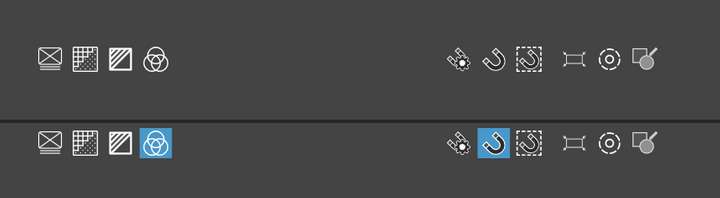
                    I have the opposite problem. My interface elements have doubled. 😆

                    0_1712973441164_vlcsnap-2024-04-12-20h57m10s045.png

                    Fun fact: The toggle UI feedback only works on some of the UI elements when this happens.
                    0_1712973521088_eea51080-5235-4a35-9dd5-69f9ca6a67a6-image.png

                    I linked a video and if you notice it loads in the center of the screen and then that splash screen scales down UI wise. So it may be "redoing" the layout without cleaning up and thus creating duplicates. Maybe? Loading the "Default" workspace still ends up with doubles.

                    Video of behavior:
                    https://1drv.ms/v/s!AuWHX0h5bAoRifU9f2cCi_uxRcEijA?e=yzAUzQ

                    Workspace files:
                    0_1712973896996_workspace-files.zip

                    I deleted the contents of the folder with VS closed and reopened. Seems fine now.

                    Windows 11 Build 26200.7171 (25H2)
                    AMD Ryzen 7 9700X with Gigabyte X870E Aorus Pro Ice
                    32GB RAM @ 6000MHz
                    PNY NVIDIA RTX 5070 Ti 16GB; Display 1: 4K @150%; Display 2: 4K @200%
                    Wacom Intuos Pro L (2025); Wacom Intuos Pro M; Epson ET-8550; Siser Romeo

                    VectorStylerV 1 Reply Last reply Reply Quote 1
                    • VectorStylerV Offline
                      VectorStyler @debraspicher
                      last edited by

                      @debraspicher I try to find out what caused this. Was there a workspace loading / resetting when the docked panels doubled?

                      debraspicherD 1 Reply Last reply Reply Quote 1
                      • debraspicherD Offline
                        debraspicher @VectorStyler
                        last edited by debraspicher

                        @VectorStyler I wish I could be of more help. They opened with the program panels doubled. If you have any suggestions how to debug or where to begin monitoring, then I could keep an eye on it for when it happens again.

                        Windows 11 Build 26200.7171 (25H2)
                        AMD Ryzen 7 9700X with Gigabyte X870E Aorus Pro Ice
                        32GB RAM @ 6000MHz
                        PNY NVIDIA RTX 5070 Ti 16GB; Display 1: 4K @150%; Display 2: 4K @200%
                        Wacom Intuos Pro L (2025); Wacom Intuos Pro M; Epson ET-8550; Siser Romeo

                        1 Reply Last reply Reply Quote 1
                        • B Offline
                          B-Vs-V @VectorStyler
                          last edited by

                          @VectorStyler said in Isue with the interface:

                          @Pat Did it reset to defaults? or is it not showing?

                          The user data folder (Help -> Workspace Folder) contains the files where all the UI state is stored.
                          If there are problems you could remove these and try launching again.

                          @VectorStyler this is a recurrent issue. I've tried restoring the default VS workspace but to no avail. Fortunately, the workspace I had saved is still functional ☺

                          W11 Pro 25H2 - 12th Gen Intel(R) i7-12700K 3.61 GHz - RAM 64 Go - NVIDIA GF GTX 4070 Ti - Intuos - Dell UP3216Q / Eizo ColorEdge
                          W11 Pro 25H2 - 12th Gen Intel(R) i7-12700KF 3.60 GHz -RAM 64 Go - NVIDIA GF GTX 3080 - IntuosPro- ProArt PA329C

                          VectorStylerV 1 Reply Last reply Reply Quote 1
                          • VectorStylerV Offline
                            VectorStyler @B-Vs-V
                            last edited by

                            @Pat said in Isue with the interface:

                            I've tried restoring the default VS workspace but to no avail

                            I tried to replicate this here, but soft far here it has been working.

                            Send me those workspace files (including the settings), and I will try with those.

                            B 2 Replies Last reply Reply Quote 0
                            • B Offline
                              B-Vs-V @VectorStyler
                              last edited by

                              @VectorStyler Files sent ☺ Thanks.

                              W11 Pro 25H2 - 12th Gen Intel(R) i7-12700K 3.61 GHz - RAM 64 Go - NVIDIA GF GTX 4070 Ti - Intuos - Dell UP3216Q / Eizo ColorEdge
                              W11 Pro 25H2 - 12th Gen Intel(R) i7-12700KF 3.60 GHz -RAM 64 Go - NVIDIA GF GTX 3080 - IntuosPro- ProArt PA329C

                              1 Reply Last reply Reply Quote 0
                              • B Offline
                                B-Vs-V @VectorStyler
                                last edited by B-Vs-V

                                @VectorStyler I forgot to mention that I saved workspaces in a directory on my DD which is in fact synchronized on an external server managed by my Institution. I don't know whether this has any impact?

                                W11 Pro 25H2 - 12th Gen Intel(R) i7-12700K 3.61 GHz - RAM 64 Go - NVIDIA GF GTX 4070 Ti - Intuos - Dell UP3216Q / Eizo ColorEdge
                                W11 Pro 25H2 - 12th Gen Intel(R) i7-12700KF 3.60 GHz -RAM 64 Go - NVIDIA GF GTX 3080 - IntuosPro- ProArt PA329C

                                VectorStylerV 1 Reply Last reply Reply Quote 1
                                • VectorStylerV Offline
                                  VectorStyler @B-Vs-V
                                  last edited by

                                  @Pat said in Isue with the interface:

                                  I don't know whether this has any impact?

                                  Should not have any impact.

                                  1 Reply Last reply Reply Quote 0
                                  • debraspicherD Offline
                                    debraspicher
                                    last edited by debraspicher

                                    I haven't figured out a trigger for this, but I've been trying. Occasionally I will go back to VS and the UI will be in this state.

                                    Video link below... (LOUD music warning: I'm sorry in advance for the music, I forgot my headphones were toggled in OBS):
                                    https://1drv.ms/v/s!AuWHX0h5bAoRifY14BXgOVp8BGU-Pg?e=T61kp9

                                    Restoring using View>Workspaces>"Default Workspace" gets us back in business, so it's not like the defect from before where I had to clean out the WS folder. But perhaps that was a result of me closing the program after the issue occurs? (I'll try again later...)

                                    This has happened twice so far and these UI issues always occur when I go back into VS after a break while it was running in the background. I lock my PC at night so my monitors will shut off and leave it running overnight, so maybe something awful occurs when my displays wake back up. Perhaps if I stop leaving it up when my displays go idle it will stop occurring?...

                                    Windows 11 Build 26200.7171 (25H2)
                                    AMD Ryzen 7 9700X with Gigabyte X870E Aorus Pro Ice
                                    32GB RAM @ 6000MHz
                                    PNY NVIDIA RTX 5070 Ti 16GB; Display 1: 4K @150%; Display 2: 4K @200%
                                    Wacom Intuos Pro L (2025); Wacom Intuos Pro M; Epson ET-8550; Siser Romeo

                                    1 Reply Last reply Reply Quote 0
                                    • debraspicherD Offline
                                      debraspicher
                                      last edited by

                                      I can confirm when VS is closed with a "corrupt" interface without reloading the Default, it apparently saves itself as the new default. I followed @Pat's solution and had a WS saved in case which I used to get back the original state. Video: https://1drv.ms/v/s!AuWHX0h5bAoRifY4lt8pfV_Rsi3QjQ?e=WFdylB

                                      Once again, this issue appeared again when I left the PC on idle (monitors off).

                                      Windows 11 Build 26200.7171 (25H2)
                                      AMD Ryzen 7 9700X with Gigabyte X870E Aorus Pro Ice
                                      32GB RAM @ 6000MHz
                                      PNY NVIDIA RTX 5070 Ti 16GB; Display 1: 4K @150%; Display 2: 4K @200%
                                      Wacom Intuos Pro L (2025); Wacom Intuos Pro M; Epson ET-8550; Siser Romeo

                                      VectorStylerV 1 Reply Last reply Reply Quote 1
                                      • VectorStylerV Offline
                                        VectorStyler @debraspicher
                                        last edited by

                                        @debraspicher said in Issue with the interface:

                                        this issue appeared again when I left the PC on idle

                                        Can you save a workspace when VS is in this broken state, and send me the workspace file? I would like to replicate this.

                                        Also: the detached context panel is not really a bug (it can be detached by dragging).
                                        But the document tap showing at the bottom is a bug.

                                        B 1 Reply Last reply Reply Quote 1
                                        • B Offline
                                          B-Vs-V
                                          last edited by

                                          Over and over again... This time, VS didn't like me testing the Shape builder tool on a previously edited object. VS got "tangled" and I ended up with the same minimal interface. I downloaded a saved WS and had to redo it after closing and reopening the software. Again, the problem is to reproduce this issue. I hadn't thought of saving my last WS, better to do it.

                                          W11 Pro 25H2 - 12th Gen Intel(R) i7-12700K 3.61 GHz - RAM 64 Go - NVIDIA GF GTX 4070 Ti - Intuos - Dell UP3216Q / Eizo ColorEdge
                                          W11 Pro 25H2 - 12th Gen Intel(R) i7-12700KF 3.60 GHz -RAM 64 Go - NVIDIA GF GTX 3080 - IntuosPro- ProArt PA329C

                                          1 Reply Last reply Reply Quote 2
                                          • B Offline
                                            B-Vs-V @VectorStyler
                                            last edited by

                                            @VectorStyler Still happening in 1.2.049 ☹

                                            W11 Pro 25H2 - 12th Gen Intel(R) i7-12700K 3.61 GHz - RAM 64 Go - NVIDIA GF GTX 4070 Ti - Intuos - Dell UP3216Q / Eizo ColorEdge
                                            W11 Pro 25H2 - 12th Gen Intel(R) i7-12700KF 3.60 GHz -RAM 64 Go - NVIDIA GF GTX 3080 - IntuosPro- ProArt PA329C

                                            VectorStylerV 1 Reply Last reply Reply Quote 1
                                            • First post
                                              Last post