VectorStyler
    • Categories
    • Unread
    • Recent
    • Tags
    • Popular
    • Users
    • Groups
    • Admin
    • Register
    • Login

    beta 1.2.010

    Scheduled Pinned Locked Moved VectorStyler 1.2 beta
    17 Posts 0 Posters 15.2k Views 6 Watching
    Loading More Posts
    • Oldest to Newest
    • Newest to Oldest
    • Most Votes
    Reply
    • Reply as topic
    Log in to reply
    This topic has been deleted. Only users with topic management privileges can see it.
    • V Offline
      vectoradmin
      last edited by

      VectorStyler 1.2.010 release notes

      • Changed the transform tool mode into separate tools.
      • Reorganized the Select menu.
      • Trace multiple images in one step
      • Show all hidden panels when activating preset or style panels.
      • Show separators in color swatches.
      • General stability improvements.
      • Scatter brush to allow zero width profile nodes.
      • Improved paragraph style synchronization.
      • Improved elastic warp effect with larger density.
      • Exporting text frame with text overflow to PDF should not clip it.
      • Cloned objects should export correctly to PDF.
      • Better handling of repeated clone references.
      • Copy layer names also when copying between documents.
      • Allow preset removal in the image trace panel.
      • Fixed a bug in using corner shapes in repeated objects.
      • Store all artboard and layer options correctly.
      • Fixed a mouse hovering issue on small scroll knobs.
      • Allow zero decimal width.
      • Show current DPI of the selected image.
      • Allow insertion of glyphs that have no character codes.
      • Do not scroll the angle field in the canvas and artboards panel.
      • Improved zigzag effect tool.
      • Layers panel should update correctly between canvases.
      • Do not show cursor image when cross-hair cursor is selected.
      • Store the font name instead of the file name for fonts added in the internal font manager.
      • Object style should update correctly if original style definition changes.
      • Joining nodes in union operation should have the correct node type.
      • Pasting objects into the same document should position them correctly.
      • Import JPEG file with WebP encoding.
      b77B S 2 Replies Last reply Reply Quote 8
      • b77B Offline
        b77 @vectoradmin
        last edited by

        Show current DPI of the selected image.

        Awesome, thanks!

        MacBook Pro (Intel) running Monterey 12.6.4

        1 Reply Last reply Reply Quote 0
        • S Offline
          Subpath @vectoradmin
          last edited by

          @VectorStyler

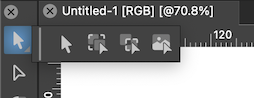
          miss the Transform Mode Tools
          where are they now ?

          0_1706362025154_Transform Mode tools.jpg

          Win 11
          CPU: AMD Ryzen 5 9600X, 6-core.
          GPU: Nvidia Geforce RTX 5070.

          BoldlineB 1 Reply Last reply Reply Quote 1
          • BoldlineB Offline
            Boldline @Subpath
            last edited by

            @Subpath said in beta 1.2.010:

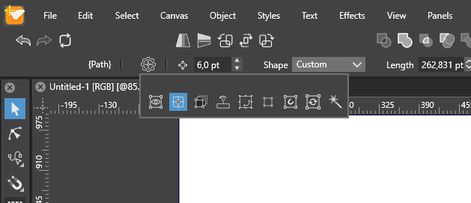
            where are they now ?

            Yes I had also just noticed they were missing

            0_1706362586441_efb3c4ee-61c5-45ae-b4ba-c24a31e7cafa-CleanShot 2024-01-27 at 08.33.02.png

            🍎 macOS Sequoia 15.3, Mac mini (M1, 2020), Chip Apple M1, Memory 16 GB
            Cintiq 27QHD Display and LG Ultra HD Display

            b77B 1 Reply Last reply Reply Quote 0
            • b77B Offline
              b77 @Boldline
              last edited by

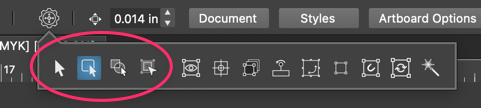
              They are here:

              0_1706362958504_Screenshot 2024-01-27 at 15.41.36.png

              MacBook Pro (Intel) running Monterey 12.6.4

              BoldlineB S 2 Replies Last reply Reply Quote 2
              • BoldlineB Offline
                Boldline @b77
                last edited by Boldline

                @b77 I had checked there but my update is missing the extend out option for the transform tool and when I click there to activate it, nothing happens
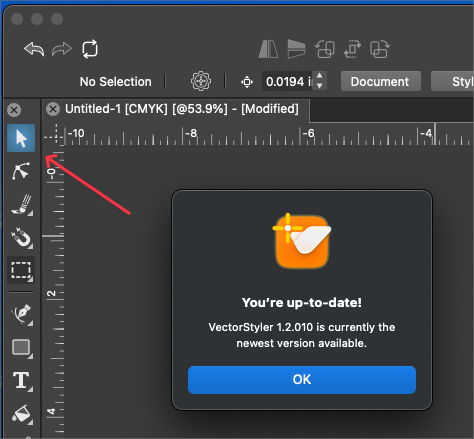
                0_1706363542820_cd8886ea-dc16-477c-a9ed-f448d1f973d1-BLD 2024-01-27 at 08.51.15.png

                🍎 macOS Sequoia 15.3, Mac mini (M1, 2020), Chip Apple M1, Memory 16 GB
                Cintiq 27QHD Display and LG Ultra HD Display

                1 Reply Last reply Reply Quote 0
                • BoldlineB Offline
                  Boldline
                  last edited by Boldline

                  @VectorStyler I like the way you have separated them into tools and then variables of those tools. This looks like it will work well and provide more clarity on what are tools and what are added function variables for the transform tools

                  UPDATE: Having used the new setup for a few days, I already love the way it's arranged compared to before. Having the main transform tools renamed and accessible in the transform panel makes sense and causes less confusion. The secondary options being located in the context bar helps differentiate their role compared to the main three. Great solution!

                  🍎 macOS Sequoia 15.3, Mac mini (M1, 2020), Chip Apple M1, Memory 16 GB
                  Cintiq 27QHD Display and LG Ultra HD Display

                  1 Reply Last reply Reply Quote 0
                  • S Offline
                    Subpath @b77
                    last edited by Subpath

                    @b77, @VectorStyler

                    thanks
                    but sorry, nothing there i tried that already before
                    works maybe Mac only ?

                    do they need to be activated in the Prefs ?

                    see Video

                    Win 11
                    CPU: AMD Ryzen 5 9600X, 6-core.
                    GPU: Nvidia Geforce RTX 5070.

                    V 1 Reply Last reply Reply Quote 0
                    • V Offline
                      vectoradmin @Subpath
                      last edited by

                      @Subpath If the toolbox was customized, then these tools will not show up. You need to reset to default.

                      BoldlineB S 2 Replies Last reply Reply Quote 2
                      • BoldlineB Offline
                        Boldline @vectoradmin
                        last edited by

                        @VectorStyler said in beta 1.2.010:

                        @Subpath If the toolbox was customized, then these tools will not show up. You need to reset to default.

                        This solved it for me - thanks! Love the updates and improvements. thank you

                        🍎 macOS Sequoia 15.3, Mac mini (M1, 2020), Chip Apple M1, Memory 16 GB
                        Cintiq 27QHD Display and LG Ultra HD Display

                        1 Reply Last reply Reply Quote 1
                        • S Offline
                          Subpath @vectoradmin
                          last edited by Subpath

                          @VectorStyler

                          thanks
                          My Toolbox wasnt customized

                          After selecting " Default Workspace"
                          it was fixed and everthing was there

                          Win 11
                          CPU: AMD Ryzen 5 9600X, 6-core.
                          GPU: Nvidia Geforce RTX 5070.

                          BoldlineB 1 Reply Last reply Reply Quote 1
                          • BoldlineB Offline
                            Boldline @Subpath
                            last edited by

                            @Subpath said in beta 1.2.010:

                            My Toolbox wasnt customized

                            Mine was not customized either, as far as I remember, but I did play around with some of the settings a while back and put them back. I also locked the toolbox, so I wonder if that was enough to not work with the update?
                            Resetting VS fixed the issue and then I added in my custom settings

                            🍎 macOS Sequoia 15.3, Mac mini (M1, 2020), Chip Apple M1, Memory 16 GB
                            Cintiq 27QHD Display and LG Ultra HD Display

                            S 1 Reply Last reply Reply Quote 1
                            • S Offline
                              Subpath @Boldline
                              last edited by Subpath

                              @Boldline

                              Yes, it's a bit curios, but a very minor thing.
                              I like the new Location of the Transformation mode tools.

                              Win 11
                              CPU: AMD Ryzen 5 9600X, 6-core.
                              GPU: Nvidia Geforce RTX 5070.

                              1 Reply Last reply Reply Quote 1
                              • D Offline
                                DMBrown
                                last edited by

                                This is a nice update. I appreciate that my request for zero decimal widths was incorporated. There isn't a setting for decimal widths for pixels. It would be useful if that were added. I will also put a post in the Features and Ideas category.

                                Your release notes are terrific.

                                1 Reply Last reply Reply Quote 0
                                • F Offline
                                  FastVector
                                  last edited by

                                  @VectorStyler said in beta 1.2.010:

                                  Show separators in color swatches

                                  Is it possible as a user to turn off the separators?

                                  Windows 10 | 1920x1080 | 125%

                                  AyoA BoldlineB 2 Replies Last reply Reply Quote 1
                                  • AyoA Offline
                                    Ayo @FastVector
                                    last edited by

                                    @FastVector said in beta 1.2.010:

                                    Is it possible as a user to turn off the separators?

                                    To keep it simple, keep border color the same as background. Would that help?

                                    1 Reply Last reply Reply Quote 0
                                    • BoldlineB Offline
                                      Boldline @FastVector
                                      last edited by

                                      @FastVector said in beta 1.2.010:

                                      @VectorStyler said in beta 1.2.010:

                                      Show separators in color swatches

                                      Is it possible as a user to turn off the separators?

                                      I personally preferred it without the separators as it looked cleaner and was easier view. The only time it was more of an issue was if the swatches in a section were very close in color

                                      🍎 macOS Sequoia 15.3, Mac mini (M1, 2020), Chip Apple M1, Memory 16 GB
                                      Cintiq 27QHD Display and LG Ultra HD Display

                                      1 Reply Last reply Reply Quote 2
                                      • First post
                                        Last post
                                      Powered by NodeBB.