VectorStyler
    • Categories
    • Unread
    • Recent
    • Tags
    • Popular
    • Register
    • Login

    Font color in text frame
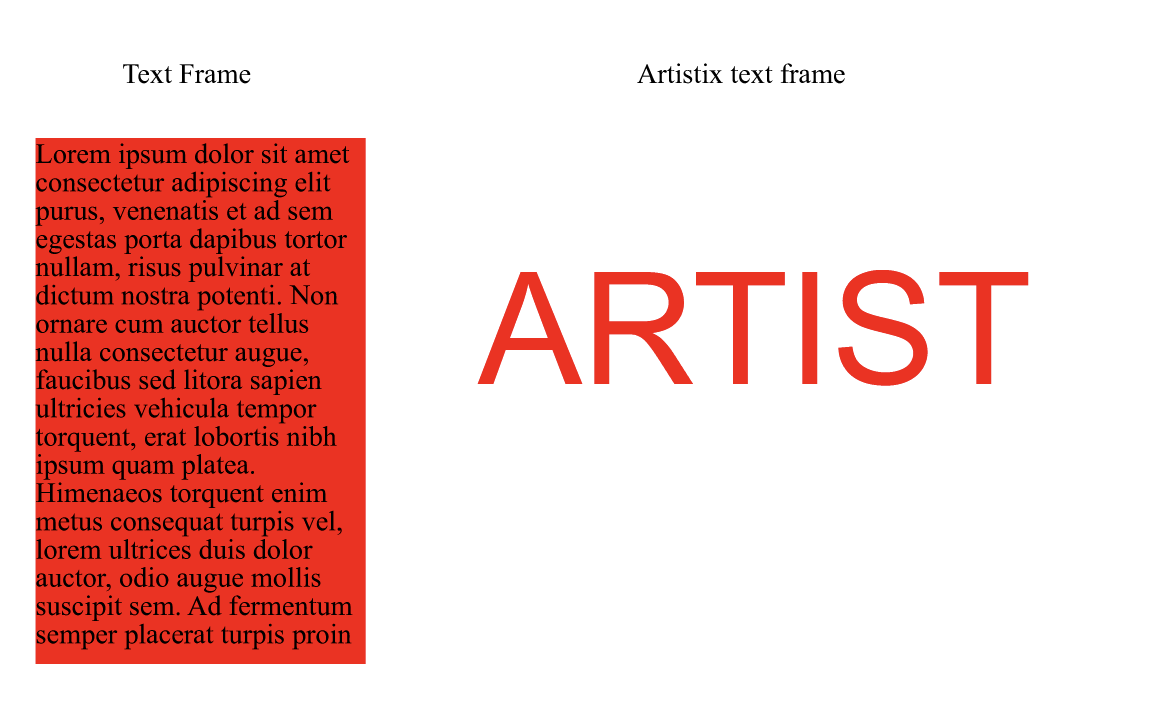
    Scheduled Pinned Locked Moved VectorStyler 1.2 beta
    14 Posts 5 Posters 12.7k Views 5 Watching
    Loading More Posts
    • Oldest to Newest
    • Newest to Oldest
    • Most Votes
    Reply
    • Reply as topic
    Log in to reply
    This topic has been deleted. Only users with topic management privileges can see it.
    • VectorStylerV Offline
      VectorStyler @b77
      last edited by

      @b77 Would this work as a global option. Change the frame color or the text color?
      And if we need background color, then just use the [+] fill in the Appearance panel.

      b77B AyoA 2 Replies Last reply Reply Quote 0
      • b77B Offline
        b77 @VectorStyler
        last edited by b77

        @VectorStyler Simple click would change the text color, left click add/change the
        stroke color just like with regular objects and with shape text ("artistic text" in CDR),
        and the 'Background Color' should be a "hardwired" setting — no need to click a
        special 'Add Frame Bkgd' button IMO.

        MacBook Pro (Intel) running Monterey 12.6.4

        K VectorStylerV 2 Replies Last reply Reply Quote 1
        • AyoA Offline
          Ayo @VectorStyler
          last edited by Ayo

          @VectorStyler said in Font color in text frame:

          Change the frame color or the text color?

          Change the text color please. It is a text object after all.

          EDIT:
          Idea; select with Node Tool > change background/frame?

          EDIT1:
          A preview Selection (text)frame and 'Hovering Sesection' would be useful in that case. Anyway, by the way.

          1 Reply Last reply Reply Quote 0
          • S Offline
            Subpath
            last edited by

            @VectorStyler

            here the Coreldraw way of doing this
            color Text is Standard even with Frame Text

            Here a Video

            Win 11
            CPU: AMD Ryzen 5 9600X, 6-core.
            GPU: Nvidia Geforce RTX 5070.

            1 Reply Last reply Reply Quote 1
            • K Offline
              Kumr @b77
              last edited by b77

              @b77 said in Font color in text frame:

              @VectorStyler Simple click would change the text color, left click add/change the
              stroke color just like with regular objects and with shape text ("artistic text" in CDR),
              and the 'Background Color' should be a "hardwired" setting — no need to click a
              special 'Add Frame Bkgd' button IMO.

              Like this approach.

              M1 MacBook Air, 16GB, macOS Sonoma 14.4.1

              1 Reply Last reply Reply Quote 0
              • VectorStylerV Offline
                VectorStyler @b77
                last edited by

                @b77 said in Font color in text frame:

                and the 'Background Color' should be a "hardwired" setting

                I will have to find a different way to do this. I will look into what other apps do in this case.

                b77B 1 Reply Last reply Reply Quote 1
                • b77B Offline
                  b77 @VectorStyler
                  last edited by

                  I will have to find a different way to do this. I will look into what other apps do in this case.

                  👍

                  (By "hardwired" I mean it has a button already there but set to 'None').

                  MacBook Pro (Intel) running Monterey 12.6.4

                  VectorStylerV 1 Reply Last reply Reply Quote 0
                  • VectorStylerV Offline
                    VectorStyler @b77
                    last edited by

                    @b77 said in Font color in text frame:

                    I mean it has a button already there but set to 'None

                    In the Appearance panel, or in the Color panel?

                    b77B 2 Replies Last reply Reply Quote 0
                    • b77B Offline
                      b77 @VectorStyler
                      last edited by b77

                      @VectorStyler A separate 'Background color' entry & color swatch when you
                      expand the 'Text Frame' object with the triangle button:
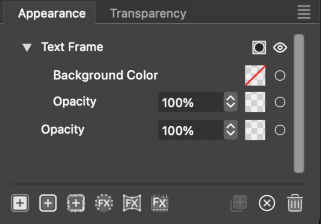
                      0_1699716965859_Screenshot 2023-11-11 at 16.36.20.png
                      (Quick mockup)

                      MacBook Pro (Intel) running Monterey 12.6.4

                      1 Reply Last reply Reply Quote 0
                      • b77B Offline
                        b77 @VectorStyler
                        last edited by b77

                        @VectorStyler OK, could be that the mockup is oversimplifying
                        things — this background color needs to be added as content
                        that can accept transparency masks, effects, etc, right?

                        MacBook Pro (Intel) running Monterey 12.6.4

                        1 Reply Last reply Reply Quote 1
                        • First post
                          Last post