VectorStyler
    • Categories
    • Unread
    • Recent
    • Tags
    • Popular
    • Register
    • Login

    Can't move combined selection
    Scheduled Pinned Locked Moved VectorStyler 1.2 beta
    24 Posts 4 Posters 41.6k Views 4 Watching
    Loading More Posts
    • Oldest to Newest
    • Newest to Oldest
    • Most Votes
    Reply
    • Reply as topic
    Log in to reply
    This topic has been deleted. Only users with topic management privileges can see it.
    • S Offline
      Subpath @Ayo
      last edited by

      @Ayo said in Can't move combined selection:

      @Subpath
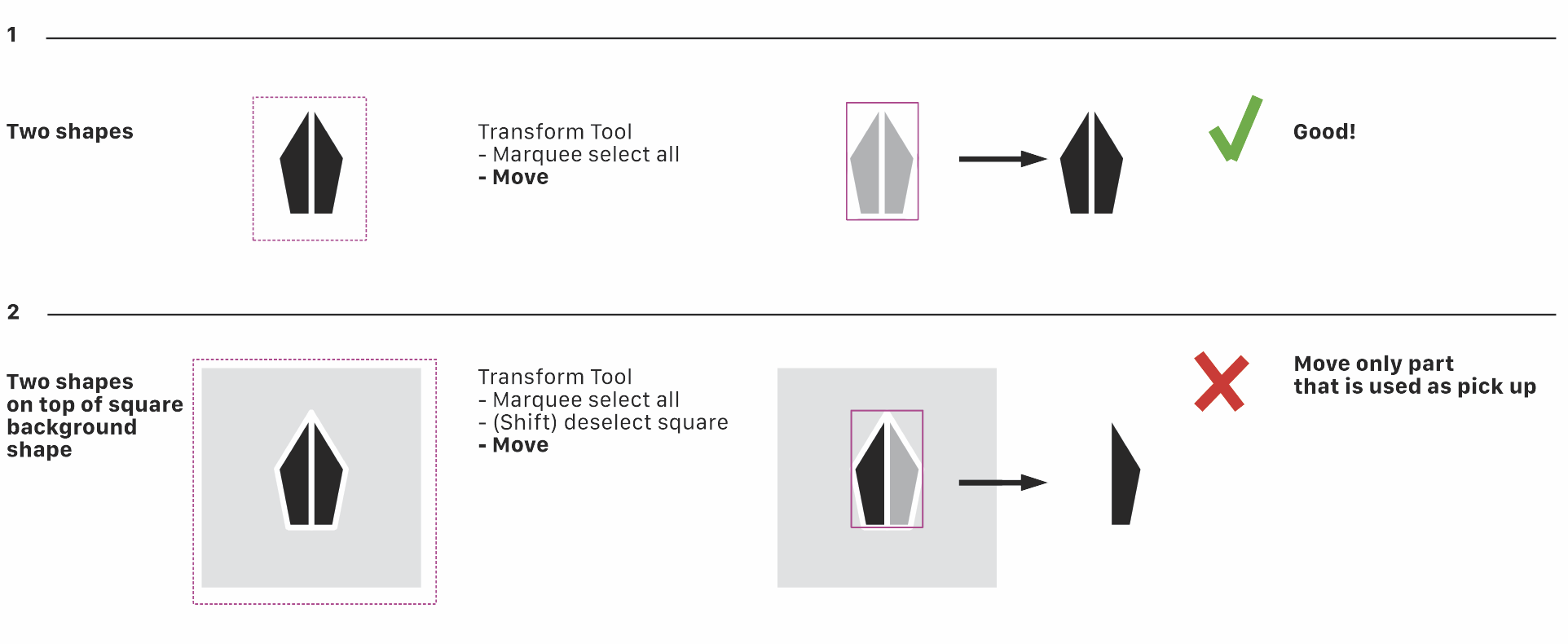
      'Combined' means nothing more than 'two objects selected' (three minus one (square)). No complicated blends or merged situations.

      combined means to me, two or more objects, combined
      via the "combine" option. Left besides the boolean options

      select two objects mean just "select" to me

      Win 11
      CPU: AMD Ryzen 5 9600X, 6-core.
      GPU: Nvidia Geforce RTX 5070.

      AyoA 1 Reply Last reply Reply Quote 0
      • b77B Offline
        b77 @Ayo
        last edited by

        @Ayo Works here without issues with the default selection modes: https://recordit.co/jVIoQdCmmp

        MacBook Pro (Intel) running Monterey 12.6.4

        AyoA 1 Reply Last reply Reply Quote 0
        • AyoA Offline
          Ayo @Subpath
          last edited by

          @Subpath Sorry!
          'Two objects selected' than

          S 1 Reply Last reply Reply Quote 1
          • AyoA Offline
            Ayo @b77
            last edited by

            @b77 Exactly what I am doing.
            Can it be a wrong setting somewhere?
            Not familiar with 'recordid' but wil try to make a recording as well.

            1 Reply Last reply Reply Quote 0
            • S Offline
              Subpath @Ayo
              last edited by

              @Ayo said in Can't move combined selection:

              @Subpath Sorry!
              'Two objects selected' than

              no problem
              i just saw in your example that your Objects had
              not the same color, which would be the case if
              you combine them
              so i though that you just mean selected, but was unshure

              Win 11
              CPU: AMD Ryzen 5 9600X, 6-core.
              GPU: Nvidia Geforce RTX 5070.

              AyoA 1 Reply Last reply Reply Quote 0
              • AyoA Offline
                Ayo @Subpath
                last edited by

                @Subpath said in Can't move combined selection:

                i just saw in your example that your Objects had
                not the same color,

                The gray is intended as the echo or imprint on the burial shroud of the moved item.

                b77B 1 Reply Last reply Reply Quote 0
                • b77B Offline
                  b77 @Ayo
                  last edited by b77

                  @Ayo Use RecordIt or some other screen recording app β€” it's much faster
                  than having to take screenshots, combining them and writing explanatory
                  text over them. πŸ‘

                  And when the file is more complex (not this case here) attach the file as well.

                  MacBook Pro (Intel) running Monterey 12.6.4

                  AyoA 1 Reply Last reply Reply Quote 0
                  • AyoA Offline
                    Ayo @b77
                    last edited by

                    @b77 said in Can't move combined selection:

                    Use RecordIt or some other screen recording app β€” it's much faster
                    than having to take screenshots, combining them and writing explanatory
                    text over them.

                    Did my best, downloaded Recordit but my recordings gives grey empty screens.
                    Again something to solve.

                    b77B 1 Reply Last reply Reply Quote 0
                    • b77B Offline
                      b77 @Ayo
                      last edited by

                      @Ayo If on Windows: Subpath had only good things to say about ScreenToGif

                      MacBook Pro (Intel) running Monterey 12.6.4

                      AyoA S 2 Replies Last reply Reply Quote 0
                      • AyoA Offline
                        Ayo @b77
                        last edited by

                        @b77 On Mac
                        Didit!
                        Had to toggle a switch in System Settings, Privacy & Security.
                        Here my first recordingπŸ˜ƒ but doesn't solve the problem: https://recordit.co/BbYZq7vnvt

                        S 1 Reply Last reply Reply Quote 1
                        • S Offline
                          Subpath @b77
                          last edited by Subpath

                          @b77 said in Can't move combined selection:

                          @Ayo If on Windows: Subpath had only good things to say about ScreenToGif

                          can only repeate my praise πŸ™‚
                          ScreenToGif ( Win only) is a very small screen recorder (only 170 kb)
                          with features you won't believe, especially at this size

                          I often use it for longer screen recordings
                          because Recordit sometimes refuses to upload

                          Then I play the recording with Screentogif and
                          use Recordit to record that. Because Recordit stores
                          the record online, which Screentogif doesn't do

                          Win 11
                          CPU: AMD Ryzen 5 9600X, 6-core.
                          GPU: Nvidia Geforce RTX 5070.

                          1 Reply Last reply Reply Quote 0
                          • S Offline
                            Subpath @Ayo
                            last edited by Subpath

                            @Ayo

                            Here my attemp, work as expected
                            Win 10, VS 1.2 Beta
                            Here the Video

                            Win 11
                            CPU: AMD Ryzen 5 9600X, 6-core.
                            GPU: Nvidia Geforce RTX 5070.

                            AyoA 1 Reply Last reply Reply Quote 0
                            • AyoA Offline
                              Ayo @Subpath
                              last edited by

                              @Subpath @b77
                              About your recordings: you both can do amazing things that I can't do.

                              Glad my classic textbook explanation still works. Advantage over Screen Recording is the exercise in VS. Working with, text, arrows etc. (For example, I notice that during my explanation the text cursor in the text boxes does not always want to appear. But that is an other issue.)

                              AyoA S 2 Replies Last reply Reply Quote 0
                              • AyoA Offline
                                Ayo @Ayo
                                last edited by

                                @b77
                                Not complex, but attach the file anyway.
                                0_1698330009516_Move2.vstyler

                                S b77B L 3 Replies Last reply Reply Quote 1
                                • S Offline
                                  Subpath @Ayo
                                  last edited by Subpath

                                  @Ayo said in Can't move combined selection:

                                  @Subpath @b77
                                  About your recordings: you both can do amazing things that I can't do.

                                  Glad my classic textbook explanation still works. Advantage over Screen Recording is the exercise in VS. Working with, text, arrows etc. (For example, I notice that during my explanation the text cursor in the text boxes does not always want to appear. But that is an other issue.)

                                  No problem, explain it with whatever you feel comfortable with

                                  When it comes to screen recording, sometimes it's just easier
                                  to figure out what someone actually does

                                  By the way, I only started screen recording when I started
                                  posting questions about VectorStyler in this forum.
                                  I never needed it before.

                                  Win 11
                                  CPU: AMD Ryzen 5 9600X, 6-core.
                                  GPU: Nvidia Geforce RTX 5070.

                                  1 Reply Last reply Reply Quote 0
                                  • S Offline
                                    Subpath @Ayo
                                    last edited by

                                    @Ayo said in Can't move combined selection:

                                    @b77
                                    Not complex, but attach the file anyway.
                                    0_1698330009516_Move2.vstyler

                                    tried it with your file
                                    everthing works as expected
                                    Here the Video

                                    Win 11
                                    CPU: AMD Ryzen 5 9600X, 6-core.
                                    GPU: Nvidia Geforce RTX 5070.

                                    1 Reply Last reply Reply Quote 0
                                    • b77B Offline
                                      b77 @Ayo
                                      last edited by b77

                                      @Ayo Moving or duplicating the two black shapes in the file works here as it should.

                                      No idea what is causing this. Maybe you're using a stylus and not a mouse or trackpad?

                                      …… . . .
                                      OK, you're on a Mac.

                                      You can try to move the two files (settings.xml and workspace.xml) somewhere else:

                                      • close VS

                                      • switch to the Finder

                                      • click the 'Go' menu > Go to Folder…

                                      • paste this: ~/Library/Application Support/NumericPath/VectorStyler1.2/vector/data/resources

                                      • press Enter/Return.

                                      • move these two files (settings.xml and workspace.xml) outside that folder.

                                      Then you can start the app again and see if the issue is solved.

                                      If it's solved, send the .xml files to the developer's email (csraba at this domain).

                                      MacBook Pro (Intel) running Monterey 12.6.4

                                      AyoA 1 Reply Last reply Reply Quote 0
                                      • L Offline
                                        Li Xiao @Ayo
                                        last edited by

                                        @Ayo Tested it and there are no issues. Try clicking on "Restore Defaults (Help\Restore Defaults)" and then test it again.

                                        1 Reply Last reply Reply Quote 1
                                        • AyoA Offline
                                          Ayo @b77
                                          last edited by

                                          @b77 Using a mouse.

                                          Followed your procedure and problem is solved Indeed!
                                          Still annoying that that happens.
                                          Will send the .xml files to the developer's email.

                                          1 Reply Last reply Reply Quote 2
                                          • First post
                                            Last post