VectorStyler
    • Categories
    • Unread
    • Recent
    • Tags
    • Popular
    • Register
    • Login

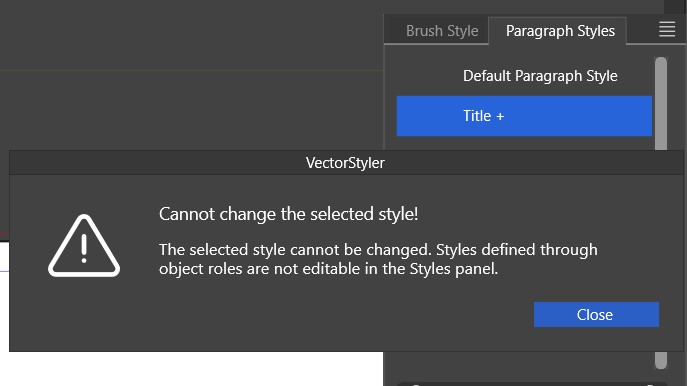
    Paragraph style - can't be changed through the panel
    Scheduled Pinned Locked Moved VectorStyler 1.2 beta
    49 Posts 2 Posters 113.0k Views 2 Watching
    Loading More Posts
    • Oldest to Newest
    • Newest to Oldest
    • Most Votes
    Reply
    • Reply as topic
    Log in to reply
    This topic has been deleted. Only users with topic management privileges can see it.
    • B Offline
      B-Vs-V @B-Vs-V
      last edited by

      Then, I changed the paragraph attributes through the Paragraph panel in order to update the paragraph style but it doesn't work.
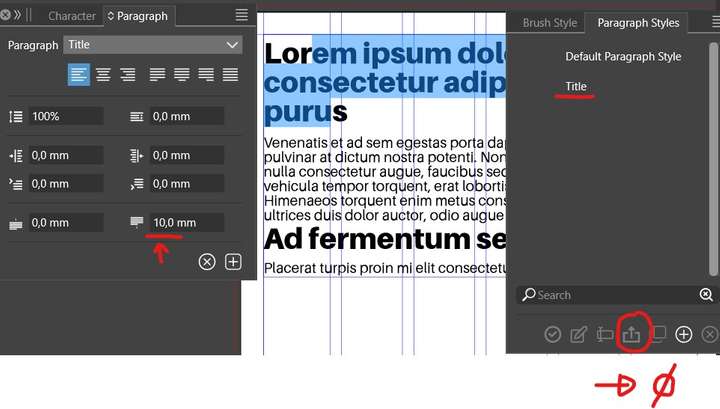
      0_1697039444305_PS.jpg

      W11 Pro 25H2 - 12th Gen Intel(R) i7-12700K 3.61 GHz - RAM 64 Go - NVIDIA GF GTX 4070 Ti - Intuos - Dell UP3216Q / Eizo ColorEdge
      W11 Pro 25H2 - 12th Gen Intel(R) i7-12700KF 3.60 GHz -RAM 64 Go - NVIDIA GF GTX 3080 - IntuosPro- ProArt PA329C

      VectorStylerV 1 Reply Last reply Reply Quote 0
      • VectorStylerV Offline
        VectorStyler @B-Vs-V
        last edited by

        @Pat This looks like a bug

        1 Reply Last reply Reply Quote 0
        • VectorStylerV Offline
          VectorStyler @B-Vs-V
          last edited by

          @Pat The two cases (editing and updated) are related, but I could not replicate this.
          Could be that the file contains some other (not paragraph) styles?
          If you could send me an example file where the paragraph styles cannot be edited and updated, I will try to replicate with that.

          Thanks

          B 3 Replies Last reply Reply Quote 0
          • B Offline
            B-Vs-V @VectorStyler
            last edited by

            @VectorStyler said in Paragraph style - can't be changed through the panel:

            @Pat The two cases (editing and updated) are related, but I could not replicate this.

            If you could send me an example file where the paragraph styles cannot be edited and updated, I will try to replicate with that.

            Thanks

            @VectorStyler I think I've already sent it to you. I'll check if I still have it.

            W11 Pro 25H2 - 12th Gen Intel(R) i7-12700K 3.61 GHz - RAM 64 Go - NVIDIA GF GTX 4070 Ti - Intuos - Dell UP3216Q / Eizo ColorEdge
            W11 Pro 25H2 - 12th Gen Intel(R) i7-12700KF 3.60 GHz -RAM 64 Go - NVIDIA GF GTX 3080 - IntuosPro- ProArt PA329C

            1 Reply Last reply Reply Quote 1
            • B Offline
              B-Vs-V @VectorStyler
              last edited by

              @VectorStyler I've sent you two files.
              I will thoroughly test the styles again with the next build ☺

              W11 Pro 25H2 - 12th Gen Intel(R) i7-12700K 3.61 GHz - RAM 64 Go - NVIDIA GF GTX 4070 Ti - Intuos - Dell UP3216Q / Eizo ColorEdge
              W11 Pro 25H2 - 12th Gen Intel(R) i7-12700KF 3.60 GHz -RAM 64 Go - NVIDIA GF GTX 3080 - IntuosPro- ProArt PA329C

              1 Reply Last reply Reply Quote 1
              • B Offline
                B-Vs-V @VectorStyler
                last edited by

                @VectorStyler no, the paragraph styles don't work, or at least I don't know how to use them in the same way as in a page layout program. I'm going to stop testing page layout and styles.

                W11 Pro 25H2 - 12th Gen Intel(R) i7-12700K 3.61 GHz - RAM 64 Go - NVIDIA GF GTX 4070 Ti - Intuos - Dell UP3216Q / Eizo ColorEdge
                W11 Pro 25H2 - 12th Gen Intel(R) i7-12700KF 3.60 GHz -RAM 64 Go - NVIDIA GF GTX 3080 - IntuosPro- ProArt PA329C

                VectorStylerV 1 Reply Last reply Reply Quote 0
                • VectorStylerV Offline
                  VectorStyler @B-Vs-V
                  last edited by

                  @Pat I will reopen this issue and will try to replicate it again.
                  I have the files you sent me previously.

                  Maybe sending the settings / workspace file might also help in replicating. Thanks!

                  B 1 Reply Last reply Reply Quote 0
                  • B Offline
                    B-Vs-V @VectorStyler
                    last edited by

                    @VectorStyler In a DP app, there's nothing more straightforward (and important) than defining paragraph styles, and if we want to make the most of VS for page layouts, it should work just the same. The settings/WSP files are new ones (I did reset VS a week or so ago).

                    W11 Pro 25H2 - 12th Gen Intel(R) i7-12700K 3.61 GHz - RAM 64 Go - NVIDIA GF GTX 4070 Ti - Intuos - Dell UP3216Q / Eizo ColorEdge
                    W11 Pro 25H2 - 12th Gen Intel(R) i7-12700KF 3.60 GHz -RAM 64 Go - NVIDIA GF GTX 3080 - IntuosPro- ProArt PA329C

                    VectorStylerV 1 Reply Last reply Reply Quote 0
                    • VectorStylerV Offline
                      VectorStyler @B-Vs-V
                      last edited by

                      @Pat said in Paragraph style - can't be changed through the panel:

                      In a DP app, there's nothing more straightforward (and important) than defining paragraph styles, and if we want to make the most of VS for page layouts, it should work just the same.

                      I agree. I will try to find the bug here and have a fix for the next build.

                      B 1 Reply Last reply Reply Quote 1
                      • B Offline
                        B-Vs-V @VectorStyler
                        last edited by

                        @VectorStyler said in Paragraph style - can't be changed through the panel:

                        @Pat said in Paragraph style - can't be changed through the panel:

                        In a DP app, there's nothing more straightforward (and important) than defining paragraph styles, and if we want to make the most of VS for page layouts, it should work just the same.

                        I agree. I will try to find the bug here and have a fix for the next build.

                        @VectorStyler for styles, the best and simplest way is to mimic exactly what is done in InDesign or Publisher (styles work well here too) in creating, applying and updating a style ☺

                        W11 Pro 25H2 - 12th Gen Intel(R) i7-12700K 3.61 GHz - RAM 64 Go - NVIDIA GF GTX 4070 Ti - Intuos - Dell UP3216Q / Eizo ColorEdge
                        W11 Pro 25H2 - 12th Gen Intel(R) i7-12700KF 3.60 GHz -RAM 64 Go - NVIDIA GF GTX 3080 - IntuosPro- ProArt PA329C

                        VectorStylerV 1 Reply Last reply Reply Quote 1
                        • VectorStylerV Offline
                          VectorStyler @B-Vs-V
                          last edited by

                          @Pat said in Paragraph style - can't be changed through the panel:

                          the best and simplest way is to mimic exactly what is done in InDesign or Publisher (styles work well here too) in creating, applying and updating a style

                          It should be similar, unless there is some bug. I will review the whole thing before the next release.

                          B 1 Reply Last reply Reply Quote 1
                          • B Offline
                            B-Vs-V @VectorStyler
                            last edited by

                            @VectorStyler said in Paragraph style - can't be changed through the panel:

                            It should be similar, unless there is some bug. I will review the whole thing before the next release.

                            @VectorStyler thank you ☺ (no need for plenty of options (to start with))

                            W11 Pro 25H2 - 12th Gen Intel(R) i7-12700K 3.61 GHz - RAM 64 Go - NVIDIA GF GTX 4070 Ti - Intuos - Dell UP3216Q / Eizo ColorEdge
                            W11 Pro 25H2 - 12th Gen Intel(R) i7-12700KF 3.60 GHz -RAM 64 Go - NVIDIA GF GTX 3080 - IntuosPro- ProArt PA329C

                            1 Reply Last reply Reply Quote 1
                            • B Offline
                              B-Vs-V
                              last edited by B-Vs-V

                              @VectorStyler no, we're not there yet.

                              1. I define a paragraph style (e.g., title)
                              2. I apply it to different paragraphs
                              3. I change the font and update the style
                              4. it's OK for the part of the text I've changed, but not for the others: the informations in the panel are not fully correct
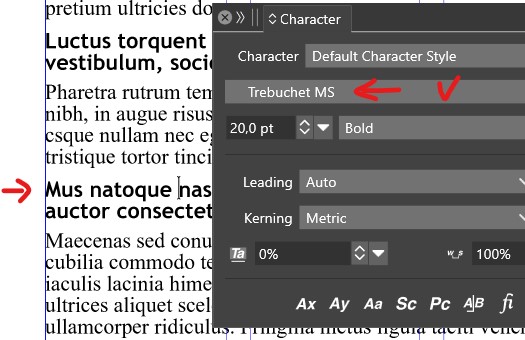
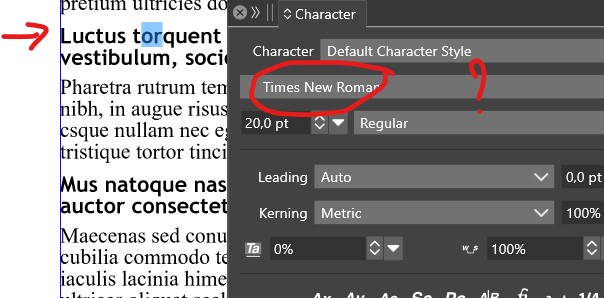
                              0_1700732464577_ps1.jpg

                              0_1700732471859_ps2.jpg

                              W11 Pro 25H2 - 12th Gen Intel(R) i7-12700K 3.61 GHz - RAM 64 Go - NVIDIA GF GTX 4070 Ti - Intuos - Dell UP3216Q / Eizo ColorEdge
                              W11 Pro 25H2 - 12th Gen Intel(R) i7-12700KF 3.60 GHz -RAM 64 Go - NVIDIA GF GTX 3080 - IntuosPro- ProArt PA329C

                              VectorStylerV 1 Reply Last reply Reply Quote 0
                              • VectorStylerV Offline
                                VectorStyler @B-Vs-V
                                last edited by

                                @Pat said in Paragraph style - can't be changed through the panel:

                                the informations in the panel are not fully correct

                                So it is basically showing incorrect attributes in the character panel.
                                I will try to replicate this. Send me the file from that screenshot.

                                B 2 Replies Last reply Reply Quote 0
                                • B Offline
                                  B-Vs-V @VectorStyler
                                  last edited by

                                  @VectorStyler Sorry, didn't save this one... I start to have too many test files ☺ but I guess you could reproduce this issue easily.

                                  W11 Pro 25H2 - 12th Gen Intel(R) i7-12700K 3.61 GHz - RAM 64 Go - NVIDIA GF GTX 4070 Ti - Intuos - Dell UP3216Q / Eizo ColorEdge
                                  W11 Pro 25H2 - 12th Gen Intel(R) i7-12700KF 3.60 GHz -RAM 64 Go - NVIDIA GF GTX 3080 - IntuosPro- ProArt PA329C

                                  1 Reply Last reply Reply Quote 1
                                  • B Offline
                                    B-Vs-V @VectorStyler
                                    last edited by

                                    @VectorStyler It seems to me that it's still not very user-friendly and buggy.
                                    To improve workflow: would it be possible to apply styles with a simple (mouse/pen) click?
                                    Updating a style after modifying the text still doesn't work.

                                    W11 Pro 25H2 - 12th Gen Intel(R) i7-12700K 3.61 GHz - RAM 64 Go - NVIDIA GF GTX 4070 Ti - Intuos - Dell UP3216Q / Eizo ColorEdge
                                    W11 Pro 25H2 - 12th Gen Intel(R) i7-12700KF 3.60 GHz -RAM 64 Go - NVIDIA GF GTX 3080 - IntuosPro- ProArt PA329C

                                    VectorStylerV 1 Reply Last reply Reply Quote 0
                                    • VectorStylerV Offline
                                      VectorStyler @B-Vs-V
                                      last edited by

                                      @Pat said in Paragraph style - can't be changed through the panel:

                                      would it be possible to apply styles with a simple (mouse/pen) click?

                                      Yes, in the panel menu -> Listing Mode, select "Edit on Double Click". Then single click will apply.

                                      Updating a style after modifying the text still doesn't work.

                                      I tried to replicate this, but the paragraph style was updated here.
                                      If you can send a file for this one, it might help replicating it. Thanks!

                                      B 1 Reply Last reply Reply Quote 0
                                      • B Offline
                                        B-Vs-V @VectorStyler
                                        last edited by

                                        @VectorStyler said in Paragraph style - can't be changed through the panel:

                                        @Pat said in Paragraph style - can't be changed through the panel:

                                        would it be possible to apply styles with a simple (mouse/pen) click?

                                        Yes, in the panel menu -> Listing Mode, select "Edit on Double Click". Then single click will apply.

                                        That's something. I'm convinced that this option isn't very useful. I don't remember how it is in InDesign but I think that styles are applied by a simple click.

                                        Updating a style after modifying the text still doesn't work.

                                        I tried to replicate this, but the paragraph style was updated here.
                                        If you can send a file for this one, it might help replicating it. Thanks!

                                        I've recorded the issue and will sent you the mp4.

                                        W11 Pro 25H2 - 12th Gen Intel(R) i7-12700K 3.61 GHz - RAM 64 Go - NVIDIA GF GTX 4070 Ti - Intuos - Dell UP3216Q / Eizo ColorEdge
                                        W11 Pro 25H2 - 12th Gen Intel(R) i7-12700KF 3.60 GHz -RAM 64 Go - NVIDIA GF GTX 3080 - IntuosPro- ProArt PA329C

                                        VectorStylerV 1 Reply Last reply Reply Quote 0
                                        • VectorStylerV Offline
                                          VectorStyler @B-Vs-V
                                          last edited by

                                          @Pat Got the recording, thanks!

                                          B 1 Reply Last reply Reply Quote 0
                                          • B Offline
                                            B-Vs-V @VectorStyler
                                            last edited by

                                            @VectorStyler I hope this helps and that what I want to show is made clear ☺

                                            W11 Pro 25H2 - 12th Gen Intel(R) i7-12700K 3.61 GHz - RAM 64 Go - NVIDIA GF GTX 4070 Ti - Intuos - Dell UP3216Q / Eizo ColorEdge
                                            W11 Pro 25H2 - 12th Gen Intel(R) i7-12700KF 3.60 GHz -RAM 64 Go - NVIDIA GF GTX 3080 - IntuosPro- ProArt PA329C

                                            VectorStylerV 1 Reply Last reply Reply Quote 1
                                            • First post
                                              Last post