VectorStyler
    • Categories
    • Unread
    • Recent
    • Tags
    • Popular
    • Register
    • Login

    Paragraph styles

    Scheduled Pinned Locked Moved VectorStyler 1.2 beta
    3 Posts 2 Posters 4.9k Views 2 Watching
    Loading More Posts
    • Oldest to Newest
    • Newest to Oldest
    • Most Votes
    Reply
    • Reply as topic
    Log in to reply
    This topic has been deleted. Only users with topic management privileges can see it.
    • B Offline
      B-Vs-V
      last edited by

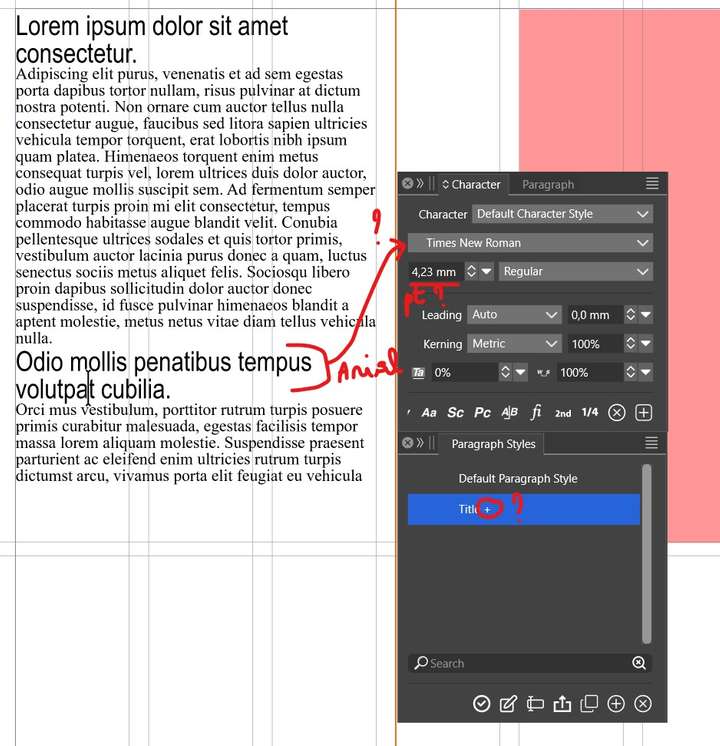
      The text in a block has a font: I select a potential title and change the font. I create a text style to make sure I always apply the same text properties.

      1. I select another part of the text and apply the style. The character panel still shows the police chosen before having applied the style - this should be changed.

      2. When the style is applied, I think the "+" sign should no longer appear next to the style name in the "Paragraph Styles" panel.

      3. How can I always have the text in "pt" and not "mm" when the "mm" unit was chosen when the document was created? Thanks ☺

      0_1696090935362_TextStyle.jpg

      W11 Pro 25H2 - 12th Gen Intel(R) i7-12700K 3.61 GHz - RAM 64 Go - NVIDIA GF GTX 4070 Ti - Intuos - Dell UP3216Q / Eizo ColorEdge
      W11 Pro 25H2 - 12th Gen Intel(R) i7-12700KF 3.60 GHz -RAM 64 Go - NVIDIA GF GTX 3080 - IntuosPro- ProArt PA329C

      VectorStylerV 1 Reply Last reply Reply Quote 0
      • VectorStylerV Offline
        VectorStyler @B-Vs-V
        last edited by

        @Pat said in Paragraph styles:

        I will try to replicate this. Send me the file in the example.

        How can I always have the text in "pt" and not "mm" when the "mm" unit was chosen when the document was created

        Settings -> Number Editors -> Font Size Units.

        1 Reply Last reply Reply Quote 1
        • B Offline
          B-Vs-V
          last edited by

          @VectorStyler file sent. Thanks ☺

          W11 Pro 25H2 - 12th Gen Intel(R) i7-12700K 3.61 GHz - RAM 64 Go - NVIDIA GF GTX 4070 Ti - Intuos - Dell UP3216Q / Eizo ColorEdge
          W11 Pro 25H2 - 12th Gen Intel(R) i7-12700KF 3.60 GHz -RAM 64 Go - NVIDIA GF GTX 3080 - IntuosPro- ProArt PA329C

          1 Reply Last reply Reply Quote 1
          • First post
            Last post