VectorStyler
    • Categories
    • Unread
    • Recent
    • Tags
    • Popular
    • Register
    • Login

    Transform/rotate after blending, weird behaviour or crashes VS
    Scheduled Pinned Locked Moved Resolved Issues
    17 Posts 5 Posters 24.9k Views 4 Watching
    Loading More Posts
    • Oldest to Newest
    • Newest to Oldest
    • Most Votes
    Reply
    • Reply as topic
    Log in to reply
    This topic has been deleted. Only users with topic management privileges can see it.
    • B Offline
      B-Vs-V @VectorStyler
      last edited by B-Vs-V

      @VectorStyler Grouping the items does not help. Bugs they are.
      here with the move effect:
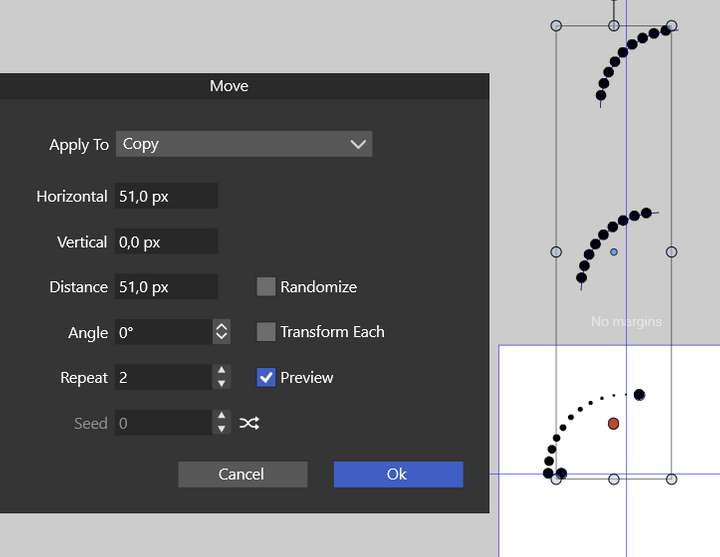
      0_1666712721940_f75670a2-e920-47f5-86ff-339d90206101-image.png

      You should have received three crash reports related to these issues. hope it will be of help. I really like combining these effects to make patterns and seamless patterns for book chapters I'm working on.

      Do you need the file or did you reproduce these bugs ?

      W11 Pro 25H2 - 12th Gen Intel(R) i7-12700K 3.61 GHz - RAM 64 Go - NVIDIA GF GTX 4070 Ti - Intuos - Dell UP3216Q / Eizo ColorEdge
      W11 Pro 25H2 - 12th Gen Intel(R) i7-12700KF 3.60 GHz -RAM 64 Go - NVIDIA GF GTX 3080 - IntuosPro- ProArt PA329C

      VectorStylerV 1 Reply Last reply Reply Quote 0
      • VectorStylerV Offline
        VectorStyler @B-Vs-V
        last edited by

        @PatrickM said in Transform/rotate after blending, weird behaviour or crashes VS:

        Do you need the file or did you reproduce these bugs ?

        Yes, please send me a file.

        B 3 Replies Last reply Reply Quote 0
        • B Offline
          B-Vs-V @VectorStyler
          last edited by

          @VectorStyler The file has been sent ☺

          W11 Pro 25H2 - 12th Gen Intel(R) i7-12700K 3.61 GHz - RAM 64 Go - NVIDIA GF GTX 4070 Ti - Intuos - Dell UP3216Q / Eizo ColorEdge
          W11 Pro 25H2 - 12th Gen Intel(R) i7-12700KF 3.60 GHz -RAM 64 Go - NVIDIA GF GTX 3080 - IntuosPro- ProArt PA329C

          1 Reply Last reply Reply Quote 1
          • B Offline
            B-Vs-V @VectorStyler
            last edited by

            @VectorStyler Just wondering, I did a blend between circles and therefore I should expect only circles as before. But I get this and I don't know why since I did as usual:

            0_1667770204048_67ea41dd-305e-4659-8fa8-36e6282e5709-image.png

            W11 Pro 25H2 - 12th Gen Intel(R) i7-12700K 3.61 GHz - RAM 64 Go - NVIDIA GF GTX 4070 Ti - Intuos - Dell UP3216Q / Eizo ColorEdge
            W11 Pro 25H2 - 12th Gen Intel(R) i7-12700KF 3.60 GHz -RAM 64 Go - NVIDIA GF GTX 3080 - IntuosPro- ProArt PA329C

            BoldlineB S b77B VectorStylerV 4 Replies Last reply Reply Quote 1
            • BoldlineB Offline
              Boldline @B-Vs-V
              last edited by

              @PatrickM I know if you record the steps you make with a video of the screen and if you save the file and send it over to @VectorStyler , those things help expedite the fixes

              🍎 macOS Sequoia 15.3, Mac mini (M1, 2020), Chip Apple M1, Memory 16 GB
              Cintiq 27QHD Display and LG Ultra HD Display

              1 Reply Last reply Reply Quote 1
              • S Offline
                Subpath @B-Vs-V
                last edited by

                @PatrickM

                all fine here and no problem
                VS 1.1065

                Win 11
                CPU: AMD Ryzen 5 9600X, 6-core.
                GPU: Nvidia Geforce RTX 5070.

                1 Reply Last reply Reply Quote 1
                • b77B Offline
                  b77 @B-Vs-V
                  last edited by b77

                  @PatrickM It looks like one of the two circles is flipped horizontally.

                  Check this value here in the Transform panel and if it has a minus, delete it:
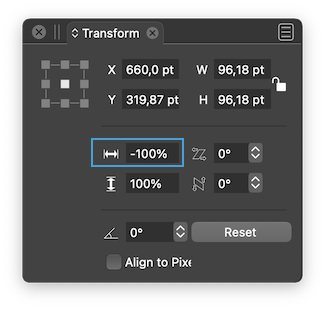
                  0_1667772120658_Screenshot 2022-11-07 at 00.00.16.png

                  MacBook Pro (Intel) running Monterey 12.6.4

                  S 1 Reply Last reply Reply Quote 1
                  • VectorStylerV Offline
                    VectorStyler @B-Vs-V
                    last edited by

                    @PatrickM Could be that they were scaled or rotated? What is the node editor showing when the start / end is selected?

                    Send me the file with that blend, I will try to figure out what could cause this.

                    B 1 Reply Last reply Reply Quote 1
                    • S Offline
                      Subpath @b77
                      last edited by

                      @b77 said in Transform/rotate after blending, weird behaviour or crashes VS:

                      It looks like one of the two circles is flipped horizontally.

                      like @b77 wrote, it looks here like @PatrickM Result
                      if a Circle was horizontally flipped in my Test
                      the Circle on the right side.

                      rotate a circle looks different

                      Win 11
                      CPU: AMD Ryzen 5 9600X, 6-core.
                      GPU: Nvidia Geforce RTX 5070.

                      1 Reply Last reply Reply Quote 2
                      • B Offline
                        B-Vs-V @VectorStyler
                        last edited by

                        @VectorStyler It seems to have been a temporary issue just after the installation of v.065.

                        @b77 & @Subpath It was indeed that unintended mirroring problem. I haven't managed to reproduce it yet and everything is as expected now.

                        @Boldline This is what I usually do and will do if I reproduce the problem.

                        Thanks to all!

                        W11 Pro 25H2 - 12th Gen Intel(R) i7-12700K 3.61 GHz - RAM 64 Go - NVIDIA GF GTX 4070 Ti - Intuos - Dell UP3216Q / Eizo ColorEdge
                        W11 Pro 25H2 - 12th Gen Intel(R) i7-12700KF 3.60 GHz -RAM 64 Go - NVIDIA GF GTX 3080 - IntuosPro- ProArt PA329C

                        1 Reply Last reply Reply Quote 2
                        • B Offline
                          B-Vs-V @VectorStyler
                          last edited by

                          @VectorStyler It is much better with v.065 ; no crash so far and expected pattern design.
                          Well, it is only a quick test and it is virtually nothing of interest as pattern but to show you that we can start to get patterns:

                          • with "copy",

                          0_1667827145101_Capture d’écran 2022-11-07 140200.jpg

                          • with "clone" however, I've got an interesting pattern but totally unexpected with respect to colours; I've just changed one colour (blue) of the gradient & I've got this multicoloured design ☺
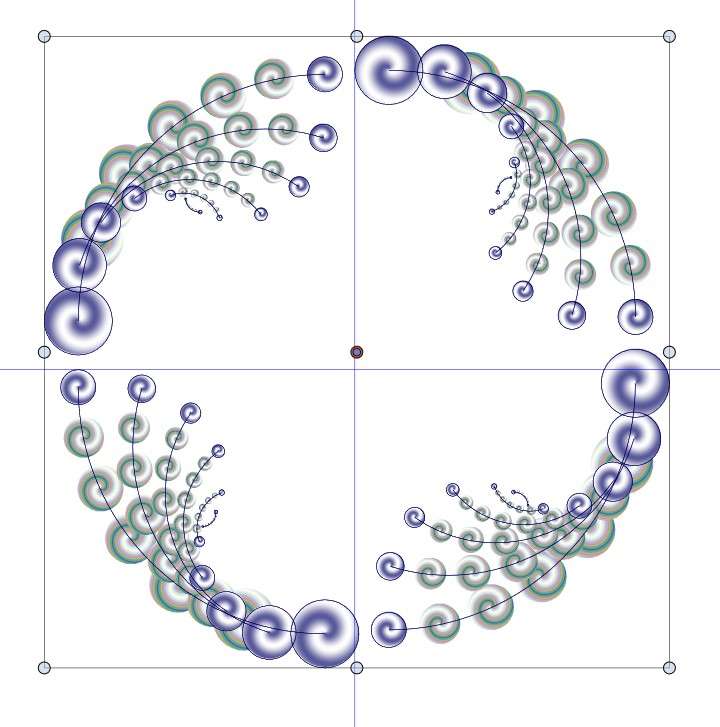
                          0_1667827369260_Capture d’écran 2022-11-07 141345.jpg

                          W11 Pro 25H2 - 12th Gen Intel(R) i7-12700K 3.61 GHz - RAM 64 Go - NVIDIA GF GTX 4070 Ti - Intuos - Dell UP3216Q / Eizo ColorEdge
                          W11 Pro 25H2 - 12th Gen Intel(R) i7-12700KF 3.60 GHz -RAM 64 Go - NVIDIA GF GTX 3080 - IntuosPro- ProArt PA329C

                          1 Reply Last reply Reply Quote 1
                          • VectorStylerV Offline
                            VectorStyler @B-Vs-V
                            last edited by

                            @Pat This issue should be fixed in build 1.1.072

                            B 1 Reply Last reply Reply Quote 1
                            • B Offline
                              B-Vs-V @VectorStyler
                              last edited by

                              @VectorStyler There are still some issues with the "clone" feature of blended objects (0.075 ; W10 & W11).

                              W11 Pro 25H2 - 12th Gen Intel(R) i7-12700K 3.61 GHz - RAM 64 Go - NVIDIA GF GTX 4070 Ti - Intuos - Dell UP3216Q / Eizo ColorEdge
                              W11 Pro 25H2 - 12th Gen Intel(R) i7-12700KF 3.60 GHz -RAM 64 Go - NVIDIA GF GTX 3080 - IntuosPro- ProArt PA329C

                              VectorStylerV 1 Reply Last reply Reply Quote 1
                              • VectorStylerV Offline
                                VectorStyler @B-Vs-V
                                last edited by

                                @Pat said in Transform/rotate after blending, weird behaviour or crashes VS:

                                @VectorStyler There are still some issues with the "clone" feature of blended objects (0.075 ; W10 & W11).

                                @Pat email me an example where this occurs

                                B 1 Reply Last reply Reply Quote 0
                                • B Offline
                                  B-Vs-V @VectorStyler
                                  last edited by

                                  @VectorStyler You can test on all the files I sent you including the one from last week. Just use the Object-Transform-Transform/Rotate feature(s) with 'clone' and you will finally get the issues. Just compare with 'Copy' where all the object changes are done correctly. Thanks.

                                  W11 Pro 25H2 - 12th Gen Intel(R) i7-12700K 3.61 GHz - RAM 64 Go - NVIDIA GF GTX 4070 Ti - Intuos - Dell UP3216Q / Eizo ColorEdge
                                  W11 Pro 25H2 - 12th Gen Intel(R) i7-12700KF 3.60 GHz -RAM 64 Go - NVIDIA GF GTX 3080 - IntuosPro- ProArt PA329C

                                  1 Reply Last reply Reply Quote 1
                                  • First post
                                    Last post