VectorStyler
    • Categories
    • Unread
    • Recent
    • Tags
    • Popular
    • Register
    • Login

    Support a Blob type of vector brush

    Scheduled Pinned Locked Moved Features and Ideas
    38 Posts 6 Posters 16.2k Views 5 Watching
    Loading More Posts
    • Oldest to Newest
    • Newest to Oldest
    • Most Votes
    Reply
    • Reply as topic
    Log in to reply
    This topic has been deleted. Only users with topic management privileges can see it.
    • BoldlineB Offline
      Boldline @Boldline
      last edited by Boldline

      Update: I tried this on my laptop running default settings and had the same issues.

      The shape only seemed to work when i was touching an existing shape. in my case here, the shape somehow changed mid-use and merged another star into itself....

      0_1758131671558_95ba5a1e-c881-4a69-b50c-22fcfe488376-CleanShot 2025-09-17 at 13.47.36.png

      🍎 macOS Tahoe 26.2, Mac mini (M1, 2020), Chip Apple M1, Memory 16 GB
      Cintiq 27QHD Display and LG Ultra HD Display

      S 1 Reply Last reply Reply Quote 0
      • S Offline
        Subpath @Boldline
        last edited by

        @Boldline

        its not your fault, got the same behaviour

        @VectorStyler

        it seems a bug
        a single Blob could only set with the
        default circle blob

        all blobs shape made via the "Shape" Role
        works only if paint with it and then single blobs can
        be set if there is a kind of overlapping. They dont work
        as single blobs
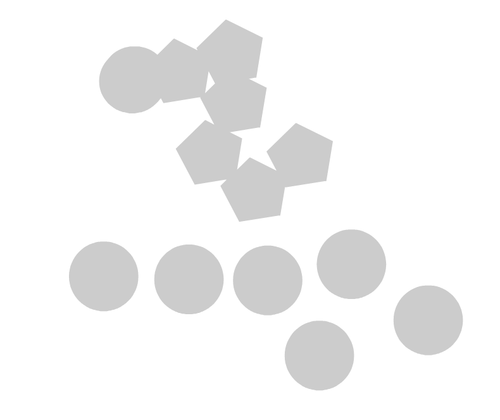
        0_1758136920305_blobs.png

        Win 11
        CPU: AMD Ryzen 5 9600X, 6-core.
        GPU: Nvidia Geforce RTX 5070.

        1 Reply Last reply Reply Quote 1
        • B Offline
          Bitten
          last edited by

          Hey all thanks for the responses, I can't find anytool called a path brush tool in the ui of the version downloaded if it is in there, it's well hidden.

          I made a video to try help explain what exactly this freeform paint style tool can do

          https://youtu.be/6JAoFnc9-Zk?t=367

          The ability to erase parts of it as well is also as important as the painting.

          Devil DinosaurD 1 Reply Last reply Reply Quote 0
          • Devil DinosaurD Offline
            Devil Dinosaur @Bitten
            last edited by Devil Dinosaur

            @Bitten
            Hi,
            Like said above, what you need is the "Path Brush Tool". It's located on the left main tool bar, third icon from the top, then the last of the menu that opens to the right. It's pressure sensitive and seems to be what you want. You may check some other tools of this section.

            0_1758151429412_path brush tool.png

            Fred.
            MacBook Pro (M1) - MacOs Sonoma 14

            B 1 Reply Last reply Reply Quote 0
            • S Offline
              Subpath
              last edited by

              @VectorStyler

              I noticed two additional things:

              First:
              I miss a live preview when changing the size of the Path Brush tool.
              The brush tip size only changes after I've set a new size. This
              makes adjusting the size a bit unintuitive.

              Second:
              No matter which shape you select as the brush tip, the Path Brush
              tool always paints with a rounded tip. This makes changing the
              Brush tip somewhat useless.

              I also demonstrate both of these points in this video.

              Win 11
              CPU: AMD Ryzen 5 9600X, 6-core.
              GPU: Nvidia Geforce RTX 5070.

              VectorStylerV 1 Reply Last reply Reply Quote 3
              • VectorStylerV Offline
                VectorStyler @Subpath
                last edited by

                @Subpath said in Support a Blob type of vector brush:

                When painting with the brush (not clicking) the top is always rounded.
                Only when clicking you can use the selected shape

                S BoldlineB 2 Replies Last reply Reply Quote 0
                • B Offline
                  Bitten @Devil Dinosaur
                  last edited by Bitten

                  @Devil-Dinosaur Ok nice yeah I found the brush tool now and it does seem to work a lot like the other tools mentioned which is great. One big issue with it right now though as I think Subpath also calls out is that the pressure changes you make don't adjust the size of the "preview / cursor" until you release.

                  What this results in is a situation where it's difficult to know if you have actually painted in a filled area on your canvas till you release the pen from screen, often showing that actually there are little gaps because pressure wasn't hard enough, This also makes it hard to do fine pen work because the preview is max brush size not the actual brush size with pressure factored in.

                  So I think in summary Yes there's a brush tool that can let you draw as shapes, and an eraser to go with it but both tools seem geared for use with a mouse not pressure pen as the brush size indicator does not adjust to match actual brush size when laying down new pressure based strokes

                  1 Reply Last reply Reply Quote 0
                  • S Offline
                    Subpath @VectorStyler
                    last edited by

                    @VectorStyler

                    Yes, I know that and I have already mentioned it,
                    but I find this behavior a bit curious

                    Win 11
                    CPU: AMD Ryzen 5 9600X, 6-core.
                    GPU: Nvidia Geforce RTX 5070.

                    1 Reply Last reply Reply Quote 1
                    • E Offline
                      EricP
                      last edited by

                      @Subpath thanks for the tip about shape nib.

                      I had tried earlier to change the shape on the toolbar when the path brush tool was active, but all it did was to replace the selected object by the shape, not change the brush nib.

                      Watching your video, I now understand that the shape must be selected with no canvas object selected so it can change the nib shape. Thanks

                      But using the feature, it doesn't apply the shape when dragging the path brush. It only seems to apply it when clicking on the border of an object, it then modifies the object shape with the selected tool shape.

                      Not very intuitive but still useful

                      S 1 Reply Last reply Reply Quote 1
                      • S Offline
                        Subpath @EricP
                        last edited by Subpath

                        @EricP

                        You're welcome.

                        I also find it strange that you can't paint with the path brush tool
                        using the selected shape tip.

                        Btw. this option to select a shape that have previously been
                        assigned the shape role is available for many tools in VectorStyler,
                        you can always check to see if a shape selection is offered in the
                        setting of a tool.

                        You can also use this to create shape presets, for example. You
                        can also do this with the parametric shapes in VS, which remain
                        editable.

                        Here a video where change a shape used in a blend

                        Win 11
                        CPU: AMD Ryzen 5 9600X, 6-core.
                        GPU: Nvidia Geforce RTX 5070.

                        E 1 Reply Last reply Reply Quote 1
                        • E Offline
                          EricP @Subpath
                          last edited by

                          @Subpath thanks for these tips.

                          Yes, I've tried to change the shape of some tools like the "Shaped Bump Tool" but did not find it to work as expected. Maybe I missed how to use it properly.

                          Coming back to the Path Brush tool, I really like what can be obtained with it, to imprint some patterns on the surface of shapes.

                          I experimented a bit and tried some modifier keys with it. I was hoping Alt would turn it into a Path Eraser but it doesn't.

                          However, a cool modifier is Shift, where if you shift-click with Path brush tool on a shape (doesn't have to have a shape role), the nib takes that shape. You can repeat over and over and get some kind of fractal construction where the path embeds smaller versions of itself.
                          here is an example : https://somup.com/cTQFl7P10Y

                          S 1 Reply Last reply Reply Quote 1
                          • BoldlineB Offline
                            Boldline @VectorStyler
                            last edited by

                            @VectorStyler said in Support a Blob type of vector brush:

                            @Subpath said in Support a Blob type of vector brush:

                            When painting with the brush (not clicking) the top is always rounded.
                            Only when clicking you can use the selected shape

                            Is there a reason you don’t want to have it operate in that manner? From my perspective, I would find that option very useful. A lot of interesting things could be done if the painting aspect used the shape and was not just the default rounded.

                            🍎 macOS Tahoe 26.2, Mac mini (M1, 2020), Chip Apple M1, Memory 16 GB
                            Cintiq 27QHD Display and LG Ultra HD Display

                            VectorStylerV 1 Reply Last reply Reply Quote 1
                            • VectorStylerV Offline
                              VectorStyler @Boldline
                              last edited by

                              @Boldline said in Support a Blob type of vector brush:

                              Is there a reason you don’t want to have it operate in that manner?

                              When paining with the path brush, an expanded outline shape is created (calligraphy and variable width included).
                              But there is no method to using an arbitrary shape in this process. It is just no way to "define" it, unless I do some hacking.

                              E S 2 Replies Last reply Reply Quote 1
                              • E Offline
                                EricP @VectorStyler
                                last edited by EricP

                                @VectorStyler It's not the way it's working today but I agree with @Boldline it would be great to be able to "paint" with a shape

                                The way I imagine it is you drag the mouse and VS inserts+merges shapes continuously (at intervals), like if you were clicking after each small position offset

                                like this : https://somup.com/cTQF2FP1a9

                                1 Reply Last reply Reply Quote 1
                                • S Offline
                                  Subpath @VectorStyler
                                  last edited by Subpath

                                  @VectorStyler

                                  I don't think any user here would want to pressure you into any kind
                                  of hacking. Is just we don't know in full the mechanism behind.

                                  As for me, I can live with the current situation. Once I know how
                                  something works, i have no problem to act accordingly.

                                  Win 11
                                  CPU: AMD Ryzen 5 9600X, 6-core.
                                  GPU: Nvidia Geforce RTX 5070.

                                  1 Reply Last reply Reply Quote 1
                                  • S Offline
                                    Subpath @EricP
                                    last edited by Subpath

                                    @EricP

                                    ... However, a cool modifier is Shift, where if you shift-click with Path brush tool on a shape (doesn't have to have a shape role), the nib takes that shape. You can repeat over and over and get some kind of fractal construction where the path embeds smaller versions of itself ....

                                    Interesting, did not know that.

                                    Win 11
                                    CPU: AMD Ryzen 5 9600X, 6-core.
                                    GPU: Nvidia Geforce RTX 5070.

                                    1 Reply Last reply Reply Quote 3
                                    • B Offline
                                      Bitten
                                      last edited by

                                      Put a video together to better show the 3 main problems with this software still
                                      https://youtu.be/Pb7otS5bovU

                                      It's definitely close but right now not quite where it needs to be.

                                      VectorStylerV 1 Reply Last reply Reply Quote 1
                                      • VectorStylerV Offline
                                        VectorStyler @Bitten
                                        last edited by

                                        @Bitten What kind of tablet is used there?

                                        B 1 Reply Last reply Reply Quote 0
                                        • B Offline
                                          Bitten @VectorStyler
                                          last edited by

                                          @VectorStyler Wacom Movink 13

                                          VectorStylerV 1 Reply Last reply Reply Quote 1
                                          • VectorStylerV Offline
                                            VectorStyler @Bitten
                                            last edited by

                                            @Bitten said in Support a Blob type of vector brush:

                                            @VectorStyler Wacom Movink 13

                                            I will try to fix these issues as soon as possible.

                                            B 1 Reply Last reply Reply Quote 0
                                            • First post
                                              Last post
