VectorStyler
    • Categories
    • Unread
    • Recent
    • Tags
    • Popular
    • Register
    • Login

    Text box not responsive to click and drag

    Scheduled Pinned Locked Moved VectorStyler 1.1 Bugs
    13 Posts 4 Posters 14.6k Views 4 Watching
    Loading More Posts
    • Oldest to Newest
    • Newest to Oldest
    • Most Votes
    Reply
    • Reply as topic
    Log in to reply
    This topic has been deleted. Only users with topic management privileges can see it.
    • VectorStylerV Offline
      VectorStyler @Raaskot
      last edited by

      @Raaskot Replicated here also. Problem with the point text.

      1 Reply Last reply Reply Quote 1
      • VectorStylerV Offline
        VectorStyler @Raaskot
        last edited by

        @Raaskot Found the issue, it is not a bug.
        Somehow the shape text is also a text frame.
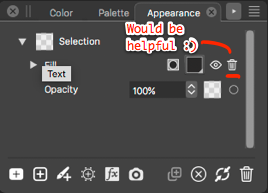
        Select the text object (that is not editable). Go to the Appearance panel and remove the Text Frame content.

        1 Reply Last reply Reply Quote 1
        • RaaskotR Offline
          Raaskot
          last edited by Raaskot

          PHEW! Luckily your advice saved my artwork and I dont have to rebuild it in Inkscape...☺
          ... but I had to clear everything including color data.

          Is that the way its intended?

          https://recordit.co/LX5dvXBpXH
          0_1705408636705_content.jpg

          VectorStylerV 1 Reply Last reply Reply Quote 0
          • VectorStylerV Offline
            VectorStyler @Raaskot
            last edited by

            @Raaskot said in Text box not responsive to click and drag:

            Is that the way its intended?

            it is enough to just select the item to be removed and use the trash button.

            RaaskotR 1 Reply Last reply Reply Quote 0
            • RaaskotR Offline
              Raaskot
              last edited by

              I simply don't get the point!😬

              Everything acts totally odd in the programme. Now I cannot change the text box size without distorting the type!

              https://recordit.co/OOcE9FscAW

              L VectorStylerV 2 Replies Last reply Reply Quote 0
              • RaaskotR Offline
                Raaskot @VectorStyler
                last edited by Raaskot

                @VectorStyler said in Text box not responsive to click and drag:

                use the trash button.

                Sorry, that's not the case! Only "clear" works thus making the box useless!

                b77B 1 Reply Last reply Reply Quote 0
                • b77B Offline
                  b77 @Raaskot
                  last edited by b77

                  @Raaskot After deleting the 'Text Frame' item in the Appearance panel,
                  use the 'Convert to Frame Text' command from the Text menu.

                  Btw, was the initial text object made in another app (you mentioned Inkscape),
                  then pasted or opened in VS?

                  MacBook Pro (Intel) running Monterey 12.6.4

                  RaaskotR 1 Reply Last reply Reply Quote 0
                  • L Offline
                    Li Xiao @Raaskot
                    last edited by

                    @Raaskot Convert to Frame Text

                    https://youtu.be/uQn6GNZBPLk

                    1 Reply Last reply Reply Quote 1
                    • VectorStylerV Offline
                      VectorStyler @Raaskot
                      last edited by

                      @Raaskot said in Text box not responsive to click and drag:

                      Now I cannot change the text box size without distorting the type!

                      Somehow that text is not a text frame, but a text shape.

                      1 Reply Last reply Reply Quote 0
                      • RaaskotR Offline
                        Raaskot @b77
                        last edited by Raaskot

                        @b77 said in Text box not responsive to click and drag:

                        'Convert to Frame Text' command from the Text menu

                        That helped!!! Didn't know of that action.

                        Also: No, didn't initiate artwork other than in VS. Try to work away from Adobe but Inkscape as alternative has a very annoying modus operandi (Linux?), where you have to select any floating panel first before executing operation.

                        1 Reply Last reply Reply Quote 0
                        • RaaskotR Offline
                          Raaskot
                          last edited by

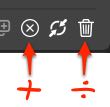
                          0_1705411186578_a6a53785-6316-4e8c-8eac-7c5b64c548b8-billede.png

                          VectorStylerV 1 Reply Last reply Reply Quote 1
                          • VectorStylerV Offline
                            VectorStyler @Raaskot
                            last edited by

                            @Raaskot Added this to the backlog.

                            1 Reply Last reply Reply Quote 1
                            • First post
                              Last post