VectorStyler
    • Categories
    • Unread
    • Recent
    • Tags
    • Popular
    • Register
    • Login

    Blend: smooth is not smooth
    Scheduled Pinned Locked Moved VectorStyler 1.1 Bugs
    st an unoptimalfeature
    21 Posts 2 Posters 43.5k Views 2 Watching
    Loading More Posts
    • Oldest to Newest
    • Newest to Oldest
    • Most Votes
    Reply
    • Reply as topic
    Log in to reply
    This topic has been deleted. Only users with topic management privileges can see it.
    • B Offline
      B-Vs-V @VectorStyler
      last edited by

      @VectorStyler said in Blend: smooth is not smooth:

      @Pat Each canvas has its own (different) layer hierarchy.

      The issue I have then is that I can only see the layers and objects of one canvas/artboard.

      Yes, this is normal, Layers panel shows one canvas content at a time.

      it seems that the layers are empty

      Is the active canvas also empty when the layers panel is empty?

      No, the artboards are all ok. I may miss something.
      I send you the file ☺

      W11 Pro 25H2 - 12th Gen Intel(R) i7-12700K 3.61 GHz - RAM 64 Go - NVIDIA GF GTX 4070 Ti - Intuos - Dell UP3216Q / Eizo ColorEdge
      W11 Pro 25H2 - 12th Gen Intel(R) i7-12700KF 3.60 GHz -RAM 64 Go - NVIDIA GF GTX 3080 - IntuosPro- ProArt PA329C

      VectorStylerV 1 Reply Last reply Reply Quote 1
      • VectorStylerV Offline
        VectorStyler @B-Vs-V
        last edited by

        @Pat Got the file, and when I change the selection in the Canvas panel, the Layers panel content is updated to the current canvas.

        But there is one thing that might happen here: how was the Layers panel opened?
        If it is opened for a canvas (from the Canvas panel), that it is "glued" to that canvas, regardless of the current canvas.
        Close all layer panels, and open one with the Panels -> Layers command, then select different canvases and check if the layers panel content updates.

        B 1 Reply Last reply Reply Quote 0
        • B Offline
          B-Vs-V @VectorStyler
          last edited by

          @VectorStyler said in Blend: smooth is not smooth:

          @Pat Got the file, and when I change the selection in the Canvas panel, the Layers panel content is updated to the current canvas.

          But there is one thing that might happen here: how was the Layers panel opened?
          If it is opened for a canvas (from the Canvas panel), that it is "glued" to that canvas, regardless of the current canvas.
          Close all layer panels, and open one with the Panels -> Layers command, then select different canvases and check if the layers panel content updates.

          Yes, this was the issue. Thanks ☺
          It's a bit counterintuitive IMHO. I expected the Layers panel to reflect the layers and objects of an artboard as soon as it was selected and not to be locked on the first artboard selected/opened.

          W11 Pro 25H2 - 12th Gen Intel(R) i7-12700K 3.61 GHz - RAM 64 Go - NVIDIA GF GTX 4070 Ti - Intuos - Dell UP3216Q / Eizo ColorEdge
          W11 Pro 25H2 - 12th Gen Intel(R) i7-12700KF 3.60 GHz -RAM 64 Go - NVIDIA GF GTX 3080 - IntuosPro- ProArt PA329C

          VectorStylerV 1 Reply Last reply Reply Quote 0
          • VectorStylerV Offline
            VectorStyler @B-Vs-V
            last edited by

            @Pat said in Blend: smooth is not smooth:

            It's a bit counterintuitive IMHO. I expected the Layers panel to reflect the layers and objects of an artboard as soon as it was selected and not to be locked on the first artboard selected/opened.

            Yes, this is a VS specific thing that you can have multiple Layers panels opened on different canvases (btw, canvases are not artboards).

            The trick here is to use the Layers panels to move objects or layers from one canvas to another with drag&drop.
            For example: have a Layers panel opened for an other (not active) canvas, containing some objects and then drag&drop objects from that Layers panel directly onto the current canvas.

            1 Reply Last reply Reply Quote 0
            • B Offline
              B-Vs-V @VectorStyler
              last edited by

              @VectorStyler said in Blend: smooth is not smooth:

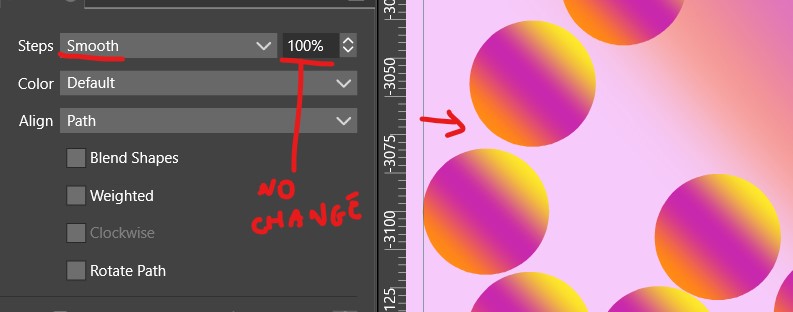
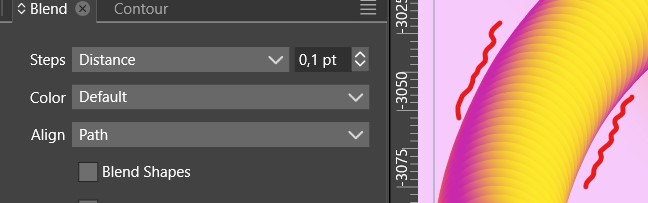
              @Pat Yes, this might be a bug, if the fill is not a solid color.

              The problem is that having too many blend steps may impact performance, especially if the fill is a gradient.

              @VectorStyler I don't see any difference/improvement with v.1.1.094.

              W11 Pro 25H2 - 12th Gen Intel(R) i7-12700K 3.61 GHz - RAM 64 Go - NVIDIA GF GTX 4070 Ti - Intuos - Dell UP3216Q / Eizo ColorEdge
              W11 Pro 25H2 - 12th Gen Intel(R) i7-12700KF 3.60 GHz -RAM 64 Go - NVIDIA GF GTX 3080 - IntuosPro- ProArt PA329C

              VectorStylerV 1 Reply Last reply Reply Quote 1
              • VectorStylerV Offline
                VectorStyler @B-Vs-V
                last edited by

                @Pat said in Blend: smooth is not smooth:

                I don't see any difference/improvement with v.1.1.094.

                Are you doing blends of gradient fills? I will try to replicate this issue.

                B 1 Reply Last reply Reply Quote 0
                • B Offline
                  B-Vs-V @VectorStyler
                  last edited by

                  @VectorStyler said in Blend: smooth is not smooth:

                  @Pat said in Blend: smooth is not smooth:

                  I don't see any difference/improvement with v.1.1.094.

                  Are you doing blends of gradient fills? I will try to replicate this issue.

                  @VectorStyler you can use the file I sent you, canvas 1/artboard n°7 ☺

                  W11 Pro 25H2 - 12th Gen Intel(R) i7-12700K 3.61 GHz - RAM 64 Go - NVIDIA GF GTX 4070 Ti - Intuos - Dell UP3216Q / Eizo ColorEdge
                  W11 Pro 25H2 - 12th Gen Intel(R) i7-12700KF 3.60 GHz -RAM 64 Go - NVIDIA GF GTX 3080 - IntuosPro- ProArt PA329C

                  1 Reply Last reply Reply Quote 1
                  • B Offline
                    B-Vs-V @VectorStyler
                    last edited by B-Vs-V

                    @VectorStyler said in Blend: smooth is not smooth:

                    @Pat said in Blend: smooth is not smooth:

                    @VectorStyler
                    Do I have co copy-paste all objects from an artboard to the one within the new canvas and delete the 1st ?

                    In the Canvas panel, select the artboard and alt+drag into another canvas.

                    It doesn't work well : drag & drop an artboard from a canvas to another left objects in the 1st canvas.

                    W11 Pro 25H2 - 12th Gen Intel(R) i7-12700K 3.61 GHz - RAM 64 Go - NVIDIA GF GTX 4070 Ti - Intuos - Dell UP3216Q / Eizo ColorEdge
                    W11 Pro 25H2 - 12th Gen Intel(R) i7-12700KF 3.60 GHz -RAM 64 Go - NVIDIA GF GTX 3080 - IntuosPro- ProArt PA329C

                    B 1 Reply Last reply Reply Quote 1
                    • B Offline
                      B-Vs-V @B-Vs-V
                      last edited by

                      @Pat said in Blend: smooth is not smooth:

                      @VectorStyler said in Blend: smooth is not smooth:

                      @Pat said in Blend: smooth is not smooth:

                      @VectorStyler
                      Do I have co copy-paste all objects from an artboard to the one within the new canvas and delete the 1st ?

                      In the Canvas panel, select the artboard and alt+drag into another canvas.

                      It doesn't work well : drag & drop an artboard from a canvas to another left objects in the 1st canvas.

                      @VectorStyler same issues in .095. VS crashed twice & reports sent.

                      W11 Pro 25H2 - 12th Gen Intel(R) i7-12700K 3.61 GHz - RAM 64 Go - NVIDIA GF GTX 4070 Ti - Intuos - Dell UP3216Q / Eizo ColorEdge
                      W11 Pro 25H2 - 12th Gen Intel(R) i7-12700KF 3.60 GHz -RAM 64 Go - NVIDIA GF GTX 3080 - IntuosPro- ProArt PA329C

                      VectorStylerV 1 Reply Last reply Reply Quote 1
                      • VectorStylerV Offline
                        VectorStyler @B-Vs-V
                        last edited by

                        @Pat I will try to fix these crashes.

                        1 Reply Last reply Reply Quote 0
                        • First post
                          Last post
