VectorStyler
    • Categories
    • Unread
    • Recent
    • Tags
    • Popular
    • Register
    • Login

    Paragraph panel

    Scheduled Pinned Locked Moved Questions and Support
    12 Posts 5 Posters 9.2k Views 4 Watching
    Loading More Posts
    • Oldest to Newest
    • Newest to Oldest
    • Most Votes
    Reply
    • Reply as topic
    Log in to reply
    This topic has been deleted. Only users with topic management privileges can see it.
    • S Offline
      Subpath @B-Vs-V
      last edited by

      @Pat

      seems its working here

      see video

      Win 11
      CPU: AMD Ryzen 5 9600X, 6-core.
      GPU: Nvidia Geforce RTX 5070.

      1 Reply Last reply Reply Quote 0
      • encartE Offline
        encart
        last edited by encart

        Works here, but each click narrows the panel.
        https://recordit.co/I7vOR59NH5

        Windows 11 Home 10.0.22621

        BoldlineB S 2 Replies Last reply Reply Quote 1
        • BoldlineB Offline
          Boldline @encart
          last edited by

          @encart said in Paragraph panel:

          Works here, but each click narrows the panel.

          I'm getting the same result as you here. All four clicks work but the panel reduces in width each time

          🍎 macOS Tahoe 26.2, Mac mini (M1, 2020), Chip Apple M1, Memory 16 GB
          Cintiq 27QHD Display and LG Ultra HD Display

          1 Reply Last reply Reply Quote 0
          • S Offline
            Subpath @encart
            last edited by

            @encart said in Paragraph panel:

            but each click narrows the panel.

            registered the same thing, but thought that maybe it was
            because of my new computer mouse

            you can also see it in my video

            Win 11
            CPU: AMD Ryzen 5 9600X, 6-core.
            GPU: Nvidia Geforce RTX 5070.

            1 Reply Last reply Reply Quote 0
            • B Offline
              B-Vs-V
              last edited by B-Vs-V

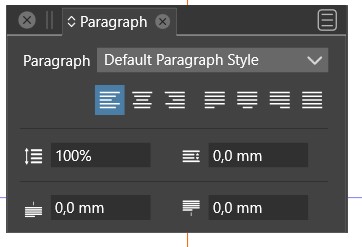
              @Boldline @encart @Subpath Thank you for testing this ☺

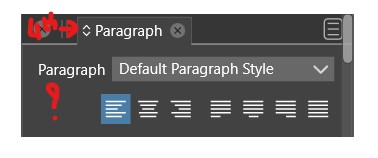
              When I launch VS, I get the complete panel with all options but when I cycle by clicking the double arrow, I get this issue... & indeed, the panel width decreases each time.

              Edit : no, I never get the complete panel... I've just checked with your videos.

              W11 Pro 25H2 - 12th Gen Intel(R) i7-12700K 3.61 GHz - RAM 64 Go - NVIDIA GF GTX 4070 Ti - Intuos - Dell UP3216Q / Eizo ColorEdge
              W11 Pro 25H2 - 12th Gen Intel(R) i7-12700KF 3.60 GHz -RAM 64 Go - NVIDIA GF GTX 3080 - IntuosPro- ProArt PA329C

              1 Reply Last reply Reply Quote 0
              • VectorStylerV Offline
                VectorStyler @B-Vs-V
                last edited by

                @Pat Could be a settings or workspace issue.
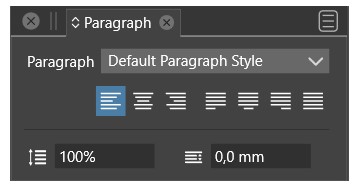
                I get here all 4 states correctly (but the size decreases, which could be a bug).

                Try starting with shift+alt+control to reset all options.

                B 1 Reply Last reply Reply Quote 0
                • B Offline
                  B-Vs-V @VectorStyler
                  last edited by

                  @VectorStyler Thanks but "shift+alt+control" doesn't reset options on my pc.

                  W11 Pro 25H2 - 12th Gen Intel(R) i7-12700K 3.61 GHz - RAM 64 Go - NVIDIA GF GTX 4070 Ti - Intuos - Dell UP3216Q / Eizo ColorEdge
                  W11 Pro 25H2 - 12th Gen Intel(R) i7-12700KF 3.60 GHz -RAM 64 Go - NVIDIA GF GTX 3080 - IntuosPro- ProArt PA329C

                  VectorStylerV 1 Reply Last reply Reply Quote 0
                  • VectorStylerV Offline
                    VectorStyler @B-Vs-V
                    last edited by

                    @Pat Try in Edit -> Preference Files -> Restore Default and View -> Workspace Files -> Restore Default

                    B 1 Reply Last reply Reply Quote 0
                    • B Offline
                      B-Vs-V @VectorStyler
                      last edited by B-Vs-V

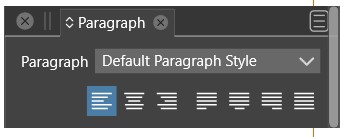
                      @VectorStyler Thanks, it works when I launch VS:
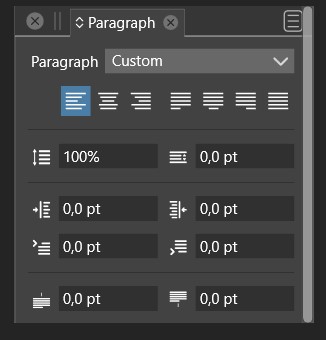
                      0_1687420490262_1.jpg

                      but once I click on the double arrow, I can't get the complete panel
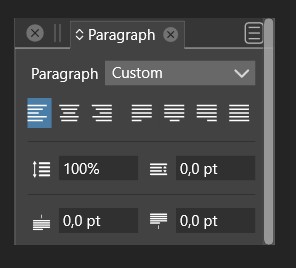
                      0_1687420514974_2.jpg

                      Edit: to get it back I always need to restore Workspaces Files default

                      W11 Pro 25H2 - 12th Gen Intel(R) i7-12700K 3.61 GHz - RAM 64 Go - NVIDIA GF GTX 4070 Ti - Intuos - Dell UP3216Q / Eizo ColorEdge
                      W11 Pro 25H2 - 12th Gen Intel(R) i7-12700KF 3.60 GHz -RAM 64 Go - NVIDIA GF GTX 3080 - IntuosPro- ProArt PA329C

                      VectorStylerV 1 Reply Last reply Reply Quote 0
                      • VectorStylerV Offline
                        VectorStyler @B-Vs-V
                        last edited by

                        @Pat I opened a bug on this one and will try to figure out what happens.

                        B 1 Reply Last reply Reply Quote 1
                        • B Offline
                          B-Vs-V @VectorStyler
                          last edited by

                          @VectorStyler Thanks. I've tested on my two W11 pc & it is the same issue.

                          W11 Pro 25H2 - 12th Gen Intel(R) i7-12700K 3.61 GHz - RAM 64 Go - NVIDIA GF GTX 4070 Ti - Intuos - Dell UP3216Q / Eizo ColorEdge
                          W11 Pro 25H2 - 12th Gen Intel(R) i7-12700KF 3.60 GHz -RAM 64 Go - NVIDIA GF GTX 3080 - IntuosPro- ProArt PA329C

                          1 Reply Last reply Reply Quote 0
                          • First post
                            Last post
