VectorStyler
    • Categories
    • Unread
    • Recent
    • Tags
    • Popular
    • Register
    • Login

    Draw tool sticky settings?

    Scheduled Pinned Locked Moved Questions and Support
    68 Posts 7 Posters 193.9k Views 6 Watching
    Loading More Posts
    • Oldest to Newest
    • Newest to Oldest
    • Most Votes
    Reply
    • Reply as topic
    Log in to reply
    This topic has been deleted. Only users with topic management privileges can see it.
    • DazmondoD Offline
      Dazmondo @Boldline
      last edited by

      @Boldline said in Draw tool sticky settings?:

      @Dazmondo can you show a video example of your process? I'm trying to follow what you want it to do - same brush settings across all three drawing methods?

      Still not sure how to post a vid here?

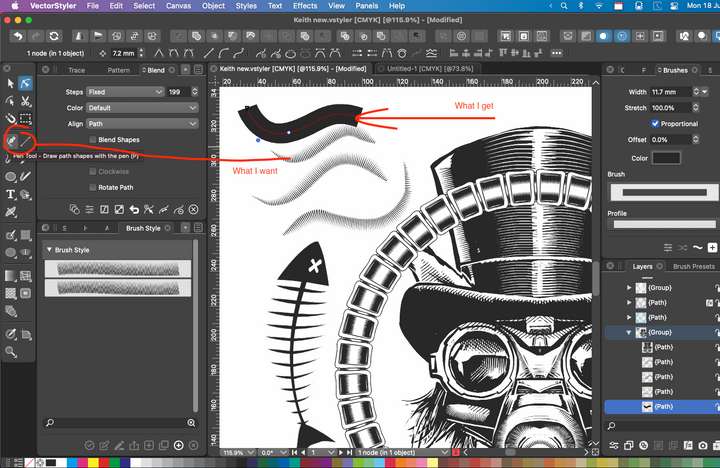
      It's for a pretty urgent screen print T-shirt design - and I've created a few brushes similar (but easier to manipulate, and use) to the some of the brushes I've created in Clip Studio Paint

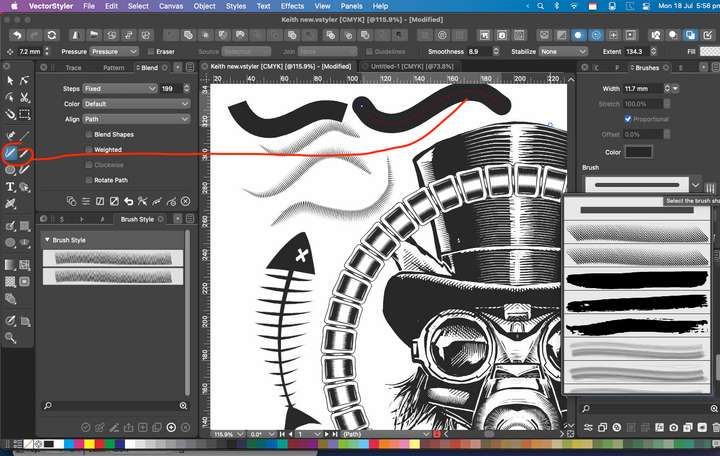
      Not sure but I think I may have solved it, at least for the Brush tool and only when I'm using a stylus to draw ---- just by clicking on the two entwined arrows icon at the bottom of the brushes panel is now allowing me to draw multiple strokes with the brush I want to use for the shading detail - although most of it is now done using the frustrating method of drawing a stroke then going through my brushes to select the required brush![alt text]

      Heres a few screen grabs: 2_1658164967355_Screen Grab 2022-07-18 at 6.04.57 pm.png 1_1658164967355_Screen Grab 2022-07-18 at 5.55.46 pm.png 0_1658164967355_Screen Grab 2022-07-18 at 5.56.27 pm.png image url)
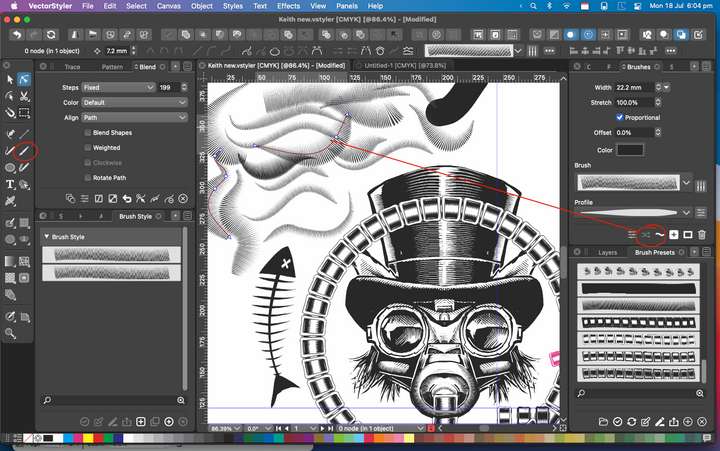
      1 Reply Last reply Reply Quote 2
      • DazmondoD Offline
        Dazmondo @Subpath
        last edited by

        @Subpath said in Draw tool sticky settings?:

        Maybe this way here could be helpful to select Strokes/Brushes faster.

        Don't understand STRG ???

        b77B S DazmondoD 3 Replies Last reply Reply Quote 0
        • b77B Offline
          b77 @Dazmondo
          last edited by b77

          @Dazmondo 'Steuerung' means 'Control' in German:
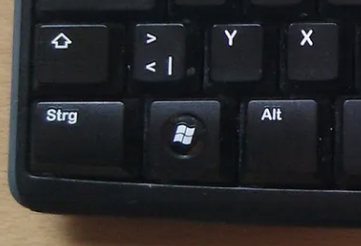
          0_1658166282772_strg.png

          MacBook Pro (Intel) running Monterey 12.6.4

          1 Reply Last reply Reply Quote 1
          • S Offline
            Subpath @Dazmondo
            last edited by Subpath

            @Dazmondo said in Draw tool sticky settings?:

            @Subpath said in Draw tool sticky settings?:

            Maybe this way here could be helpful to select Strokes/Brushes faster.

            Don't understand STRG ???

            @b77 already wrote the answer.
            STRG is German Keyboard Layout πŸ™‚
            STRG same as CTRL (PC) and Command on Mac

            I mention Ctrl behind STRG also in my Picture above.

            Win 11
            CPU: AMD Ryzen 5 9600X, 6-core.
            GPU: Nvidia Geforce RTX 5070.

            1 Reply Last reply Reply Quote 0
            • DazmondoD Offline
              Dazmondo @Dazmondo
              last edited by

              @Dazmondo said in Draw tool sticky settings?:

              @Subpath said in Draw tool sticky settings?:

              Maybe this way here could be helpful to select Strokes/Brushes faster.

              Don't understand STRG ???

              Tried all the usual key combos and just can't get this to work for the pencil tool

              Is it maybe a PC only feature? But would be really great if you could click on a stroke with the brush applied while holding down a combo (or having an option via the right click options) which then sucks up the style to use continually til you want to change to another brush?

              S VectorStylerV 2 Replies Last reply Reply Quote 0
              • S Offline
                Subpath @Dazmondo
                last edited by

                @Dazmondo

                Is the Key that temporaly switch to the Shape Editor Tool
                and i think this work on Mac too

                Win 11
                CPU: AMD Ryzen 5 9600X, 6-core.
                GPU: Nvidia Geforce RTX 5070.

                b77B 1 Reply Last reply Reply Quote 0
                • b77B Offline
                  b77 @Subpath
                  last edited by b77

                  @Subpath and @Dazmondo On the Mac it's the Command key that does the momentary switch to Shape Editing mode when you hold it.
                  …or to the Select/Transform tool (V) when you are in Shape Editing mode.

                  MacBook Pro (Intel) running Monterey 12.6.4

                  S 1 Reply Last reply Reply Quote 1
                  • S Offline
                    Subpath @b77
                    last edited by

                    @b77 , thanks for looking πŸ‘

                    Win 11
                    CPU: AMD Ryzen 5 9600X, 6-core.
                    GPU: Nvidia Geforce RTX 5070.

                    1 Reply Last reply Reply Quote 1
                    • S Offline
                      Subpath
                      last edited by Subpath

                      @Dazmondo

                      so select the Pencil Tool and press and hold the Command Key
                      If you look in the Toolbar the Shape Editor Tool should be selected.

                      Now keep holding the Command Key and select any other Stroke/
                      Brush. Then release the Command key and draw with Pencil tool
                      the stroke should now be in the Style of your last selected.

                      Here another Video for you
                      where the Shortcuts will be shown.
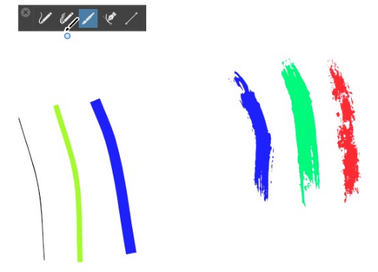
                      Here the Video:

                      0_1658168803649_Command-use.png

                      Win 11
                      CPU: AMD Ryzen 5 9600X, 6-core.
                      GPU: Nvidia Geforce RTX 5070.

                      1 Reply Last reply Reply Quote 0
                      • S Offline
                        Subpath
                        last edited by Subpath

                        @Dazmondo

                        What you trying to do in your Pictures above
                        would not work, as far as i know.

                        You cant draw Brush Strokes with the Pencil Tool.

                        And to draw Brush Strokes with the Pen Tool
                        would only work if you do the following.
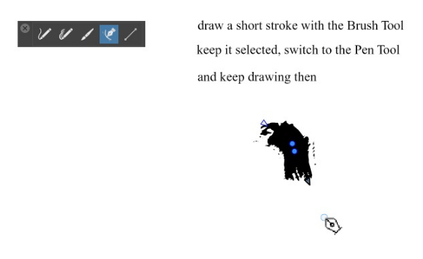
                        Take a look at this Video:

                        0_1658169888068_Brush-with-Pen.png

                        Win 11
                        CPU: AMD Ryzen 5 9600X, 6-core.
                        GPU: Nvidia Geforce RTX 5070.

                        1 Reply Last reply Reply Quote 0
                        • VectorStylerV Offline
                          VectorStyler @Dazmondo
                          last edited by VectorStyler

                          @Dazmondo Question: should the Pencil tool be able to paint with vector brushes (as an option)?

                          DazmondoD S 2 Replies Last reply Reply Quote 0
                          • DazmondoD Offline
                            Dazmondo @VectorStyler
                            last edited by

                            Thanks Subpath / b77 for the tips, I was originally (stupidly) concentrating using the combo with the pencil tool (which doesn't work on the Mac) but works with the brush tool.

                            Managed to get there in the end and got the job finished0_1658213279043_Screen Grab 2022-07-19 at 7.47.27 am.png

                            I'm sure with a little practice I could now motor through these types of jobs - also now using that nice little tip from Subpath for working with the pen tool by temporally pressing 'b' to select the brush tool then hitting 'p' to continue the path - works great --- Thanks everyone

                            S 1 Reply Last reply Reply Quote 3
                            • S Offline
                              Subpath @Dazmondo
                              last edited by

                              @Dazmondo

                              your welcome, always happy to help

                              have to say that i am very impressed by your Design, wow πŸ‘

                              As a small note, because it struck me.
                              The text "Steam Kittens" doesn't really follow a text on curve.
                              But maybe that's intended.

                              Win 11
                              CPU: AMD Ryzen 5 9600X, 6-core.
                              GPU: Nvidia Geforce RTX 5070.

                              1 Reply Last reply Reply Quote 0
                              • S Offline
                                Subpath @VectorStyler
                                last edited by Subpath

                                @VectorStyler

                                would it not a little more helpful if we could use
                                the Pen Tool direct also for Vector Brushes ?

                                without the workaround a descriped above

                                Win 11
                                CPU: AMD Ryzen 5 9600X, 6-core.
                                GPU: Nvidia Geforce RTX 5070.

                                VectorStylerV 1 Reply Last reply Reply Quote 1
                                • VectorStylerV Offline
                                  VectorStyler @Subpath
                                  last edited by

                                  @Subpath said in Draw tool sticky settings?:

                                  would it not a little more helpful if we could use the Pen Tool direct also for Vector Brushes ?

                                  Yes, this could be easy to enable. But, it might result in confusion as all other apps differentiate between the Pen and brush tools.

                                  S IngolfI 2 Replies Last reply Reply Quote 0
                                  • S Offline
                                    Subpath @VectorStyler
                                    last edited by Subpath

                                    @VectorStyler

                                    For me, the advantage of this is so much greater than any confusion about it.

                                    As you can see, @dazmondo has a problem while he
                                    likes using the Pen Tool
                                    with Vector Brushes and can't do that. I know he could apply it later.
                                    But direct editing would be so much more forward.

                                    Here two Programs from old Times :), that have been using this for a long time.
                                    I still like them and have copies installed. These are
                                    "Creature House Expression" and "Expression Design."

                                    In "Creature House Expression" it is called B-Spline, but
                                    Expression Design uses the Pen Tool for Vector brushes.
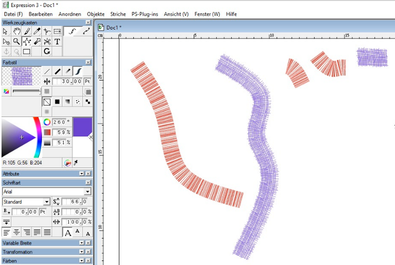
                                    Here a Video Example:

                                    0_1658238145352_Expression.png

                                    Win 11
                                    CPU: AMD Ryzen 5 9600X, 6-core.
                                    GPU: Nvidia Geforce RTX 5070.

                                    VectorStylerV 1 Reply Last reply Reply Quote 2
                                    • VectorStylerV Offline
                                      VectorStyler @Subpath
                                      last edited by

                                      @Subpath Added this as an option to the backlog.

                                      S 1 Reply Last reply Reply Quote 1
                                      • S Offline
                                        Subpath @VectorStyler
                                        last edited by

                                        @VectorStyler

                                        great !
                                        I think this will put a smile on many faces πŸ™‚

                                        Win 11
                                        CPU: AMD Ryzen 5 9600X, 6-core.
                                        GPU: Nvidia Geforce RTX 5070.

                                        1 Reply Last reply Reply Quote 0
                                        • DazmondoD Offline
                                          Dazmondo
                                          last edited by

                                          The Steam Kittens have requested a back print for the T-shirt featuring Keith (the steampunk kitten character featured on the front) so thought I'd have a crack using the method detailed in this post and glad to report it was far less bother to do the shading using the brushes I made and really easy to edit ---- did have a fair few times that I had to force quit when doing the top hat detail, but got there in the end --- Still need to add tour dates and a logo:


                                          1_1658249855933_Screen Grab 2022-07-19 at 5.55.50 pm.png 0_1658249855932_Screen Grab 2022-07-19 at 5.56.46 pm.png
                                          @Subpath said in Draw tool sticky settings?:

                                          @VectorStyler

                                          great !
                                          I think this will put a smile on many faces πŸ™‚

                                          Big smile hereπŸ‘

                                          S 1 Reply Last reply Reply Quote 5
                                          • S Offline
                                            Subpath @Dazmondo
                                            last edited by

                                            @Dazmondo

                                            Thats so insane, i am totaly floored by your design
                                            WOW !!!

                                            Win 11
                                            CPU: AMD Ryzen 5 9600X, 6-core.
                                            GPU: Nvidia Geforce RTX 5070.

                                            1 Reply Last reply Reply Quote 0
                                            • First post
                                              Last post