VectorStyler
    • Categories
    • Unread
    • Recent
    • Tags
    • Popular
    • Register
    • Login

    Extend Square Star by one Point
    Scheduled Pinned Locked Moved Features and Ideas
    29 Posts 5 Posters 43.5k Views 4 Watching
    Loading More Posts
    • Oldest to Newest
    • Newest to Oldest
    • Most Votes
    Reply
    • Reply as topic
    Log in to reply
    This topic has been deleted. Only users with topic management privileges can see it.
    • VectorStylerV Offline
      VectorStyler @Subpath
      last edited by

      @Subpath Yes, the Styles panel also works for this.

      1 Reply Last reply Reply Quote 0
      • Victor VectorV Offline
        Victor Vector @Subpath
        last edited by

        @Subpath said in Extend Square Star by one Point:

        shapes without scaling point
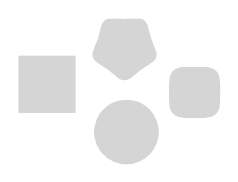
        0_1651906052930_without scaling point.png

        shapes with a scaling point
        0_1651906081400_with scaling point.png

        For consistency, and to clean up the Shape Tool "blue point" interface, it wouldn't bother me if there were no scaling points, but scaling was achieved via the Transform Tool, or the Shape Panel.

        But I do like the "one point" scaler idea too!

        @b77 said in Extend Square Star by one Point:

        And… it all looks a bit busy. Maybe use just one knob for scaling?
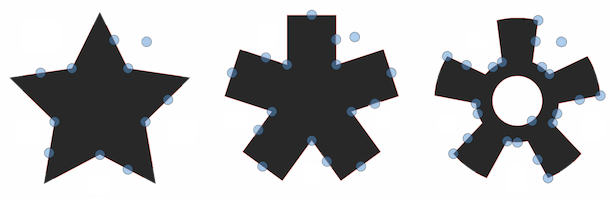
        0_1651881591885_sst cl.png

        S 1 Reply Last reply Reply Quote 0
        • S Offline
          Subpath @Victor Vector
          last edited by

          @Victor-Vector

          As from my point of view, i dont know the cause that Point for scaling by now.

          It doesnt matter that much to me if there is one or non.
          So i have nothing against your Idea, if you like one.

          The Post of mine where you reply to is just an observation i made.

          Win 11
          CPU: AMD Ryzen 5 9600X, 6-core.
          GPU: Nvidia Geforce RTX 5070.

          b77B 1 Reply Last reply Reply Quote 0
          • b77B Offline
            b77 @Subpath
            last edited by b77

            Having a knob or knobs for scaling the shape when in Shape Editing mode (shortcut: A) means you don't have to switch to the Move/Transform tool (V) for scaling.
            So I'm not suggesting it should go away.

            MacBook Pro (Intel) running Monterey 12.6.4

            S 1 Reply Last reply Reply Quote 0
            • S Offline
              Subpath @b77
              last edited by

              @b77

              A knob for scaling can stay. I have nothing against it.
              But it is surprising why some Shapes have one and others do not.

              Win 11
              CPU: AMD Ryzen 5 9600X, 6-core.
              GPU: Nvidia Geforce RTX 5070.

              Victor VectorV b77B 2 Replies Last reply Reply Quote 0
              • Victor VectorV Offline
                Victor Vector @Subpath
                last edited by

                @Subpath, I hear what you are saying. I advocate for the consistency as well.
                @b77, I really like the single scaling knob idea as it creates less confusion in the interface.
                Thank you for sharing those ideas.

                1 Reply Last reply Reply Quote 1
                • b77B Offline
                  b77 @Subpath
                  last edited by b77

                  @Subpath said in Extend Square Star by one Point:

                  But it is surprising why some Shapes have one and others do not.

                  You mean the rectangle and the ellipse? These are not usually supposed to be scaled symmetrically from the center like the polygon/star based shapes.

                  MacBook Pro (Intel) running Monterey 12.6.4

                  S 1 Reply Last reply Reply Quote 0
                  • S Offline
                    Subpath @b77
                    last edited by

                    @b77

                    understand your point about the rectangle and the ellipse.

                    i mentioned the shapes above in my post
                    here again the picture with all shapes without a scaling knob
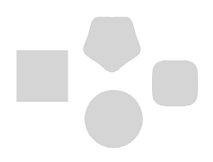
                    0_1651944018173_without-scaling.png

                    Win 11
                    CPU: AMD Ryzen 5 9600X, 6-core.
                    GPU: Nvidia Geforce RTX 5070.

                    b77B 1 Reply Last reply Reply Quote 0
                    • b77B Offline
                      b77 @Subpath
                      last edited by b77

                      @Subpath Sorry, I didn't see that image. Yes, the Super Ellipse and Super Shape could have a scaling knob, I agree. πŸ‘

                      MacBook Pro (Intel) running Monterey 12.6.4

                      S 1 Reply Last reply Reply Quote 1
                      • S Offline
                        Subpath @b77
                        last edited by

                        @b77

                        no problem πŸ™‚

                        Win 11
                        CPU: AMD Ryzen 5 9600X, 6-core.
                        GPU: Nvidia Geforce RTX 5070.

                        1 Reply Last reply Reply Quote 1
                        • First post
                          Last post