VectorStyler
    • Categories
    • Unread
    • Recent
    • Tags
    • Popular
    • Register
    • Login

    Extend Square Star by one Point

    Scheduled Pinned Locked Moved Features and Ideas
    29 Posts 5 Posters 43.5k Views 4 Watching
    Loading More Posts
    • Oldest to Newest
    • Newest to Oldest
    • Most Votes
    Reply
    • Reply as topic
    Log in to reply
    This topic has been deleted. Only users with topic management privileges can see it.
    • S Offline
      Subpath
      last edited by Subpath

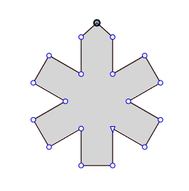
      Would be great if the Square Stare could
      be extended by one point.

      Because that would expand the possible shapes a bit.
      I would like to have a moveable/editable peak point.
      Like so, but editable.
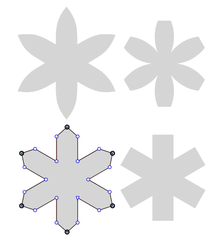
      0_1651844725258_Square Star-with-Peak.png

      0_1651844734103_Square-Star-with Peak-2.png

      left my Idea, right as it is by now.

      Win 11
      CPU: AMD Ryzen 5 9600X, 6-core.
      GPU: Nvidia Geforce RTX 5070.

      BoldlineB VectorStylerV 2 Replies Last reply Reply Quote 2
      • BoldlineB Online
        Boldline @Subpath
        last edited by

        @Subpath I completely understand why you are asking for that additional point.
        Here are two thoughts why it might not be needed:
        1- it's adding more potentially unnecessary nodes to the design. (for shapes created that don't need that middle point)
        2. you can easily add a node to the exact center point of any shape like that by double-clicking the node next to it. So to add a node where you are requesting it, just double click on the node to the far left side. it's really a neat feature

        I have this same thought about the potential addition of a triangle shape. Sometimes I prefer a dedicated triangle shape in VS and other times I realize it would just take up more space when I can click on the star tool and make it have three points instead of 5 and have the triangle I need.

        🍎 macOS Tahoe 26.2, Mac mini (M1, 2020), Chip Apple M1, Memory 16 GB
        Cintiq 27QHD Display and LG Ultra HD Display

        S 1 Reply Last reply Reply Quote 0
        • S Offline
          Subpath @Boldline
          last edited by Subpath

          @Boldline

          ...1- it's adding more potentially unnecessary nodes to the design.
          (for shapes created that don't need that middle point)...

          I suspect that this shape already has points that Users don't use.
          But i have uses for this and it's just "one" more point and many more possibilities.
          Sorry but I don't understand your concerns in this case.

          .
          .

          ... 2. you can easily add a node to the exact center point of any shape like that by
          double-clicking the node next to it. So to add a node where you are requesting it,
          just double click on the node to the far left side. it's really a neat feature ....

          I know I can do what you described, and I know how to do it.
          But I would like it to be "editable", like the Square Star, before I turn it into a curve.
          That's the point of my request in the first place.

          Win 11
          CPU: AMD Ryzen 5 9600X, 6-core.
          GPU: Nvidia Geforce RTX 5070.

          b77B 1 Reply Last reply Reply Quote 0
          • b77B Offline
            b77 @Subpath
            last edited by b77

            @Subpath Currently this parametric shape (Square Star) has control handles that scale the shape at the locations where you suggested it could have an editable path point.

            Where should the handle for scaling the shape be? Or it should not have that?

            MacBook Pro (Intel) running Monterey 12.6.4

            S 1 Reply Last reply Reply Quote 0
            • VectorStylerV Offline
              VectorStyler @Subpath
              last edited by

              @Subpath The gear shape options are symmetric, in that they have the same effect for each knob.
              Would this peak be the same (as in the 3rd tow), so when dragged it would be on all knobs?
              In this case the example from the first row would not work.

              S 1 Reply Last reply Reply Quote 0
              • S Offline
                Subpath @VectorStyler
                last edited by Subpath

                @vectoradmin

                Such a shape was the original reason for my request.
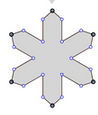
                0_1651856896829_First-Shape-1.png

                Yes, this shape is also possible with the gear shape.

                0_1651856968458_second-shape.png

                So only for the first form, my request is maybe a bit too much,
                but i still found it useful.

                Win 11
                CPU: AMD Ryzen 5 9600X, 6-core.
                GPU: Nvidia Geforce RTX 5070.

                Victor VectorV 1 Reply Last reply Reply Quote 0
                • Victor VectorV Offline
                  Victor Vector @Subpath
                  last edited by

                  @Subpath I like your idea and I see value in adding this function.

                  Here's an interface suggestion to make your idea easily editable:
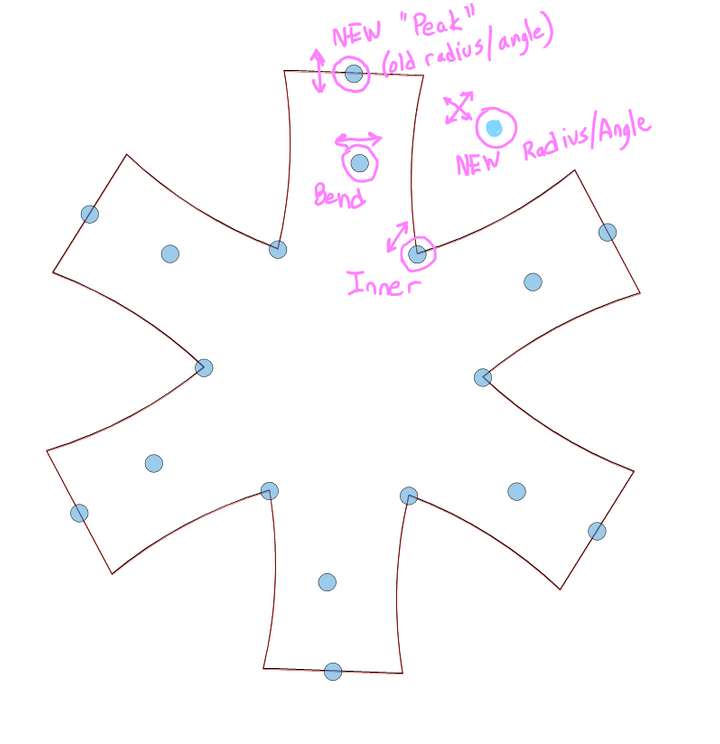
                  0_1651857177590_Peak Square-Star.png

                  Of course the Shape Panel would need to be updated as well.

                  S 1 Reply Last reply Reply Quote 2
                  • S Offline
                    Subpath @b77
                    last edited by Subpath

                    @b77

                    Yes, the position of the scaling point is the weak point in my request.
                    Honestly, I don't really know where to put it.

                    Win 11
                    CPU: AMD Ryzen 5 9600X, 6-core.
                    GPU: Nvidia Geforce RTX 5070.

                    1 Reply Last reply Reply Quote 0
                    • S Offline
                      Subpath @Victor Vector
                      last edited by

                      @Victor-Vector

                      Like your idea, for the scaling point.

                      Win 11
                      CPU: AMD Ryzen 5 9600X, 6-core.
                      GPU: Nvidia Geforce RTX 5070.

                      b77B 1 Reply Last reply Reply Quote 1
                      • b77B Offline
                        b77 @Subpath
                        last edited by b77

                        I thought about all this, and things might not be that simple.

                        First, an observation:

                        The bending knob of the Square Star shape is positioned between the two segments it bends, which is different from the Star and Gear shapes, where it is positioned on the segments:
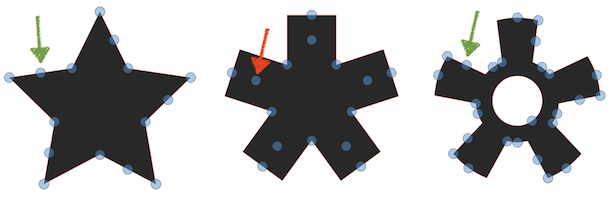
                        0_1651876427871_sst.png

                        Unless there is some good reason for this being in the middle, I would move it also on the segment β€” it makes more sense IMO.

                        …………………… … .. .

                        Anyway, I made a mockup to see how the star-based shapes would look with the scaling knobs positioned between the rays:
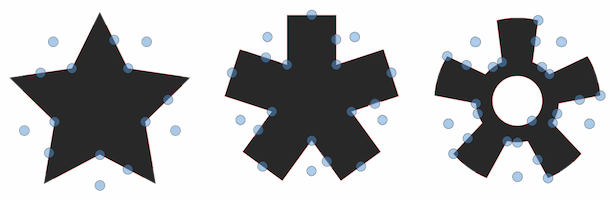
                        0_1651881200973_sst copy.png

                        What I'm afraid is that these knobs can be less visible if there are other objects in the background.

                        The way half of each knob overlaps the shape now avoids this.

                        And… it all looks a bit busy. Maybe use just one knob for scaling?
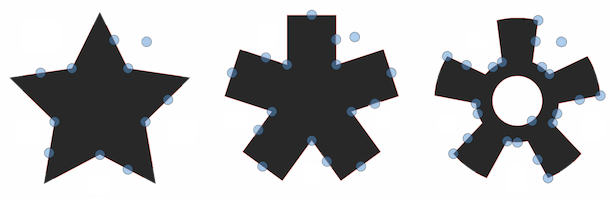
                        0_1651881591885_sst cl.png

                        …………………… … .. .

                        Another thing:

                        Can the bend knobs have a way to reset their segments to straight β€” a double-click maybe?

                        And a question:

                        Just in case the developer would include a [–|+] button/handle that allows you to change the ray count for the Star shapes directly on the canvas, where should such a handle be positioned? Somewhere between the rays of the shape or in a corner of the bounding box?

                        MacBook Pro (Intel) running Monterey 12.6.4

                        VectorStylerV S 2 Replies Last reply Reply Quote 1
                        • VectorStylerV Offline
                          VectorStyler @b77
                          last edited by

                          @b77 I added these to the backlog for the extra shape parameter.

                          There is no bend knob reset at this time, but double click seems like an easy solution.

                          I would leave out a [+/-] handle for now. The up/down arrow keys can be used to change the count.

                          S 1 Reply Last reply Reply Quote 1
                          • S Offline
                            Subpath @b77
                            last edited by

                            @b77

                            Thank you for your explorations,
                            I really appreciate it.

                            Win 11
                            CPU: AMD Ryzen 5 9600X, 6-core.
                            GPU: Nvidia Geforce RTX 5070.

                            1 Reply Last reply Reply Quote 1
                            • S Offline
                              Subpath @VectorStyler
                              last edited by Subpath

                              @vectoradmin

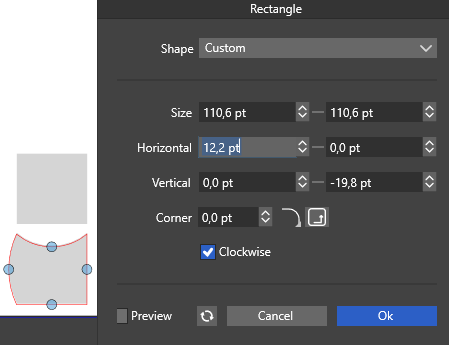
                              I always use the Shape Panel to change the count
                              and also to reset the Bend.

                              But the Bend in the Rectangle/Square shape
                              doesnt have an Option to do that.
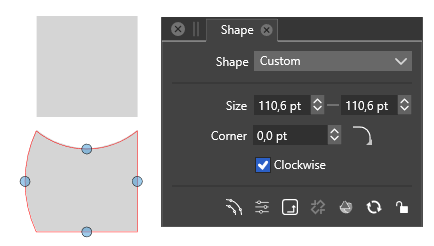
                              0_1651906941976_Shape-Option.png

                              Only the Rectangle Option have this
                              0_1651906974731_Rectangle Option.png

                              Win 11
                              CPU: AMD Ryzen 5 9600X, 6-core.
                              GPU: Nvidia Geforce RTX 5070.

                              1 Reply Last reply Reply Quote 1
                              • S Offline
                                Subpath
                                last edited by Subpath

                                First of all, I have to say that I am not in a hurry at all.

                                I will try to explain my somewhat diffuse thoughts.
                                .

                                One point of my thoughts is that I like the concept of non-destructive modeling
                                in 3D programs and, of course, in 2D. Therefore, in my vector graphics heaven,
                                shapes always remained editable.

                                VS already has a lot to offer in this regard.

                                The second point of my consideration is the creation of shapes that always
                                remain editable for pattern creation.

                                .
                                .
                                .

                                Using clones is certainly also a way to create such editable shapes.
                                Composite objects also offer some possibilities.
                                Unfortunately, both have transformation bugs at the moment.

                                If one day the transformation problems with them are solved,
                                then I see a very flexible way to create such editable shapes.
                                .
                                .
                                .

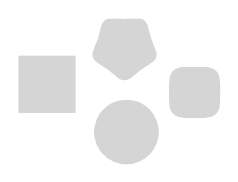
                                I looked at the shapes themselves and found that some shapes don't use
                                a scale point at all, they are scaled just with the normal selection rectangle.
                                So whats the scale point for ?
                                .

                                shapes without scaling point
                                0_1651906052930_without scaling point.png

                                shapes with a scaling point
                                0_1651906081400_with scaling point.png

                                Win 11
                                CPU: AMD Ryzen 5 9600X, 6-core.
                                GPU: Nvidia Geforce RTX 5070.

                                VectorStylerV Victor VectorV 2 Replies Last reply Reply Quote 2
                                • VectorStylerV Offline
                                  VectorStyler @Subpath
                                  last edited by

                                  @Subpath The best way to keep shapes editable (and reused) is to enable the Shape role of an object, and select Shape styles.

                                  The composite shape transformation errors will be fixed, but these concern only the arrangement of shapes inside a composite shape.

                                  S 1 Reply Last reply Reply Quote 1
                                  • S Offline
                                    Subpath @VectorStyler
                                    last edited by Subpath

                                    @vectoradmin

                                    I looked at under Object > Object Role and found only "Shape"
                                    as a Role, did you mean this ?

                                    And where will this be different instead of using symbols or clones
                                    (i know the different between Symbols and Clones)

                                    Win 11
                                    CPU: AMD Ryzen 5 9600X, 6-core.
                                    GPU: Nvidia Geforce RTX 5070.

                                    VectorStylerV 1 Reply Last reply Reply Quote 0
                                    • VectorStylerV Offline
                                      VectorStyler @Subpath
                                      last edited by

                                      @Subpath Yes that is the "Shape" role. It can also be set in the Object Options view with the Role button.

                                      The difference:
                                      When using the Shape role a "virtual" shape style is created (think of a shape style as a fill or stroke style, but for shapes).
                                      This shape style can then be selected on any object to be the shape of the object. These objects will not be symbol instances, and they may have any other local attributes, but their shape is linked as a style to the shape style.

                                      S 1 Reply Last reply Reply Quote 2
                                      • S Offline
                                        Subpath @VectorStyler
                                        last edited by Subpath

                                        @vectoradmin

                                        thank you for the explanation.
                                        Could you briefly explain how I then pass this "style" to other objects ?
                                        .
                                        .
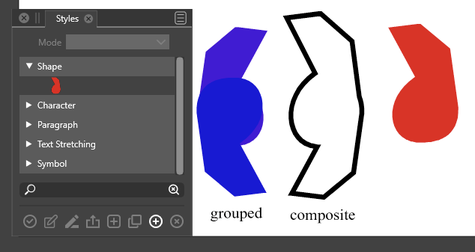
                                        I think I figured out how to do this.
                                        Select Panels > Styles > Styles (alt+v).

                                        Open Shape in the panel and here is your previously
                                        created Shape role

                                        Select the object(s) you want to apply it to and press the icon in the bottom
                                        left corner. To test it, just scale your original object

                                        Did some tests:
                                        Node editing is possible
                                        Group shapes after you applied the style too
                                        Even composite objects work (not possible with clone)
                                        but give me a fixable strange position for an object inside the composite object
                                        .
                                        will explore this further

                                        0_1651916012455_Style apply-2.png
                                        .
                                        .
                                        Video: here my results

                                        Win 11
                                        CPU: AMD Ryzen 5 9600X, 6-core.
                                        GPU: Nvidia Geforce RTX 5070.

                                        VectorStylerV 2 Replies Last reply Reply Quote 1
                                        • VectorStylerV Offline
                                          VectorStyler @Subpath
                                          last edited by

                                          @Subpath When an object is selected, the Shape panel (and the Context panel) will contain a "Shape" drop down, that lists all the Shape styles and presets.
                                          Select the shape from there. The shape is listed with the name that was assigned to the object with the Shape role.

                                          1 Reply Last reply Reply Quote 1
                                          • VectorStylerV Offline
                                            VectorStyler @Subpath
                                            last edited by

                                            @Subpath Yes, the Styles panel also works for this.

                                            1 Reply Last reply Reply Quote 0
                                            • First post
                                              Last post