VectorStyler
    • Categories
    • Unread
    • Recent
    • Tags
    • Popular
    • Register
    • Login

    Snapping to the center

    Scheduled Pinned Locked Moved Implemented Features
    12 Posts 5 Posters 18.3k Views 5 Watching
    Loading More Posts
    • Oldest to Newest
    • Newest to Oldest
    • Most Votes
    Reply
    • Reply as topic
    Log in to reply
    This topic has been deleted. Only users with topic management privileges can see it.
    • 861475_VctSt8 Offline
      861475_VctSt @VectorStyler
      last edited by

      @vectoradmin

      I am using that setting. And there is a feeling that I am Snaping somewhere.
      However, if I have other snap options turned on at the same time, it's hard to tell if that's the center.
      That's why I also want a snap guideline indicator.

      LIc. 0 OS10.15.7
      MacBook Air (13-inch, Mid 2012) / Intel Core i5, 8GB / Intel HD Graphics 4000
      LIc. 1 OS13.6.7
      MacBook Pro (14-inch, 2023) / Apple M2 Pro, 16GB / Apple GPU

      b77B 1 Reply Last reply Reply Quote 0
      • b77B Offline
        b77 @861475_VctSt
        last edited by

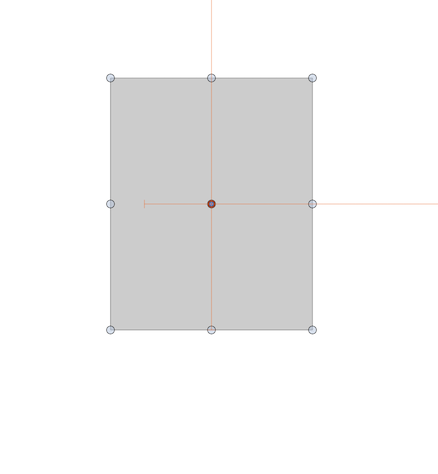
        @861475_VctSt When 'Snap to Artboards' is enabled, here the app displays orange guides when the object snaps to the center of the artboard:
        0_1634893908693_snap_indicator.png

        MacBook Pro (Intel) running Monterey 12.6.4

        861475_VctSt8 1 Reply Last reply Reply Quote 0
        • 861475_VctSt8 Offline
          861475_VctSt @b77
          last edited by

          @b77
          @vectoradmin

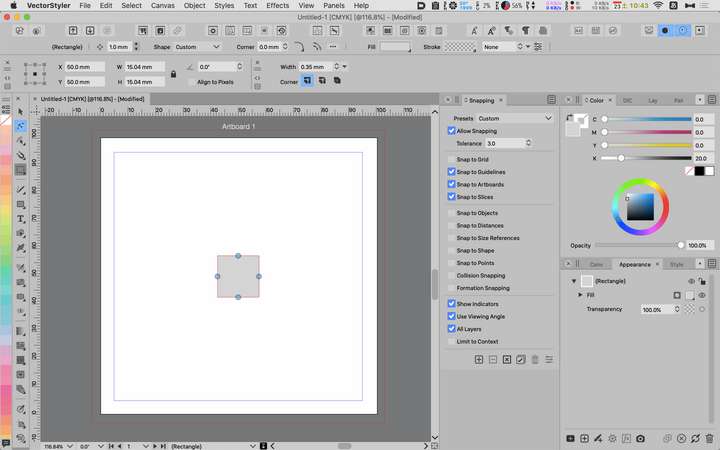
          I'm sure my settings are ready. Why can't I do it?
          Do I need Prefarence settings?

          0_1634953726161_2021-10-23.png

          LIc. 0 OS10.15.7
          MacBook Air (13-inch, Mid 2012) / Intel Core i5, 8GB / Intel HD Graphics 4000
          LIc. 1 OS13.6.7
          MacBook Pro (14-inch, 2023) / Apple M2 Pro, 16GB / Apple GPU

          VectorStylerV 1 Reply Last reply Reply Quote 0
          • VectorStylerV Offline
            VectorStyler @861475_VctSt
            last edited by

            @861475_VctSt Is the issue with Snapping, or with Pasting?
            The snapping should work when the object is moved with the settings form then screenshot.
            Pasting only works if a different artboard is active (I will improve on this one).

            861475_VctSt8 1 Reply Last reply Reply Quote 0
            • 861475_VctSt8 Offline
              861475_VctSt @VectorStyler
              last edited by 861475_VctSt

              @vectoradmin

              Sorry. Let's get back to the topic at hand.
              I want to move the object to the center of the artboard by dragging it with the mouse.
              I want to display the guide indicater at the same time, so that it is attached to the center of the artboard.

              That's my first post about wanting that feature.
              I have received several answers since then, but I can't do it.

              LIc. 0 OS10.15.7
              MacBook Air (13-inch, Mid 2012) / Intel Core i5, 8GB / Intel HD Graphics 4000
              LIc. 1 OS13.6.7
              MacBook Pro (14-inch, 2023) / Apple M2 Pro, 16GB / Apple GPU

              VectorStylerV 1 Reply Last reply Reply Quote 0
              • G Offline
                Gremriel
                last edited by

                I tried it, and I can't get the object snapping to the artboard center either.

                WIndows 11

                1 Reply Last reply Reply Quote 0
                • VectorStylerV Offline
                  VectorStyler @861475_VctSt
                  last edited by

                  @861475_VctSt It looks like there are some issues with the indicator (at least for me), but the snapping works. I will open a bug on this one.

                  1 Reply Last reply Reply Quote 1
                  • VectorStylerV Offline
                    VectorStyler @861475_VctSt
                    last edited by

                    @861475_VctSt This feature is available now in 1.1.002 (beta)

                    861475_VctSt8 1 Reply Last reply Reply Quote 0
                    • 861475_VctSt8 Offline
                      861475_VctSt @VectorStyler
                      last edited by

                      @vectoradmin

                      VS 1.1.010
                      MacOS X 10.15.7

                      I have confirmed that it is fixed.

                      Thank you.
                      I've been waiting for this.

                      LIc. 0 OS10.15.7
                      MacBook Air (13-inch, Mid 2012) / Intel Core i5, 8GB / Intel HD Graphics 4000
                      LIc. 1 OS13.6.7
                      MacBook Pro (14-inch, 2023) / Apple M2 Pro, 16GB / Apple GPU

                      1 Reply Last reply Reply Quote 0
                      • IngolfI Offline
                        Ingolf
                        last edited by Ingolf

                        Indeed fixed, yes.

                        🍏 macOS Sequoia Apple Silicon

                        1 Reply Last reply Reply Quote 0
                        • First post
                          Last post