Could we add an option for circles in the "dash" section of the stroke panel?
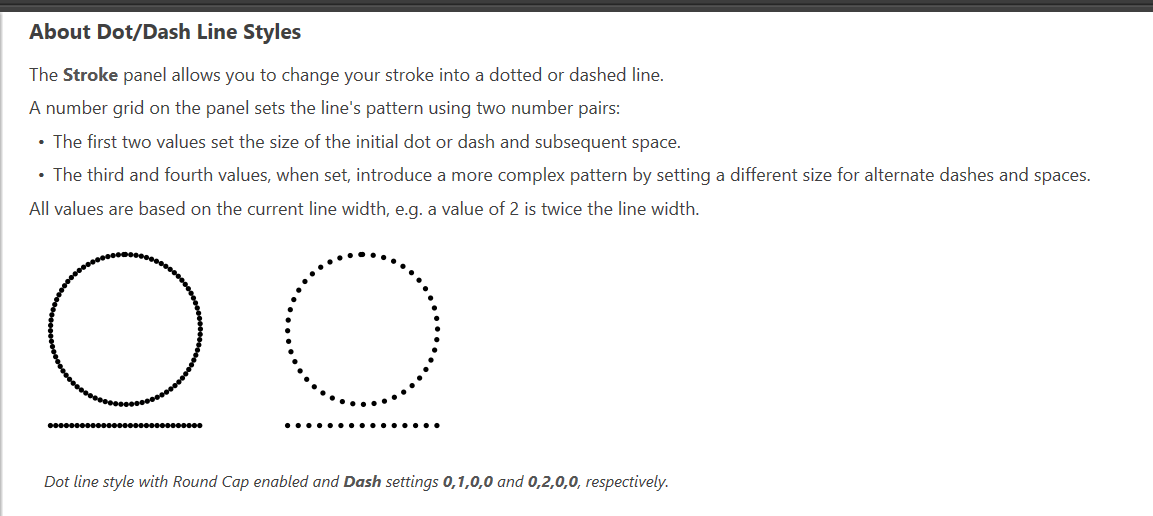
-
I was needing to make a line with circle dots. The dash portion of the stroke panel is really cool, but all the marks are rectangles and squares. Could we add an option to turn them into circles and rounded rectangles? Affinity refers to it as "Dot/Dash"


-
@Boldline The dash controls the spacing along the line. To have circles, select the zero size dash (those thin rectangles), and then select the round Cap in the cap field for both ends.
-
@vectoradmin said in Could we add an option for circles in the "dash" section of the stroke panel?:
@Boldline The dash controls the spacing along the line. To have circles, select the zero size dash (those thin rectangles), and then select the round Cap in the cap field for both ends.
@vectoradmin,
Adobe Illustrator allows for Circled dashes when setting Dash size to Zero and Cap to Round also.

.
A couple of things I prefer with Adobe Illustrator:- While it is a benefit to have a round cap option for both ends as in VectorStyler, it adds an extra step compared to Illustrator for this process and situations when you want both settings the same.
- I like how with Illustrator you have direct access to a few Dash/Gap Editor Fields without using the Fly-out Panel for simple patterns settings.
.
Maybe a couple of VectorStyler Improvements could be made in the Stroke Panel?-
Would it make sense to have a "Chain Link" type Icon next to the Cap and Arrow options such that if set to "linked", setting one of the values automatically sets the other identically?
-
Maybe add a Dashed Line "Check Box" and have Dash and Gap Editor Fields in the "main" Panel for a few settings (Adobe Illustrator has three)? Maybe with a Right Pointing Arrow key for Scrolling additional fields?
-
@Vector-Rock I added to the backlog a dash/cap selection improvement task.

