VectorStyler
    • Categories
    • Unread
    • Recent
    • Tags
    • Popular
    • Register
    • Login

    Strange results and behavior while editing inside a clipping mask

    Scheduled Pinned Locked Moved Bugs in VectorStyler
    14 Posts 3 Posters 39 Views 2 Watching
    Loading More Posts
    • Oldest to Newest
    • Newest to Oldest
    • Most Votes
    Reply
    • Reply as topic
    Log in to reply
    This topic has been deleted. Only users with topic management privileges can see it.
    • BoldlineB Online
      Boldline
      last edited by

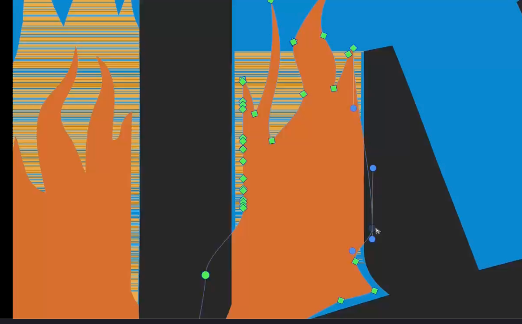
      I clipped vector flames inside of a blue text mask. When i go to edit the inset flames, I get strange results as shown in this video.

      Below is a photo of one example of the odd behavior i the video. Another example happens too quickly to capture in a still image, but its like the clipped shape is fully visible for a moment.
      2422beb9-53c5-4ee5-9b23-fb2c48fe8695-CleanShot 2026-07-18 at 10.49.41.png

      Here is the file in the video:
      clipping mask issue.vstyler

      🍎 macOS Tahoe 26.2, Mac mini (M1, 2020), Chip Apple M1, Memory 16 GB
      Cintiq 27QHD Display and LG Ultra HD Display

      VectorStylerV 3 Replies Last reply Reply Quote 1
      • VectorStylerV Offline
        VectorStyler @Boldline
        last edited by

        @Boldline I will try to replicate and fix this.

        1 Reply Last reply Reply Quote 1
        • VectorStylerV Offline
          VectorStyler @Boldline
          last edited by

          @Boldline Is this with GPU view?

          BoldlineB 1 Reply Last reply Reply Quote 0
          • BoldlineB Online
            Boldline @VectorStyler
            last edited by

            @VectorStyler no, it was not activated this time

            🍎 macOS Tahoe 26.2, Mac mini (M1, 2020), Chip Apple M1, Memory 16 GB
            Cintiq 27QHD Display and LG Ultra HD Display

            VectorStylerV 1 Reply Last reply Reply Quote 1
            • VectorStylerV Offline
              VectorStyler @Boldline
              last edited by

              @Boldline Could not replicate this here

              BoldlineB L 2 Replies Last reply Reply Quote 0
              • BoldlineB Online
                Boldline @VectorStyler
                last edited by

                @VectorStyler just sent you by email the workspace settings files - in case that helps

                🍎 macOS Tahoe 26.2, Mac mini (M1, 2020), Chip Apple M1, Memory 16 GB
                Cintiq 27QHD Display and LG Ultra HD Display

                1 Reply Last reply Reply Quote 0
                • L Offline
                  Li Xiao @VectorStyler
                  last edited by

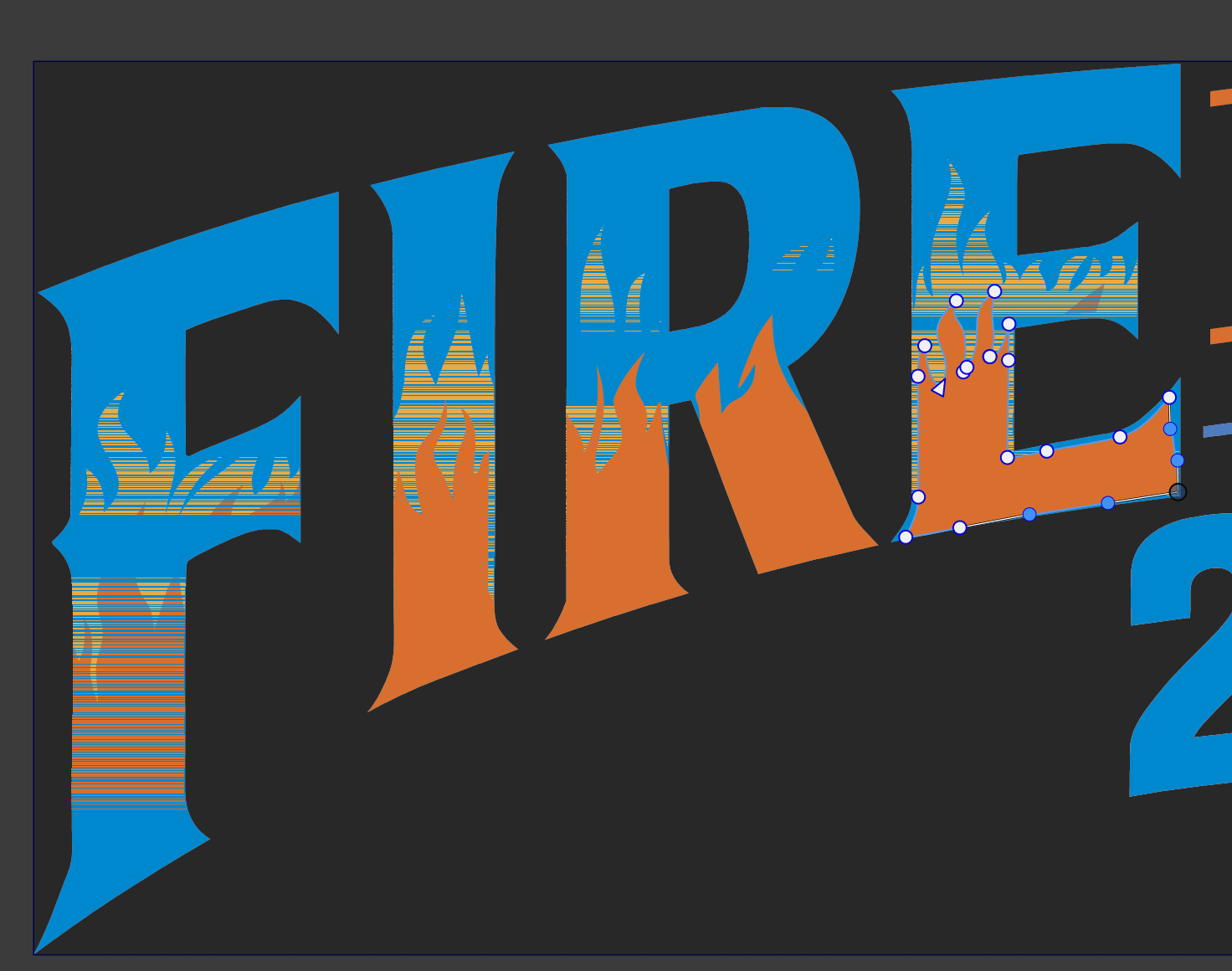
                  @VectorStyler I have tested this on both macOS and Windows, and the issue illustrated in the image occurs on both platforms.
                  2026-07-18.png

                  1 Reply Last reply Reply Quote 2
                  • VectorStylerV Offline
                    VectorStyler @Boldline
                    last edited by

                    @Boldline Can be replicated with the workspace you sent.

                    BoldlineB 2 Replies Last reply Reply Quote 2
                    • BoldlineB Online
                      Boldline @VectorStyler
                      last edited by

                      @VectorStyler Awesome! thanks for checking that. I'm guessing @li-xiao has a similar workspace setting that allows it to occur on his computer as well.

                      🍎 macOS Tahoe 26.2, Mac mini (M1, 2020), Chip Apple M1, Memory 16 GB
                      Cintiq 27QHD Display and LG Ultra HD Display

                      1 Reply Last reply Reply Quote 1
                      • BoldlineB Online
                        Boldline @VectorStyler
                        last edited by

                        @VectorStyler This issue seems to be resolved in build 23 that you released today! I created a new example with a couple vector objects clipped inside a shape and then edited them and it worked perfectly. I went back to the old example from this thread and the issue remains, but instead of flashing, the shape stays visible outside the clipping shape when actively edited. What I did notice was that in this example, the orange was always the issue even when it was the yellow shape I was editing.
                        Here is a video where I show both examples - the new one that works and the old one that still has an issue in build 23

                        Here is the file from a couple weeks ago uploaded again for comparison with the new build 23 fixes.

                        clipping-mask-issue.vstyler

                        🍎 macOS Tahoe 26.2, Mac mini (M1, 2020), Chip Apple M1, Memory 16 GB
                        Cintiq 27QHD Display and LG Ultra HD Display

                        VectorStylerV 1 Reply Last reply Reply Quote 1
                        • VectorStylerV Offline
                          VectorStyler @Boldline
                          last edited by

                          @Boldline said in Strange results and behavior while editing inside a clipping mask:

                          the shape stays visible outside the clipping shape when actively edited.

                          I will try to replicate and fix this

                          BoldlineB 1 Reply Last reply Reply Quote 1
                          • BoldlineB Online
                            Boldline @VectorStyler
                            last edited by

                            @VectorStyler I had a little more time to investigate. The old file works perfectly in default settings on Tahoe. It still has the issue I made a screen video of today when I am using my custom settings. My custom settings in Tahoe were no issue with the new sample I used in the screen video. I can send you those settings

                            🍎 macOS Tahoe 26.2, Mac mini (M1, 2020), Chip Apple M1, Memory 16 GB
                            Cintiq 27QHD Display and LG Ultra HD Display

                            VectorStylerV 1 Reply Last reply Reply Quote 0
                            • VectorStylerV Offline
                              VectorStyler @Boldline
                              last edited by

                              @Boldline send me the settings

                              BoldlineB 1 Reply Last reply Reply Quote 1
                              • BoldlineB Online
                                Boldline @VectorStyler
                                last edited by

                                @VectorStyler just sent! thanks

                                🍎 macOS Tahoe 26.2, Mac mini (M1, 2020), Chip Apple M1, Memory 16 GB
                                Cintiq 27QHD Display and LG Ultra HD Display

                                1 Reply Last reply Reply Quote 0
                                • First post
                                  Last post
