Masking Bugs - Strokes and Scaling
-
Hello. I believe I have found some bugs regarding masks. It could be just me missing something, but I'll present them as I found them.
To be honest, I'm a little fried because I've lost days trying to work around these problems just to get a logo that was supposed to be done days ago exported without parts of it breaking.
As someone who has worked on software bugs of my own, though, my respect goes to anyone who can put together a program like this and still manage to be active and responsive on their forum, which I've gathered the devs here are good for. Despite how frustrated I have been with the software at various points, it's still one of the most useful vector programs I've used and has features I needed that others don't handle as nicely.
For Context:
I'm on Windows 11
Currently I'm on VS1.3.016, but that version actually introduced one of the bugs I need to report. I'll cover that one first.In my current project I've been using VS for, I have a lot of shapes with child stroke paths clipped to the parent, specifically to use the gradient 'Along/Across Stroke' feature. VectorStyler's ability to handle gradients this way is the reason I discovered the program. For shapes and fills where I needed more than a simple transparency gradient I had also been using stroke paths to create masks, which worked for the most part.
Bug One:
After upgrading from1.3.012to1.3.016(I had a file saved under.012that was then bugged in.016), many of these masks (but not all of them - I haven't been able to determine the difference) broke. At first glance, it was like the masks were simply 'ignored', though as I later found out, it seems the mask itself was getting 'masked'.I tried recreating the masks, removing, and redoing parts of it, repositioning the masks, moving them to different layers, toggling isolation mode, but nothing worked.
During that whole process, I accidentally discovered that the mask worked if there was a mask on BOTH the stroke and the layer/path I was trying to mask. Specifically, I couldn't put it on just one or the other. It had to be both, because wherever the masks intersected it behaved like anANDoperation. Without one or the other, masking simply didn't appear.I ended up putting a white box mask on the
Strokein theAppearance Panelto cover the area the normal mask would take up, which in turn allowed the actual mask in theLayershierarchy to work in the content.Bug Two:
This bug (or behavior) predates my upgrade to1.3.016.This one I have less specific information on, so I apologize. After discovering the hard way that
Transform ContentandTransform Mask Contentwere features, and that they weren't enabled by default, I found that certain masks still broke when attempting to scale or move my shapes.This was after:
- Flattening any latent transforms using Convert to Curves to make sure they weren't messing with the coordinate space.
- Redrawing the masks.
- Making sure the position of the mask was
Linked - Making sure
Transform Mask Contentwas enabled - And
Transform Contentfor good measure - Trying both an external layer mask and a directly drawn mask
- Comparing them to other masks in the project that scaled just fine (for all the settings I could dig through, they appeared identical)
Additional note: When editing the broken mask, it appeared to be in the correct place, whereas ironically the working masks appeared the wrong size and offset when editing them, even though the path itself showed as in the correct location.
Bug Three:
Just a very simple rendering issue in the layers hierarchy text. Double-clicking on a layer to bring up itsObject Optionsmakes the text in the hierarchy... shrink? It's difficult to describe, so I'll include a screenshot. Scrolling up and down in the hierarchy fixes it.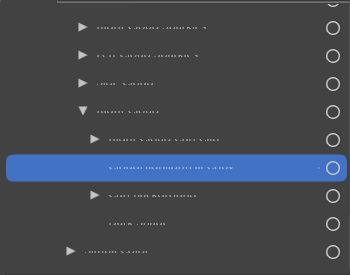
Bug Four:
A small thing withgradientstops. When clicking on stops, thepositionandtransparencydon't update to reflect the properties of the newly selected stop. They stay at whatever was there previously.Small Suggestion:
For mask position linking, I think the button might work better as a clear 'toggle' for on and off states rather than switching between alinkand abreaking linkimage. It may just be me, but I had to go digging to make sure I had the behavior right, because I couldn't tell whether the button was indicating "What happens if you click this" or "What the current state is". A highlight to indicate on/off on the regular link image might be more readable to those unfamiliar. Definitely not a huge issue, so feel free to ignore this suggestion, but I figured I would mention it.Thank you for your time.
-
@DreamS Can you send me som example files with the masking issues: to csraba at vectorstyler.com
I will try to replicate and fix these issues as soon as possible.
-
I'll get an example file set up for you as soon as I can - it may be around a day or two, but I'll do sooner if I can. Thank you for the reply!
-
@VectorStyler said in Masking Bugs - Strokes and Scaling:
@DreamS Can you send me som example files with the masking issues: to csraba at vectorstyler.com
I will try to replicate and fix these issues as soon as possible.
I'm sending you an example file now - I apologize in advance if this is just me not knowing how to properly use the software. If it is a bug, then I hope this helps.
-
@DreamS I got the files, I will try to find out what can cause these issues
