VectorStyler
    • Categories
    • Unread
    • Recent
    • Tags
    • Popular
    • Register
    • Login

    Is there a way to align node handles? (one to another)

    Scheduled Pinned Locked Moved Questions and Support
    4 Posts 3 Posters 18 Views 2 Watching
    Loading More Posts
    • Oldest to Newest
    • Newest to Oldest
    • Most Votes
    Reply
    • Reply as topic
    Log in to reply
    This topic has been deleted. Only users with topic management privileges can see it.
    • debraspicherD Offline
      debraspicher
      last edited by

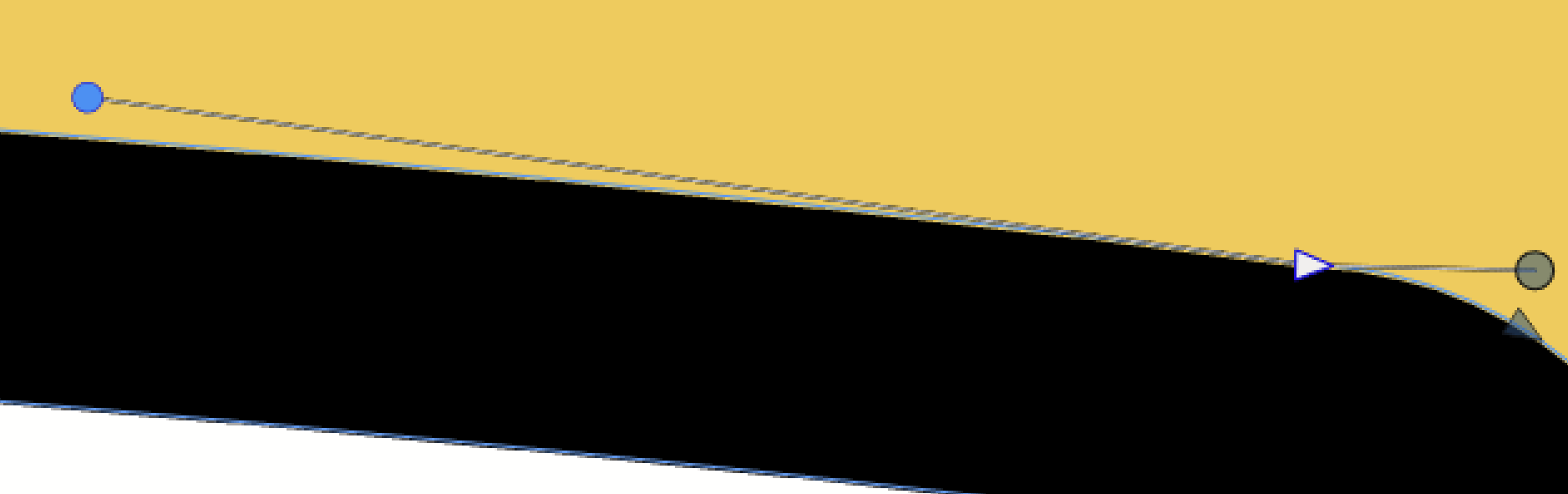
      So I have this node and I'd like to "flatten" it so that the right side handle is in line with the other. Is this possible?
      6dbd9c3c-5ab9-4f20-8316-1eaa7c5030d5-image.png

      Windows 11 Build 26200.7171 (25H2)
      AMD Ryzen 7 9700X with Gigabyte X870E Aorus Pro Ice
      32GB RAM @ 6000MHz
      PNY NVIDIA RTX 5070 Ti 16GB; Display 1: 4K @150%; Display 2: 4K @150%
      Wacom Intuos Pro L (2025); Wacom Intuos Pro M; Epson ET-8550; Siser Romeo

      BoldlineB VectorStylerV 2 Replies Last reply Reply Quote 0
      • BoldlineB Offline
        Boldline @debraspicher
        last edited by

        @debraspicher Have you tried holding down the shift key when you drag the node handle on the right side to match the left side?

        🍎 macOS Tahoe 26.2, Mac mini (M1, 2020), Chip Apple M1, Memory 16 GB
        Cintiq 27QHD Display and LG Ultra HD Display

        debraspicherD 1 Reply Last reply Reply Quote 0
        • debraspicherD Offline
          debraspicher @Boldline
          last edited by debraspicher

          @Boldline Yes, that's usually what I try first. It moves the right handle in fixed directions (0dg, 45dg, etc)

          Windows 11 Build 26200.7171 (25H2)
          AMD Ryzen 7 9700X with Gigabyte X870E Aorus Pro Ice
          32GB RAM @ 6000MHz
          PNY NVIDIA RTX 5070 Ti 16GB; Display 1: 4K @150%; Display 2: 4K @150%
          Wacom Intuos Pro L (2025); Wacom Intuos Pro M; Epson ET-8550; Siser Romeo

          1 Reply Last reply Reply Quote 0
          • VectorStylerV Offline
            VectorStyler @debraspicher
            last edited by

            @debraspicher Select the other control point and use the "smooth node" command (context panel second node type button)

            1 Reply Last reply Reply Quote 0
            • First post
              Last post