VectorStyler
    • Categories
    • Unread
    • Recent
    • Tags
    • Popular
    • Register
    • Login

    General feedback on performance

    Scheduled Pinned Locked Moved General Discussion
    6 Posts 3 Posters 613 Views 3 Watching
    Loading More Posts
    • Oldest to Newest
    • Newest to Oldest
    • Most Votes
    Reply
    • Reply as topic
    Log in to reply
    This topic has been deleted. Only users with topic management privileges can see it.
    • DanielD Offline
      Daniel
      last edited by

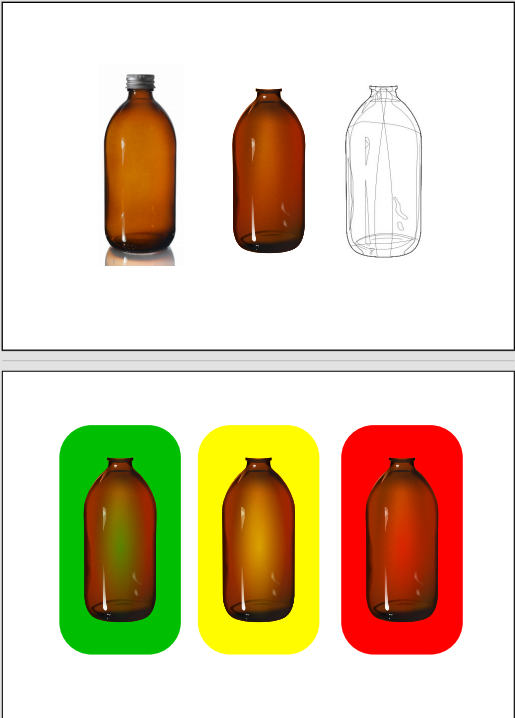
      0_1766093482358_c5c47a3d-dc16-4bd0-b715-c8315d50bf7d-image.png

      I wanted to give some feedback on VS 1.3 performance. I tried to recreate a photo realistic illustration of a bottle. There are just about 50 elements, and a combination of a variety of noises, masks and blurs. I have to say, VS could not keep up. Image FX remains the Achilles heel of the program. I ultimately couldn't complete the project in VS, and had to transfer over to Xara, which ran without any problems. @VectorStyler: I am unable to provide more detailed feedback. Let me know if you have any questions.

      Work: Windows 11 | Intel i9 14900HS (24 Cores/32 Threads) | GeForce RTX 4070 | 64 GB RAM
      Personal: Windows 11 | Amd Ryzen 9 7950X (16 Core, 32 Threads) | GeForce RTX 3060 | 32 GB RAM

      VectorStylerV 1 Reply Last reply Reply Quote 1
      • VectorStylerV Offline
        VectorStyler @Daniel
        last edited by

        @Daniel A file that where performance issues happen might help

        1 Reply Last reply Reply Quote 0
        • DanielD Offline
          Daniel
          last edited by

          PS: Whilst working on the project I realised something Xara can do that VS presently cannot. It's the application of a second layer of transparency over an already transparency masked object. What I mean is this. Create an object. Apply a transparency mask to it. At this point, you can't create a group of an object with itself.
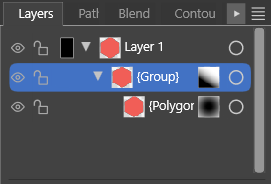
          0_1766094144527_05fb1517-a061-40bb-a582-0d5c920a74a1-image.png

          Like this. It is one of my favourite techniques for reducing the number of objects while creating complex fills. You can create a workaround. You create a duplicate of the object, create a group, and then delete the duplicate in the group, and you're left with a self-grouped object which you can mask on top of itself.

          It would be quite useful to self-group the object.
          I checked Affinity. It is possible. It's possible very simply in Xara, without any layers panel intervention. And it's the default workflow in PL. 🙂
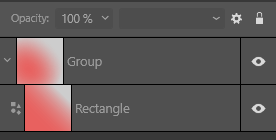
          0_1766094299188_c305e698-5b67-4fa8-9fcb-0e14d44ef8cc-image.png

          Work: Windows 11 | Intel i9 14900HS (24 Cores/32 Threads) | GeForce RTX 4070 | 64 GB RAM
          Personal: Windows 11 | Amd Ryzen 9 7950X (16 Core, 32 Threads) | GeForce RTX 3060 | 32 GB RAM

          VectorStylerV 1 Reply Last reply Reply Quote 2
          • VectorStylerV Offline
            VectorStyler @Daniel
            last edited by

            @Daniel So would this be solved by allowing the creation of groups from single objects?

            DanielD 1 Reply Last reply Reply Quote 1
            • DanielD Offline
              Daniel @VectorStyler
              last edited by Daniel

              @VectorStyler: Yup! Self-group is the solution. 🙂

              Also, I accidentally hit don't save when I was prompted for the file. So I'll rebuild and share this weekend. Sorry.

              Work: Windows 11 | Intel i9 14900HS (24 Cores/32 Threads) | GeForce RTX 4070 | 64 GB RAM
              Personal: Windows 11 | Amd Ryzen 9 7950X (16 Core, 32 Threads) | GeForce RTX 3060 | 32 GB RAM

              S 1 Reply Last reply Reply Quote 2
              • S Offline
                SaskiaHong @Daniel
                last edited by

                I've noticed performance can vary quite a bit depending on document complexity. One thing that helped me was simplifying some live effects while editing and only enabling everything again before export. It would be great to see more optimization for larger projects though, especially when working with lots of nodes and layers.


                1 Reply Last reply Reply Quote 0
                • First post
                  Last post