VectorStyler
    • Categories
    • Unread
    • Recent
    • Tags
    • Popular
    • Register
    • Login

    Draw circles/arcs from central point

    Scheduled Pinned Locked Moved Features and Ideas
    15 Posts 5 Posters 8.5k Views 4 Watching
    Loading More Posts
    • Oldest to Newest
    • Newest to Oldest
    • Most Votes
    Reply
    • Reply as topic
    Log in to reply
    This topic has been deleted. Only users with topic management privileges can see it.
    • VectorStylerV Offline
      VectorStyler @Usuario
      last edited by

      @Usuario said in Draw circles/arcs from central point:

      The improvement would come if the cursor marked the limit of the radius you draw and you could snap the circumference to that point you're interested in.

      Not clear how the user would do this. Any app where this is possible?

      Maybe it can be solved with snapping to other object sizes?

      1 Reply Last reply Reply Quote 1
      • U Offline
        Usuario
        last edited by

        Yes, there are applications that do this, for example, CorelCAD 2021. I've also seen it in AutoCAD.
        Perhaps it's a feature of 2D CAD applications.

        🍏 macOS Sequoia 15.5 - 3 GHz Intel Core i5 de 6 nĂșcleos

        1 Reply Last reply Reply Quote 1
        • IngolfI Offline
          Ingolf
          last edited by

          It's a need that designers have, but I've always managed just as easily by snapping to guides or similar. The very specific need for extreme precision sounds more like a CAD requirement, but of course, I can only speak from my own habits and knowledge. 🙂

          🍏 macOS Sequoia Apple Silicon

          1 Reply Last reply Reply Quote 1
          • S Offline
            Subpath
            last edited by

            I'm not entirely sure I understood it correctly,
            but to me it sounds like this Tool.

            Here's an example from Rhino 3D

            Win 11
            CPU: AMD Ryzen 5 9600X, 6-core.
            GPU: Nvidia Geforce RTX 5070.

            1 Reply Last reply Reply Quote 0
            • U Offline
              Usuario
              last edited by

              Yes, it seems that this is the function I am referring to, although I don't see clearly that the cursor accompanies the figure you are drawing to the connection you want to make.

              🍏 macOS Sequoia 15.5 - 3 GHz Intel Core i5 de 6 nĂșcleos

              S 1 Reply Last reply Reply Quote 0
              • S Offline
                Subpath @Usuario
                last edited by Subpath

                @Usuario said in Draw circles/arcs from central point:

                ... although I don't see clearly that the cursor accompanies the figure you are drawing to the connection you want to make...

                This is probably because I did not have snapping enabled in Rhino
                i just want to show the Tool

                Win 11
                CPU: AMD Ryzen 5 9600X, 6-core.
                GPU: Nvidia Geforce RTX 5070.

                1 Reply Last reply Reply Quote 0
                • U Offline
                  Usuario
                  last edited by Usuario

                  @Subpath said in Draw circles/arcs from central point:

                  Rhino

                  Ok. The point for me is that VectorStyler can do the drawing with the help of that very interesting feature.

                  🍏 macOS Sequoia 15.5 - 3 GHz Intel Core i5 de 6 nĂșcleos

                  1 Reply Last reply Reply Quote 1
                  • W Offline
                    William Kansepa
                    last edited by

                    I think Xara Designer also has something similar... They have these options for shape creation:
                    Radius Creation
                    Diameter Creation
                    Bounds Creation

                    HP‱Windows 11 Pro‱11th Gen Intel(R) Core(TM) i7-1165G7 @ 2.80GHz 2.70 GHz‱ RAM: 16.0 GB (DDR4)

                    S 1 Reply Last reply Reply Quote 1
                    • S Offline
                      Subpath @William Kansepa
                      last edited by

                      @William-Kansepa said in Draw circles/arcs from central point:

                      I think Xara Designer also has something similar... They have these options for shape creation:
                      Radius Creation
                      Diameter Creation
                      Bounds Creation

                      some kind of, while Radius Creation is similar
                      Rhino shows the Midpoint while you draw the circle
                      Xara doesnt

                      Win 11
                      CPU: AMD Ryzen 5 9600X, 6-core.
                      GPU: Nvidia Geforce RTX 5070.

                      1 Reply Last reply Reply Quote 1
                      • U Offline
                        Usuario
                        last edited by

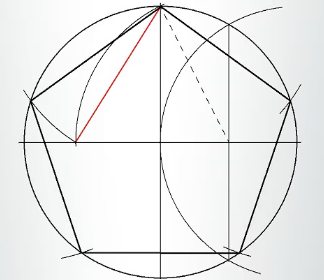
                        I wanted to do this accurately and I couldn't.
                        0_1748154271418_Captura de pantalla 2025-05-25 a las 8.20.59 a. m..png

                        🍏 macOS Sequoia 15.5 - 3 GHz Intel Core i5 de 6 nĂșcleos

                        S VectorStylerV 2 Replies Last reply Reply Quote 0
                        • S Offline
                          Subpath @Usuario
                          last edited by Subpath

                          @Usuario

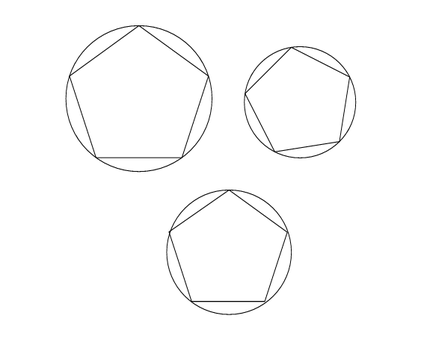
                          Don't know if this was what you were looking for (see picture),
                          but if so, here are a few options I found
                          see video here

                          0_1748163192640_circle-polygon.png

                          Win 11
                          CPU: AMD Ryzen 5 9600X, 6-core.
                          GPU: Nvidia Geforce RTX 5070.

                          1 Reply Last reply Reply Quote 1
                          • VectorStylerV Offline
                            VectorStyler @Usuario
                            last edited by

                            @Usuario Some shape properties can be manually entered in the Shape panel. For example to set the circle and polygon radius to the same value.

                            Also: alignment might not help in this case, but using Collision snapping could place the polygon to the right position (if its radius is the same as the circle).

                            1 Reply Last reply Reply Quote 0
                            • First post
                              Last post