VectorStyler
    • Categories
    • Unread
    • Recent
    • Tags
    • Popular
    • Register
    • Login

    Draw circles/arcs from central point

    Scheduled Pinned Locked Moved Features and Ideas
    15 Posts 5 Posters 8.5k Views 4 Watching
    Loading More Posts
    • Oldest to Newest
    • Newest to Oldest
    • Most Votes
    Reply
    • Reply as topic
    Log in to reply
    This topic has been deleted. Only users with topic management privileges can see it.
    • IngolfI Offline
      Ingolf
      last edited by

      It's a need that designers have, but I've always managed just as easily by snapping to guides or similar. The very specific need for extreme precision sounds more like a CAD requirement, but of course, I can only speak from my own habits and knowledge. 🙂

      🍏 macOS Sequoia Apple Silicon

      1 Reply Last reply Reply Quote 1
      • S Offline
        Subpath
        last edited by

        I'm not entirely sure I understood it correctly,
        but to me it sounds like this Tool.

        Here's an example from Rhino 3D

        Win 11
        CPU: AMD Ryzen 5 9600X, 6-core.
        GPU: Nvidia Geforce RTX 5070.

        1 Reply Last reply Reply Quote 0
        • U Offline
          Usuario
          last edited by

          Yes, it seems that this is the function I am referring to, although I don't see clearly that the cursor accompanies the figure you are drawing to the connection you want to make.

          🍏 macOS Sequoia 15.5 - 3 GHz Intel Core i5 de 6 nĂșcleos

          S 1 Reply Last reply Reply Quote 0
          • S Offline
            Subpath @Usuario
            last edited by Subpath

            @Usuario said in Draw circles/arcs from central point:

            ... although I don't see clearly that the cursor accompanies the figure you are drawing to the connection you want to make...

            This is probably because I did not have snapping enabled in Rhino
            i just want to show the Tool

            Win 11
            CPU: AMD Ryzen 5 9600X, 6-core.
            GPU: Nvidia Geforce RTX 5070.

            1 Reply Last reply Reply Quote 0
            • U Offline
              Usuario
              last edited by Usuario

              @Subpath said in Draw circles/arcs from central point:

              Rhino

              Ok. The point for me is that VectorStyler can do the drawing with the help of that very interesting feature.

              🍏 macOS Sequoia 15.5 - 3 GHz Intel Core i5 de 6 nĂșcleos

              1 Reply Last reply Reply Quote 1
              • W Offline
                William Kansepa
                last edited by

                I think Xara Designer also has something similar... They have these options for shape creation:
                Radius Creation
                Diameter Creation
                Bounds Creation

                HP‱Windows 11 Pro‱11th Gen Intel(R) Core(TM) i7-1165G7 @ 2.80GHz 2.70 GHz‱ RAM: 16.0 GB (DDR4)

                S 1 Reply Last reply Reply Quote 1
                • S Offline
                  Subpath @William Kansepa
                  last edited by

                  @William-Kansepa said in Draw circles/arcs from central point:

                  I think Xara Designer also has something similar... They have these options for shape creation:
                  Radius Creation
                  Diameter Creation
                  Bounds Creation

                  some kind of, while Radius Creation is similar
                  Rhino shows the Midpoint while you draw the circle
                  Xara doesnt

                  Win 11
                  CPU: AMD Ryzen 5 9600X, 6-core.
                  GPU: Nvidia Geforce RTX 5070.

                  1 Reply Last reply Reply Quote 1
                  • U Offline
                    Usuario
                    last edited by

                    I wanted to do this accurately and I couldn't.
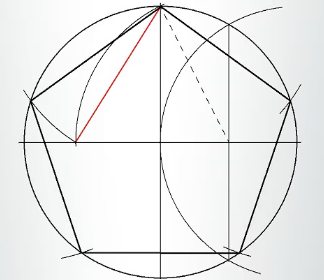
                    0_1748154271418_Captura de pantalla 2025-05-25 a las 8.20.59 a. m..png

                    🍏 macOS Sequoia 15.5 - 3 GHz Intel Core i5 de 6 nĂșcleos

                    S VectorStylerV 2 Replies Last reply Reply Quote 0
                    • S Offline
                      Subpath @Usuario
                      last edited by Subpath

                      @Usuario

                      Don't know if this was what you were looking for (see picture),
                      but if so, here are a few options I found
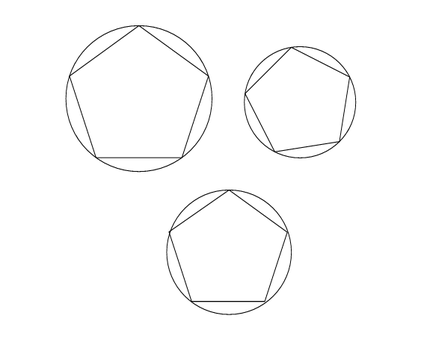
                      see video here

                      0_1748163192640_circle-polygon.png

                      Win 11
                      CPU: AMD Ryzen 5 9600X, 6-core.
                      GPU: Nvidia Geforce RTX 5070.

                      1 Reply Last reply Reply Quote 1
                      • VectorStylerV Offline
                        VectorStyler @Usuario
                        last edited by

                        @Usuario Some shape properties can be manually entered in the Shape panel. For example to set the circle and polygon radius to the same value.

                        Also: alignment might not help in this case, but using Collision snapping could place the polygon to the right position (if its radius is the same as the circle).


                        1 Reply Last reply Reply Quote 0
                        • First post
                          Last post