VectorStyler
    • Categories
    • Unread
    • Recent
    • Tags
    • Popular
    • Register
    • Login

    Detail optimization and function enhancement

    Scheduled Pinned Locked Moved Questions and Support
    87 Posts 6 Posters 97.0k Views 4 Watching
    Loading More Posts
    • Oldest to Newest
    • Newest to Oldest
    • Most Votes
    Reply
    • Reply as topic
    Log in to reply
    This topic has been deleted. Only users with topic management privileges can see it.
    • M Online
      monsterfox
      last edited by

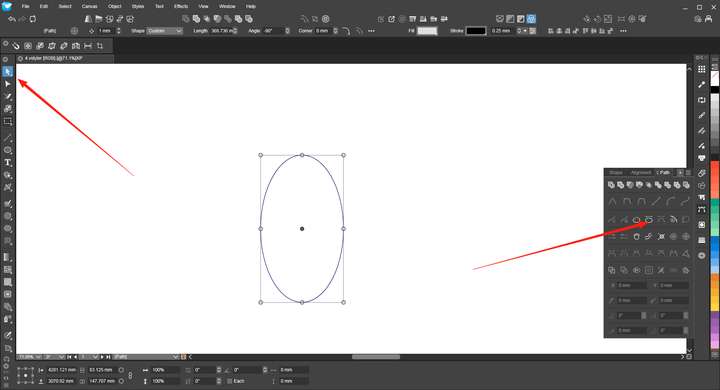
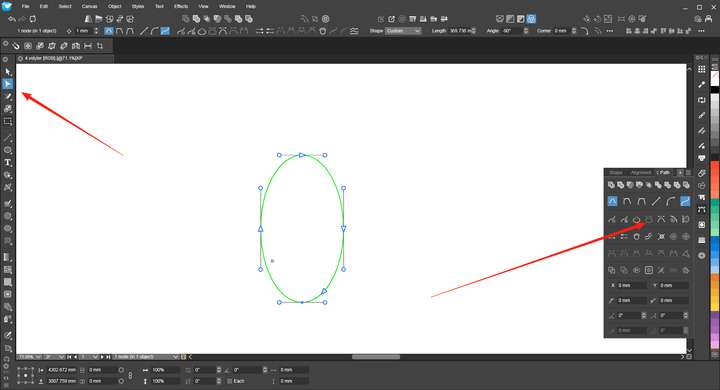
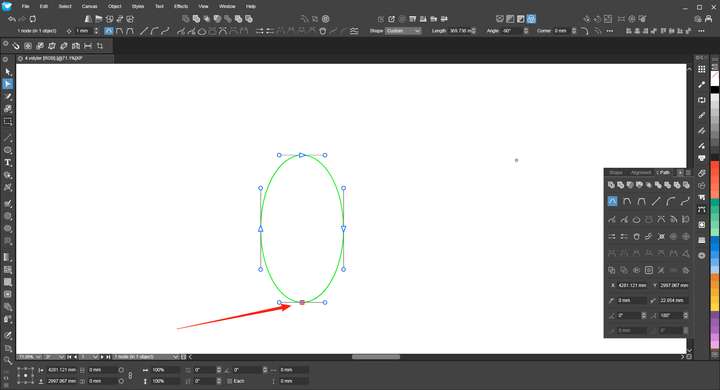
      @VectorStyler Strictly speaking, this is an error. When using the Direct Selection Tool and the Node Tool on an unclosed path, the results displayed in the Path panel are different, which needs to be fixed.!2_1750950034005_mmexport1750948282437.png 1_1750950033992_mmexport1750948280840.png 0_1750950033981_mmexport1750948278018.png

      VectorStylerV 1 Reply Last reply Reply Quote 1
      • VectorStylerV Offline
        VectorStyler @monsterfox
        last edited by

        @monsterfox I added this to the backlog.

        M 1 Reply Last reply Reply Quote 0
        • M Online
          monsterfox @VectorStyler
          last edited by

          @VectorStyler Draw two shapes, A and B. Group them together. Use the selection tool to select shape A and press Ctrl+D (duplicate in place). The newly generated shape will be grouped together with A and B. This logic is incorrect; it should be independent instead. It is hoped that this issue will be fixed.

          E VectorStylerV 2 Replies Last reply Reply Quote 1
          • E Offline
            EricP @monsterfox
            last edited by

            @monsterfox I don't think this logic is incorrect.
            Duplicate a member of a group, the copy belongs to that group. Affinity works the same way

            M 1 Reply Last reply Reply Quote 0
            • M Online
              monsterfox @EricP
              last edited by

              @EricP I'm using Freehand, and it follows the same logic as I described. Having the in-place duplicated shapes grouped together is For example, if I need to offset the path of the newly generated shape, being in a group reduces flexibility and makes the process feel restrictive.

              1 Reply Last reply Reply Quote 0
              • S Offline
                Subpath
                last edited by

                Dont know whats the right or best one in this case.
                Just wondering that Corel Draw keep a duplicated shape
                of a group ( using CTRL D) also in the Group.

                Whereby using CTRL C and CTRL V put that Shape
                outside of a group, in VectorStyler and Corel Draw.

                Win 11
                CPU: AMD Ryzen 5 9600X, 6-core.
                GPU: Nvidia Geforce RTX 5070.

                1 Reply Last reply Reply Quote 0
                • VectorStylerV Offline
                  VectorStyler @monsterfox
                  last edited by

                  @monsterfox said in Detail optimization and function enhancement:

                  The newly generated shape will be grouped together with A and B.

                  This is a bit problematic. Currently any duplication will be done inside the same Layer / Group as the source.

                  But there could be an option in the future to control this.

                  M 2 Replies Last reply Reply Quote 0
                  • M Online
                    monsterfox @VectorStyler
                    last edited by

                    @VectorStyler https://youtu.be/9ZGx038Sd6w?feature=shared
                    The Contour cannot be preset, so it has to be reset every time you use it, which is very troublesome.

                    VectorStylerV M 2 Replies Last reply Reply Quote 1
                    • VectorStylerV Offline
                      VectorStyler @monsterfox
                      last edited by

                      @monsterfox said in Detail optimization and function enhancement:

                      The Contour cannot be preset, so it has to be reset every time you use it, which is very troublesome.

                      I added this to the backlog

                      1 Reply Last reply Reply Quote 0
                      • M Online
                        monsterfox @monsterfox
                        last edited by

                        @monsterfox Function repetition0_1753368428389_mmexport1753368337756.png

                        1 Reply Last reply Reply Quote 1
                        • M Online
                          monsterfox @VectorStyler
                          last edited by

                          @VectorStyler 1. When using the offset tool effect, it cannot be converted to a curve.
                          2. For the individual transformation functions, rotation and stretching can all take effect based on their own coordinates, but mirroring does not work with the original coordinates. It is hoped that this function can be optimized.
                          https://youtu.be/GjPcbM1yNQI?feature=shared

                          VectorStylerV 1 Reply Last reply Reply Quote 1
                          • VectorStylerV Offline
                            VectorStyler @monsterfox
                            last edited by

                            @monsterfox I added this to the backlog

                            M 1 Reply Last reply Reply Quote 0
                            • M Online
                              monsterfox @VectorStyler
                              last edited by

                              @VectorStyler It seems that clicking the eraser tool to erase the graphic isn't working.

                              VectorStylerV 2 Replies Last reply Reply Quote 1
                              • VectorStylerV Offline
                                VectorStyler @monsterfox
                                last edited by

                                @monsterfox Can you show a recording? Also what is the icon of the tool? (there are multiple different eraser tools).
                                And an example file (could be something with the shape).

                                M 1 Reply Last reply Reply Quote 0
                                • M Online
                                  monsterfox @VectorStyler
                                  last edited by

                                  @VectorStyler https://youtu.be/QABT2hjyjZs?feature=shared

                                  1 Reply Last reply Reply Quote 1
                                  • VectorStylerV Offline
                                    VectorStyler @monsterfox
                                    last edited by

                                    @monsterfox said in Detail optimization and function enhancement:

                                    It seems that clicking the eraser tool to erase the graphic isn't working.

                                    I cannot replicate this, I need that file from the recording.

                                    M 2 Replies Last reply Reply Quote 0
                                    • M Online
                                      monsterfox @VectorStyler
                                      last edited by

                                      @VectorStyler 0_1754404481232_擦除.vstyler

                                      1 Reply Last reply Reply Quote 1
                                      • M Online
                                        monsterfox @VectorStyler
                                        last edited by

                                        @VectorStyler https://youtu.be/hq_XGUYcn1g?feature=shared
                                        When blending two graphics, in Freehand, you can select one of the graphics and then select "Parent" to choose the blended graphic. However, VS does not yet have this function, and we hope it can be added.

                                        VectorStylerV 1 Reply Last reply Reply Quote 1
                                        • VectorStylerV Offline
                                          VectorStyler @monsterfox
                                          last edited by

                                          @monsterfox The problem here is that in VS the starting - blend - ending objects are 3 separate objects. They can be grouped, but that is a separate action.
                                          Selecting the parent of one ending will not select the blend as it is not the parent.

                                          M 1 Reply Last reply Reply Quote 0
                                          • M Online
                                            monsterfox @VectorStyler
                                            last edited by

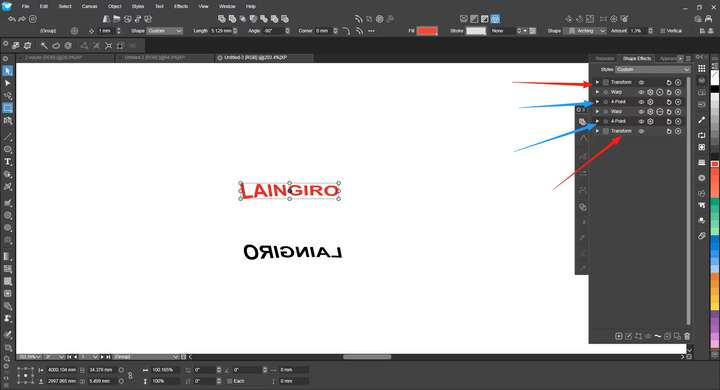
                                            @VectorStyler 0_1754664178907_重复效果.vstyler
                                            0_1754664210455_mmexport1754663541632.png
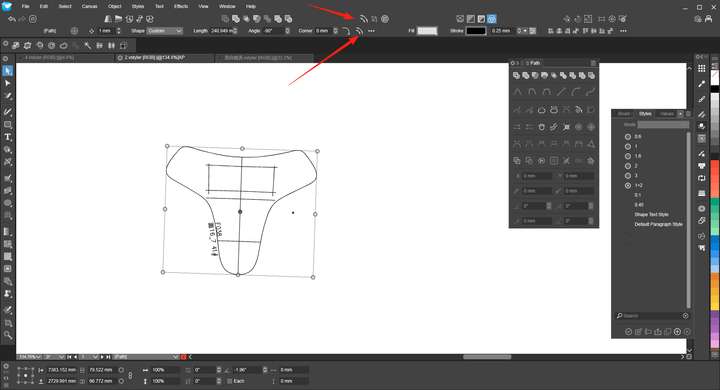
                                            In the operation process, I mostly use shortcut keys for most functions. When I open the Effects panel, I notice several duplicate effects, specifically the 4-point effect and the Transform effect. I'm not sure if this is by design, but at least the Transform effects should be mergeable.

                                            I had already applied the 4-point effect and added some other effects afterward. When I tried to continue using the 4-point effect via the shortcut key, it created a new instance instead of continuing the operation on the existing one, resulting in several duplicate effects. Is it possible to merge them?

                                            VectorStylerV 1 Reply Last reply Reply Quote 1
                                            • First post
                                              Last post