Detail optimization and function enhancement
-
@EricP I'm using Freehand, and it follows the same logic as I described. Having the in-place duplicated shapes grouped together is For example, if I need to offset the path of the newly generated shape, being in a group reduces flexibility and makes the process feel restrictive.
-
Dont know whats the right or best one in this case.
Just wondering that Corel Draw keep a duplicated shape
of a group ( using CTRL D) also in the Group.Whereby using CTRL C and CTRL V put that Shape
outside of a group, in VectorStyler and Corel Draw. -
@monsterfox said in Detail optimization and function enhancement:
The newly generated shape will be grouped together with A and B.
This is a bit problematic. Currently any duplication will be done inside the same Layer / Group as the source.
But there could be an option in the future to control this.
-
@VectorStyler https://youtu.be/9ZGx038Sd6w?feature=shared
The Contour cannot be preset, so it has to be reset every time you use it, which is very troublesome. -
@monsterfox said in Detail optimization and function enhancement:
The Contour cannot be preset, so it has to be reset every time you use it, which is very troublesome.
I added this to the backlog
-
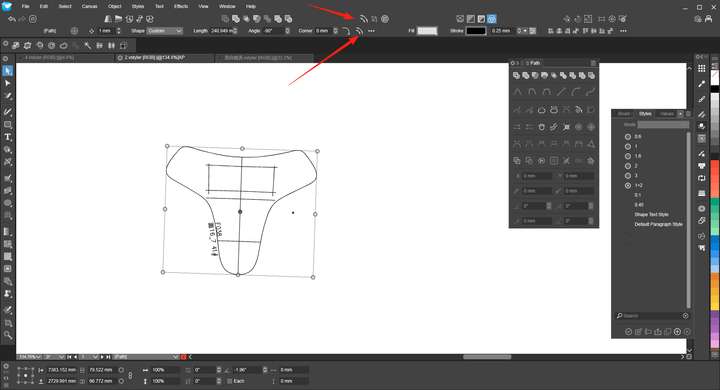
@monsterfox Function repetition
-
@VectorStyler 1. When using the offset tool effect, it cannot be converted to a curve.
2. For the individual transformation functions, rotation and stretching can all take effect based on their own coordinates, but mirroring does not work with the original coordinates. It is hoped that this function can be optimized.
https://youtu.be/GjPcbM1yNQI?feature=shared -
@monsterfox I added this to the backlog
-
@VectorStyler It seems that clicking the eraser tool to erase the graphic isn't working.
-
@monsterfox Can you show a recording? Also what is the icon of the tool? (there are multiple different eraser tools).
And an example file (could be something with the shape). -
-
@monsterfox said in Detail optimization and function enhancement:
It seems that clicking the eraser tool to erase the graphic isn't working.
I cannot replicate this, I need that file from the recording.
-
-
@VectorStyler https://youtu.be/hq_XGUYcn1g?feature=shared
When blending two graphics, in Freehand, you can select one of the graphics and then select "Parent" to choose the blended graphic. However, VS does not yet have this function, and we hope it can be added. -
@monsterfox The problem here is that in VS the starting - blend - ending objects are 3 separate objects. They can be grouped, but that is a separate action.
Selecting the parent of one ending will not select the blend as it is not the parent. -
@VectorStyler 0_1754664178907_重复效果.vstyler
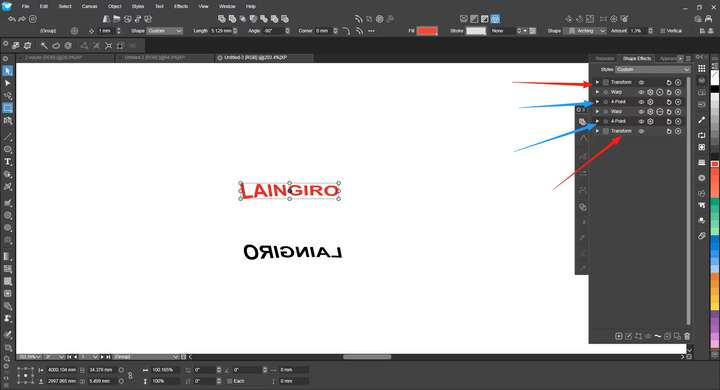
In the operation process, I mostly use shortcut keys for most functions. When I open the Effects panel, I notice several duplicate effects, specifically the 4-point effect and the Transform effect. I'm not sure if this is by design, but at least the Transform effects should be mergeable.I had already applied the 4-point effect and added some other effects afterward. When I tried to continue using the 4-point effect via the shortcut key, it created a new instance instead of continuing the operation on the existing one, resulting in several duplicate effects. Is it possible to merge them?
-
@monsterfox said in Detail optimization and function enhancement:
When I tried to continue using the 4-point effect via the shortcut key, it created a new instance instead of continuing the operation on the existing one
Yes, this is by design, and these effects cannot be merged.
First: if you want to edit the existing 4-point effect, select it in the Shape Effects panel and click the second button in the panel button row.
Invoking menu commands will add a new effect, unless the selected effect is the last effect.
Why this is by design (even for transform): transforming an object with a 4-point effect is not the same that adding a 4-point effect to a transformed object (these are not commutative operations, the order cannot be exchanged).
There are only a few small sub-cases where the order could be exchanged (like a transform with uniform scaling only), but otherwise the order is important.
So if we have a "transform -> 4-point -> transform" sequence, the two transforms cannot be merged because that would mean changing the ordering. -
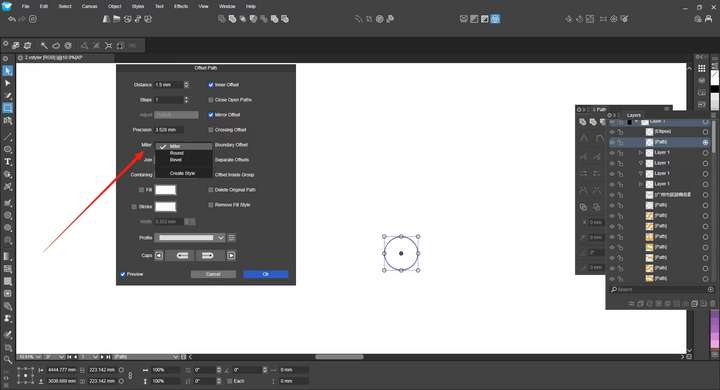
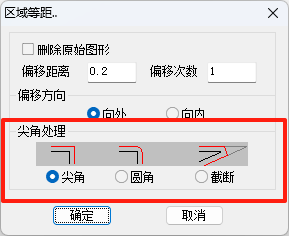
1. Could we remove the secondary menu for "Miter" in the path offset function and replace it with the three function icons as shown in the image below? Miter is used quite frequently, and it's rather cumbersome to always have to click through the secondary menu to select it. Hope this can be addressed.
2. Could we add the color replacement function from the path offset dialog box to the path panel? The need for it in the panel is greater than in the dialog box, especially for replacing stroke colors. Hope this function can be added. Thank you.
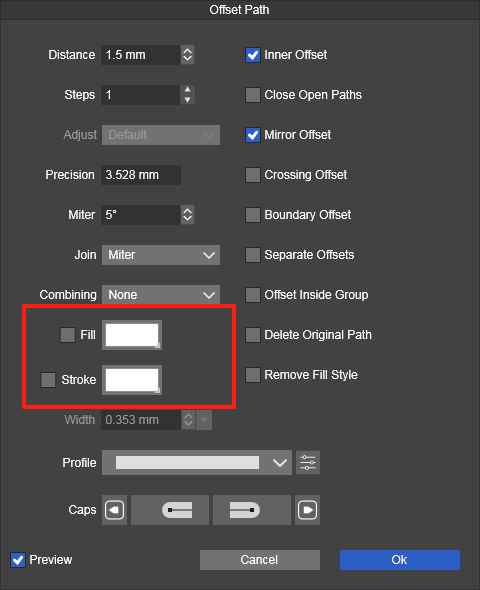
-
@monsterfox said in Detail optimization and function enhancement:
1. Could we remove the secondary menu for "Miter" in the path offset function and replace it with the three function icons as shown in the image below? Miter is used quite frequently, and it's rather cumbersome to always have to click through the secondary menu to select it. Hope this can be addressed.
This can be done.
2. Could we add the color replacement function from the path offset dialog box to the path panel? The need for it in the panel is greater than in the dialog box, especially for replacing stroke colors. Hope this function can be added. Thank you.
I don't understand this. The Path panel does not work with fill or stroke. There is a Properties panel for this and the same in the Context panel.
-
@VectorStyler I have a specific need for the path color-changing function in the Paths panel, and I'm not sure if others have the same requirement. In my work, I need to offset some black lines in a graph by 1.5mm in a specified direction. There are too many paths, and the offset distance is small, so it's easy to make mistakes accidentally. Therefore, I need to change the color of the already offset paths as a mark. This operation needs to be applied to 9-21 such graphs. Since the quantity is large, I always try to optimize my workflow. I've also tried using actions to achieve this, which works, but it's cumbersome to switch back and forth between the operation interface and the panel. This Chinese software has the function of changing the color of the path after offsetting, and it can control the offset direction. When you click on the path with the mouse, you can see bidirectional arrows; just click in the corresponding opposite direction again to complete the operation. If possible, please add these two functions. At least add the function of changing the stroke color. Thank you.
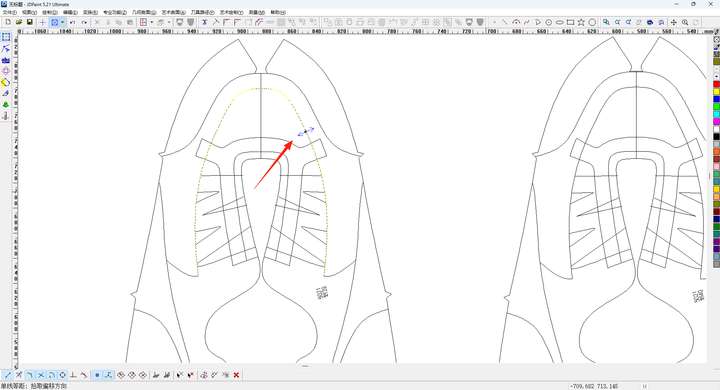 https://youtu.be/faf_Rhnh-w4?feature=shared
