VectorStyler
    • Categories
    • Unread
    • Recent
    • Tags
    • Popular
    • Register
    • Login

    Using the Stroke Width Tool and creating new shapes

    Scheduled Pinned Locked Moved Questions and Support
    3 Posts 2 Posters 2.8k Views 2 Watching
    Loading More Posts
    • Oldest to Newest
    • Newest to Oldest
    • Most Votes
    Reply
    • Reply as topic
    Log in to reply
    This topic has been deleted. Only users with topic management privileges can see it.
    • P Offline
      PixEllipsus
      last edited by

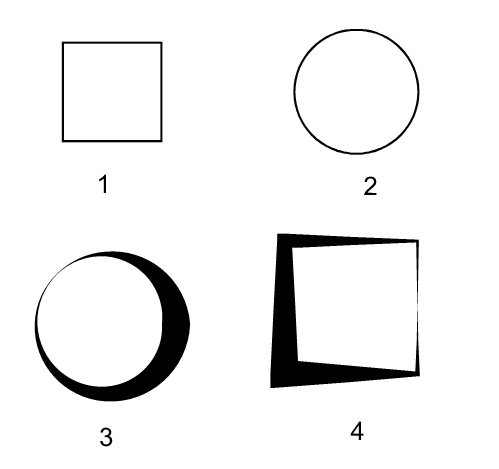
      I I have noticed that after using the Stroke Width Tool (I will called swt forward) when I switch to one of the shape tools and create a new shape, the object will appear as if I had used the swt on it.

      In the image below #1 and #2 were created before using the swt, then I created #3 and applied the swt on it before creating #4:
      0_1739902281701_Vectorstyler-stroke-tool.png

      I didn't aplied any effect on #4. I just made it.

      Is this behavior intended or is it a bug?

      VectorStylerV 1 Reply Last reply Reply Quote 1
      • VectorStylerV Offline
        VectorStyler @PixEllipsus
        last edited by

        @PixEllipsus Not a bug. The new object will take the current object style (fill and stroke), including the width profile.
        This can be disabled using the Settings -> Drawing -> Width Profile in New Objects option

        1 Reply Last reply Reply Quote 2
        • P Offline
          PixEllipsus
          last edited by

          Thanks @VectorStyler for your quick answer. I have already disabled the width profile in new objects and it's working fine.

          1 Reply Last reply Reply Quote 0
          • First post
            Last post