VectorStyler
    • Categories
    • Unread
    • Recent
    • Tags
    • Popular
    • Register
    • Login

    How do I reset the settings of the eraser panel back to the default?

    Scheduled Pinned Locked Moved Questions and Support
    6 Posts 3 Posters 8.9k Views 2 Watching
    Loading More Posts
    • Oldest to Newest
    • Newest to Oldest
    • Most Votes
    Reply
    • Reply as topic
    Log in to reply
    This topic has been deleted. Only users with topic management privileges can see it.
    • BoldlineB Offline
      Boldline
      last edited by

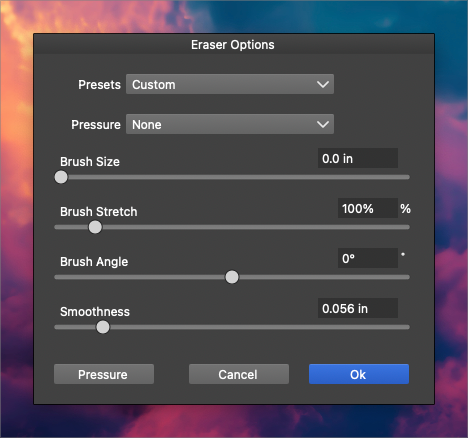
      How do I go about resetting the eraser panel back to the default settings? I tried Vectorstyler>Reset Panels but that did not change anything
      0_1722018466705_44f571bd-a861-4905-b868-45c64951f907-BLD 2024-07-26 at 14.25.41.png

      🍎 macOS Tahoe 26.2, Mac mini (M1, 2020), Chip Apple M1, Memory 16 GB
      Cintiq 27QHD Display and LG Ultra HD Display

      M VectorStylerV 2 Replies Last reply Reply Quote 1
      • M Offline
        monsterfox @Boldline
        last edited by

        @Boldline Is that your default setting now?

        BoldlineB 1 Reply Last reply Reply Quote 0
        • VectorStylerV Offline
          VectorStyler @Boldline
          last edited by

          @Boldline In the "Presets" drop down, select "Default"

          1 Reply Last reply Reply Quote 1
          • BoldlineB Offline
            Boldline @monsterfox
            last edited by Boldline

            @monsterfox said in How do I reset the settings of the eraser panel back to the default?:

            @Boldline Is that your default setting now?

            @monsterfox I had tried changing it a few times and then tried Vectorstyler>Reset Panels but that did not change anything. But going to the eraser options panel and selecting the "Presets" drop down, and then clicking "Default" fixed it. thank you

            🍎 macOS Tahoe 26.2, Mac mini (M1, 2020), Chip Apple M1, Memory 16 GB
            Cintiq 27QHD Display and LG Ultra HD Display

            1 Reply Last reply Reply Quote 0
            • BoldlineB Offline
              Boldline
              last edited by

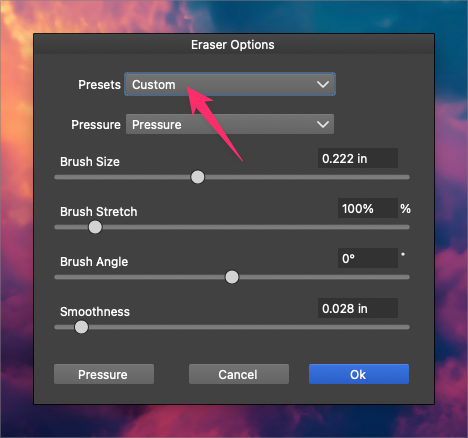
              @VectorStyler I noticed this as I was taking the advice to reset the path eraser settings; when I click on "default" in the dropdown, the name "custom" remains in the main box instead of the expected "default". It would make more sense if "default was listed instead of it always saying "custom". Here is a video showing this
              0_1722200944455_44cd4c42-fb9d-4978-9be0-e92a118c5991-BLD 2024-07-28 at 17.08.46.png

              🍎 macOS Tahoe 26.2, Mac mini (M1, 2020), Chip Apple M1, Memory 16 GB
              Cintiq 27QHD Display and LG Ultra HD Display

              VectorStylerV 1 Reply Last reply Reply Quote 1
              • VectorStylerV Offline
                VectorStyler @Boldline
                last edited by

                @Boldline said in How do I reset the settings of the eraser panel back to the default?:

                It would make more sense if "default was listed instead of it always saying "custom".

                I will try to change this.

                1 Reply Last reply Reply Quote 1
                • First post
                  Last post
