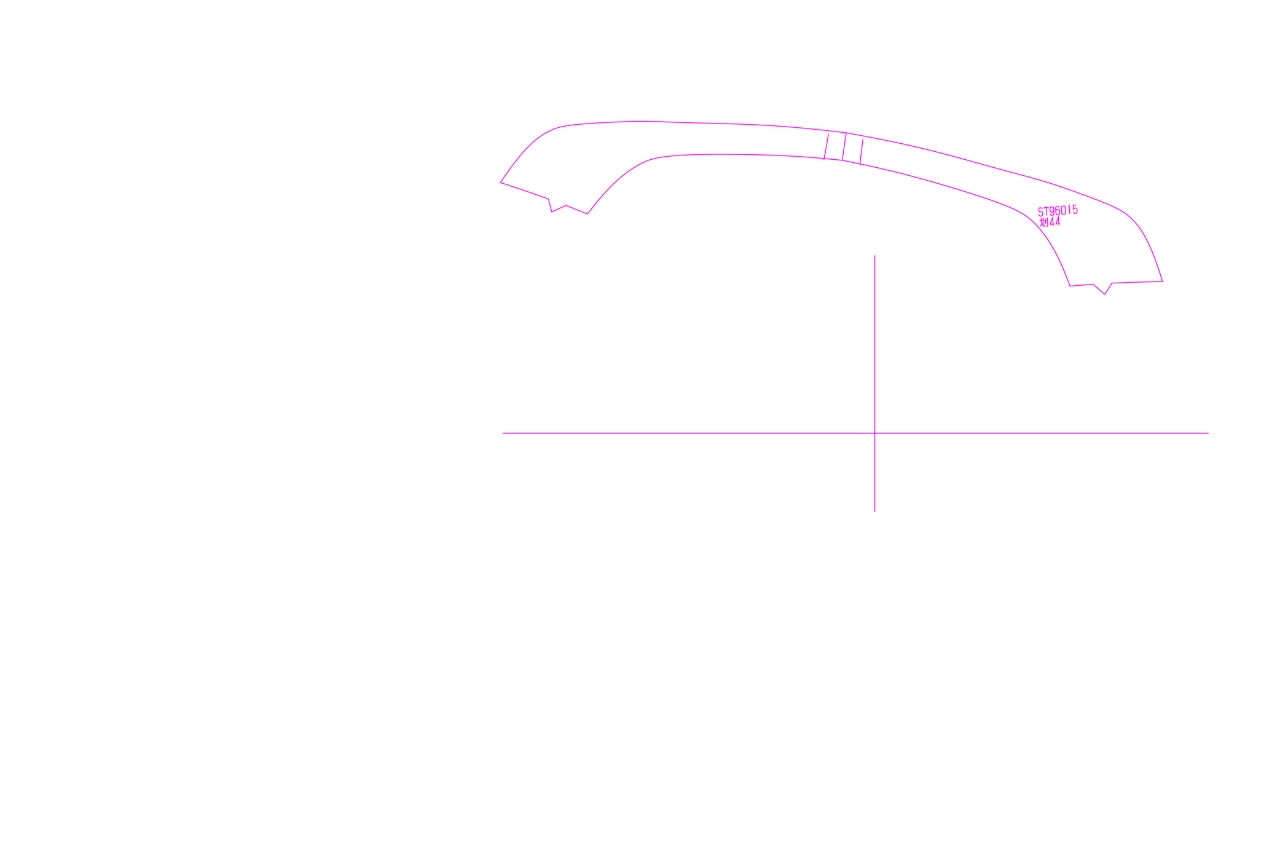
A symmetrical figure, rotated by an unknown angle. How to adjust the angle to normal level? Or how to measure the angle of two anchor points?
-
@monsterfox said in A symmetrical figure, rotated by an unknown angle. How to adjust the angle to normal level? Or how to measure the angle of two anchor points?:
那就要感谢你的付出了。你也是这个论坛的管理员吗?
不是,我买了VS,希望更多的人用VS
@monsterfox said in A symmetrical figure, rotated by an unknown angle. How to adjust the angle to normal level? Or how to measure the angle of two anchor points?:
@Li-Xiao 因为软件是英文的,我甚至连什么地方设置快捷键都找不到,很痛苦啊

如果你有使用其他软件的经验,界面是不是英文并不重要,很快就能上手的
-
@Li-Xiao 我用freehand9.0超过10年,虽然软件是英文的,但是我学习的时候有人教,所以上手并不复杂。但VS确实功能太强大了。Ai , Cdr, Inkscape(前年开始关注到,但目前还不够流畅卡顿明显)我刚才说的几款软件都不如VS强大。所以要是没有中文版的话,学习起来会很吃力。
-
@monsterfox said in A symmetrical figure, rotated by an unknown angle. How to adjust the angle to normal level? Or how to measure the angle of two anchor points?:
@Li-Xiao 我用freehand9.0超过10年,虽然软件是英文的,但是我学习的时候有人教,所以上手并不复杂。但VS确实功能太强大了。Ai , Cdr, Inkscape(前年开始关注到,但目前还不够流畅卡顿明显)我刚才说的几款软件都不如VS强大。所以要是没有中文版的话,学习起来会很吃力。
你用过这么多矢量软件再用VS肯定没问题的,我最初不需要看说明文档就能直接用VS了,感觉像是用了很久的软件一样
-
@Li-Xiao 一些基础功能我也很容易上手,但也有一些基础功能是其他软件所没有的。所以还需要摸索一些时间。还有一些高级功能,我现在甚至连门槛都还没有入。顺便问一下,你到时候把教程发论坛什么位置?还是说你也会抖音发一下,给我的账号,提前关注 。
-
@VectorStyler This is a Chinese carving software, this is the rotation tool, it is very easy to use for the rotation correction of such symmetrical graphics, very fast and convenient.Perhaps VS can also add this feature. https://youtu.be/HQV-DTiMLMY?feature=shared
-
@monsterfox said in A symmetrical figure, rotated by an unknown angle. How to adjust the angle to normal level? Or how to measure the angle of two anchor points?:
Perhaps VS can also add this feature
I added this to the backlog.
-
@monsterfox , my strategy is to draw a rectangle between the two reference points, then do arctan(height/width) and you have the angle to apply.
At some point we may be able to type in math expressions in fields and have VS parsing them...BR/ Lars
-
@larsherold said in A symmetrical figure, rotated by an unknown angle. How to adjust the angle to normal level? Or how to measure the angle of two anchor points?:
At some point we may be able to type in math expressions in fields and have VS parsing them
This is already possible, and (depending on the field) it is also possible to set number properties as expressions using number variables defined at document level.
-
@VectorStyler said in A symmetrical figure, rotated by an unknown angle. How to adjust the angle to normal level? Or how to measure the angle of two anchor points?:
This is already possible
Ah great! I'll dig into that..

-
@VectorStyler The new feature is great, the experience is very special, I never thought it could be achieved in this way to rotate the angle, your thinking is very active. There are two details, I hope to be strengthened. 1. This new feature supports single paths and merged paths, but not groups, I don't know if it can be achieved? 2. When rotating, it is rotated around the first plotting point, can it be achieved to rotate around the object itself?
-
@monsterfox said in A symmetrical figure, rotated by an unknown angle. How to adjust the angle to normal level? Or how to measure the angle of two anchor points?:
I don't know if it can be achieved? 2. When rotating, it is rotated around the first plotting point, can it be achieved to rotate around the object itself?
I added these to the backlog.
-
@VectorStyler I suddenly thought of a more convenient way to work today. After selecting points A and B, set the angle in the path panel. Can a mouse wheel shortcut be added, and slide at angles such as 90 degrees and 180 degrees, which will have a more convenient operation experience.Can this function be added, thank you for your hard work.
-
@monsterfox I will try to find a way to make this easier.
-
This post is deleted! -
@VectorStyler This feature still does not support groups. Can you add it first? Thank you. I've been waiting for a long time.
-
@monsterfox I have this in the feature backlog for 1.3, I will tyr to bring it forward.
