VectorStyler
    • Categories
    • Unread
    • Recent
    • Tags
    • Popular
    • Register
    • Login

    Assigning a fill colour to a text frame

    Scheduled Pinned Locked Moved VectorStyler 1.2 beta
    12 Posts 3 Posters 11.9k Views 3 Watching
    Loading More Posts
    • Oldest to Newest
    • Newest to Oldest
    • Most Votes
    Reply
    • Reply as topic
    Log in to reply
    This topic has been deleted. Only users with topic management privileges can see it.
    • B Offline
      B-Vs-V
      last edited by

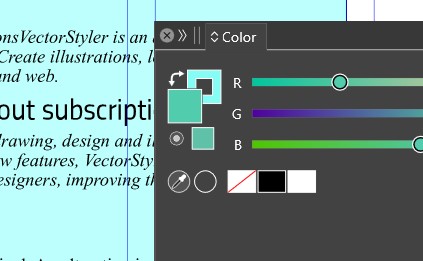
      I've just noticed that I can't assign a colour to a text frame directly:
      0_1707056497177_tf1.jpg

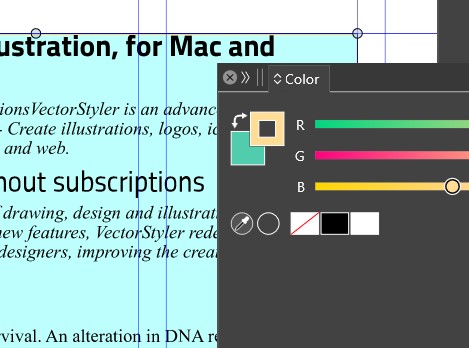
      I first have to assign a colour to the frame border
      0_1707056514646_tf2.jpg

      and then swap the colours:

      0_1707056528408_tf3.jpg

      W11 Pro 25H2 - 12th Gen Intel(R) i7-12700K 3.61 GHz - RAM 64 Go - NVIDIA GF GTX 4070 Ti - Intuos - Dell UP3216Q / Eizo ColorEdge
      W11 Pro 25H2 - 12th Gen Intel(R) i7-12700KF 3.60 GHz -RAM 64 Go - NVIDIA GF GTX 3080 - IntuosPro- ProArt PA329C

      b77B 1 Reply Last reply Reply Quote 0
      • b77B Offline
        b77 @B-Vs-V
        last edited by

        @Pat You can add a fill from the Appearance panel (click the first button
        at the bottom), then drag the fill content under the text content.
        (Btw, in the case of text, a fill should be added under the text directly).

        MacBook Pro (Intel) running Monterey 12.6.4

        B 1 Reply Last reply Reply Quote 1
        • B Offline
          B-Vs-V @b77
          last edited by

          @b77 Thank you for the information ☺ In fact, assigning a colour via the colour panel does not directly add a fill to the text block.
          But assigning a colour to the stroke and swapping the colours (in the colour panel) does give the text block a fill... which can be seen in the appearance panel.

          W11 Pro 25H2 - 12th Gen Intel(R) i7-12700K 3.61 GHz - RAM 64 Go - NVIDIA GF GTX 4070 Ti - Intuos - Dell UP3216Q / Eizo ColorEdge
          W11 Pro 25H2 - 12th Gen Intel(R) i7-12700KF 3.60 GHz -RAM 64 Go - NVIDIA GF GTX 3080 - IntuosPro- ProArt PA329C

          b77B 1 Reply Last reply Reply Quote 0
          • b77B Offline
            b77 @B-Vs-V
            last edited by b77

            @Pat Yes, I got that.
            Color picked in the color panel being assigned to the text itself and not
            to the text background was requested recently here on the forum (because
            most of the time it's the text color you want to change), so it was implemented
            by the developer two or three versions ago.
            https://www.vectorstyler.com/forum/topic/3744/font-color-in-text-frame

            MacBook Pro (Intel) running Monterey 12.6.4

            B 1 Reply Last reply Reply Quote 1
            • B Offline
              B-Vs-V @b77
              last edited by

              @b77 Ok thanks to point this thread ☺ but as it stands nothing happens when the block of text is selected and a colour is chosen in the colour panel (or palette or variation), no fill colour nor text colour.

              In any case, if I wanted a specific colour for the text, or part of the text, I would define it in the paragraph style.

              W11 Pro 25H2 - 12th Gen Intel(R) i7-12700K 3.61 GHz - RAM 64 Go - NVIDIA GF GTX 4070 Ti - Intuos - Dell UP3216Q / Eizo ColorEdge
              W11 Pro 25H2 - 12th Gen Intel(R) i7-12700KF 3.60 GHz -RAM 64 Go - NVIDIA GF GTX 3080 - IntuosPro- ProArt PA329C

              b77B 1 Reply Last reply Reply Quote 0
              • b77B Offline
                b77 @B-Vs-V
                last edited by b77

                What should happen and is happening here if I pick a color in the Color panel
                is the color of the text itself (the letters) of the text frame is changed and not
                the background of the text frame.

                If it's not working as described above, please post a screen recording and a test file.

                In any case, if I wanted a specific colour for the text, or part of the text, I would define it in the paragraph style.

                That's how it might be done in a page layout app, but it's too slow for a
                vector graphics app where many users rarely use paragraph styles.

                MacBook Pro (Intel) running Monterey 12.6.4

                B 1 Reply Last reply Reply Quote 0
                • B Offline
                  B-Vs-V @b77
                  last edited by

                  @b77 It works when no paragraph style is applied.

                  Logically, when a style is applied, it is impossible to change the text colour simply by selecting the block of text. The synchronisation of styles is then fine...

                  W11 Pro 25H2 - 12th Gen Intel(R) i7-12700K 3.61 GHz - RAM 64 Go - NVIDIA GF GTX 4070 Ti - Intuos - Dell UP3216Q / Eizo ColorEdge
                  W11 Pro 25H2 - 12th Gen Intel(R) i7-12700KF 3.60 GHz -RAM 64 Go - NVIDIA GF GTX 3080 - IntuosPro- ProArt PA329C

                  VectorStylerV 1 Reply Last reply Reply Quote 0
                  • VectorStylerV Offline
                    VectorStyler @B-Vs-V
                    last edited by

                    @Pat @b77 I opened a bug on the text frame color issue. Swapping the color should work on the text not the frame.

                    B 2 Replies Last reply Reply Quote 0
                    • B Offline
                      B-Vs-V @VectorStyler
                      last edited by

                      @VectorStyler I found it quite useful ☺

                      I think there are other bugs with colour management and text blocks.
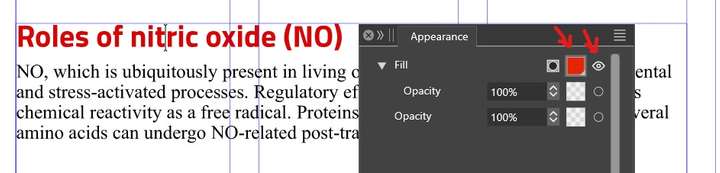
                      As soon as a style is applied to a piece of text, it's no longer possible to assign a colour to it other than by selecting the text using the text tool, but the colour of the text doesn't always match the information in the appearance panel. You have to either click on the eye icon (when it works) or click on the colour icon to get the right colour:
                      0_1707118064936_tc.jpg .

                      W11 Pro 25H2 - 12th Gen Intel(R) i7-12700K 3.61 GHz - RAM 64 Go - NVIDIA GF GTX 4070 Ti - Intuos - Dell UP3216Q / Eizo ColorEdge
                      W11 Pro 25H2 - 12th Gen Intel(R) i7-12700KF 3.60 GHz -RAM 64 Go - NVIDIA GF GTX 3080 - IntuosPro- ProArt PA329C

                      1 Reply Last reply Reply Quote 1
                      • B Offline
                        B-Vs-V @VectorStyler
                        last edited by

                        @VectorStyler I wanted to test different text opacities using the appearance panel, but I can't see any change in the opacity of the words when I change the slider:
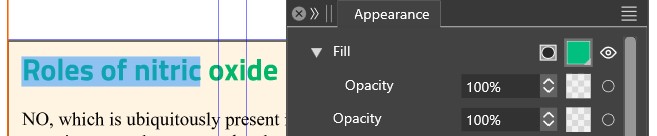

                        0_1711782731346_t1.jpg

                        0_1711782749123_t2.jpg

                        0_1711782759562_t3.jpg

                        W11 Pro 25H2 - 12th Gen Intel(R) i7-12700K 3.61 GHz - RAM 64 Go - NVIDIA GF GTX 4070 Ti - Intuos - Dell UP3216Q / Eizo ColorEdge
                        W11 Pro 25H2 - 12th Gen Intel(R) i7-12700KF 3.60 GHz -RAM 64 Go - NVIDIA GF GTX 3080 - IntuosPro- ProArt PA329C

                        VectorStylerV 1 Reply Last reply Reply Quote 1
                        • VectorStylerV Offline
                          VectorStyler @B-Vs-V
                          last edited by

                          @Pat said in Assigning a fill colour to a text frame:

                          can't see any change in the opacity of the words when I change the slide

                          I added this to the backlog, could be a bug. Did you try the opacity change from the Transparency or Color panels?

                          B 1 Reply Last reply Reply Quote 1
                          • B Offline
                            B-Vs-V @VectorStyler
                            last edited by

                            @VectorStyler I forgot to mention that it is fine with the Transparency/Color panels (same values). It is only the Appearance panel that is not showing any effect.


                            W11 Pro 25H2 - 12th Gen Intel(R) i7-12700K 3.61 GHz - RAM 64 Go - NVIDIA GF GTX 4070 Ti - Intuos - Dell UP3216Q / Eizo ColorEdge
                            W11 Pro 25H2 - 12th Gen Intel(R) i7-12700KF 3.60 GHz -RAM 64 Go - NVIDIA GF GTX 3080 - IntuosPro- ProArt PA329C

                            1 Reply Last reply Reply Quote 1
                            • First post
                              Last post