VectorStyler
    • Categories
    • Unread
    • Recent
    • Tags
    • Popular
    • Register
    • Login

    Creating folders to organize symbols

    Scheduled Pinned Locked Moved VectorStyler 1.2 beta
    5 Posts 3 Posters 6.5k Views 3 Watching
    Loading More Posts
    • Oldest to Newest
    • Newest to Oldest
    • Most Votes
    Reply
    • Reply as topic
    Log in to reply
    This topic has been deleted. Only users with topic management privileges can see it.
    • B Offline
      B-Vs-V
      last edited by B-Vs-V

      I don't see the possibility of creating folders to organize symbols (by themes for example) in the symbol panel.

      W11 Pro 25H2 - 12th Gen Intel(R) i7-12700K 3.61 GHz - RAM 64 Go - NVIDIA GF GTX 4070 Ti - Intuos - Dell UP3216Q / Eizo ColorEdge
      W11 Pro 25H2 - 12th Gen Intel(R) i7-12700KF 3.60 GHz -RAM 64 Go - NVIDIA GF GTX 3080 - IntuosPro- ProArt PA329C

      1 Reply Last reply Reply Quote 0
      • B Offline
        B-Vs-V
        last edited by B-Vs-V

        @VectorStyler Stupid question but I have a file with folders in the Symbol panel and another file without. I can't remember how I did create those folders... Thanks for any tip ☺

        W11 Pro 25H2 - 12th Gen Intel(R) i7-12700K 3.61 GHz - RAM 64 Go - NVIDIA GF GTX 4070 Ti - Intuos - Dell UP3216Q / Eizo ColorEdge
        W11 Pro 25H2 - 12th Gen Intel(R) i7-12700KF 3.60 GHz -RAM 64 Go - NVIDIA GF GTX 3080 - IntuosPro- ProArt PA329C

        VectorStylerV b77B 2 Replies Last reply Reply Quote 0
        • VectorStylerV Offline
          VectorStyler @B-Vs-V
          last edited by

          @Pat The symbols are also listed in the Styles panel. Select the symbols here and use "Group Selected" from the panel menu.

          There is a bug here, the "Group Selected" and "Create Group" should also be in the symbols panel. I will fix this.

          1 Reply Last reply Reply Quote 2
          • b77B Offline
            b77 @B-Vs-V
            last edited by b77

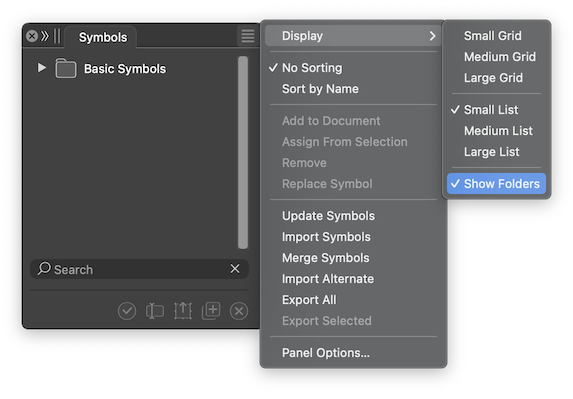
            @Pat Also: make sure 'Show Folders' is enabled:
            0_1706952879602_dfg.png

            MacBook Pro (Intel) running Monterey 12.6.4

            B 1 Reply Last reply Reply Quote 1
            • B Offline
              B-Vs-V @b77
              last edited by

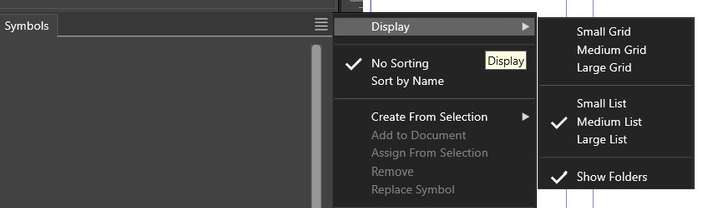
              @b77 Thanks ☺ yes, it is & I can see folders in one of my files:
              0_1706953072720_s1.jpg

              apparently, "create group is missing" in the symbol panel options.

              W11 Pro 25H2 - 12th Gen Intel(R) i7-12700K 3.61 GHz - RAM 64 Go - NVIDIA GF GTX 4070 Ti - Intuos - Dell UP3216Q / Eizo ColorEdge
              W11 Pro 25H2 - 12th Gen Intel(R) i7-12700KF 3.60 GHz -RAM 64 Go - NVIDIA GF GTX 3080 - IntuosPro- ProArt PA329C

              1 Reply Last reply Reply Quote 1
              • First post
                Last post