VectorStyler
    • Categories
    • Unread
    • Recent
    • Tags
    • Popular
    • Register
    • Login

    Distribute objects with value?

    Scheduled Pinned Locked Moved Questions and Support
    15 Posts 5 Posters 12.0k Views 4 Watching
    Loading More Posts
    • Oldest to Newest
    • Newest to Oldest
    • Most Votes
    Reply
    • Reply as topic
    Log in to reply
    This topic has been deleted. Only users with topic management privileges can see it.
    • S Offline
      Subpath @Igull
      last edited by

      @Igull

      ... bit like adjusting exponential curves on my RC aircraft transmitter ...
      yes it is 🙂

      Win 11
      CPU: AMD Ryzen 5 9600X, 6-core.
      GPU: Nvidia Geforce RTX 5070.

      1 Reply Last reply Reply Quote 0
      • VectorStylerV Offline
        VectorStyler @Igull
        last edited by b77

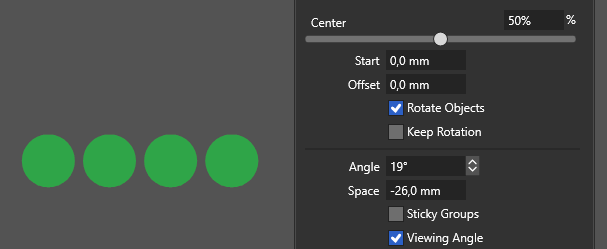
        @Igull To space objects at a fixed distance: open the Alignment panel and from the panel menu enable the Alignment Options.
        Select the objects, set a spacing amount in the Space field and use the fourth mode in the Align Position icon row.

        IgullI encartE 2 Replies Last reply Reply Quote 0
        • IgullI Offline
          Igull @VectorStyler
          last edited by

          @VectorStyler said in Distribute objects with value?:

          @Igull To space objects at a fixed distance: open then alignment panel and from the panel menu enable the Alignment Options.
          Select the objects, set a spacing amount in the Space field and use the fourth mode in the Align Position icon row.

          Absolutely wonderful, works a treat - you've saved me a pile of time 👍 👍 👍

          So many easter eggs in VS 🙂

          Neil

          iMac 27" 2015 Catalina 32Gb, MacBook Pro 13" 2016 Monterey 8Gb, Mac Mini M2 2023 8Gb

          1 Reply Last reply Reply Quote 1
          • encartE Offline
            encart @VectorStyler
            last edited by

            @VectorStyler I wonder if it would not be better for negative values to reduce the space between objects. Currently, the opposite is true.0_1687538664974_screenshot_20230623_184210.png

            Windows 11 Home 10.0.22621

            VectorStylerV 1 Reply Last reply Reply Quote 0
            • VectorStylerV Offline
              VectorStyler @encart
              last edited by

              @encart Depends on the order of the selection and the alignment direction.

              IgullI 1 Reply Last reply Reply Quote 0
              • IgullI Offline
                Igull @VectorStyler
                last edited by

                @VectorStyler said in Distribute objects with value?:

                @encart Depends on the order of the selection and the alignment direction.

                Yes, works with both pos and neg values - I always have my alignment set by geometry by default.

                Wish I had known this was here earlier - I've used it at least 5 times this afternoon LOL 🙂

                Neil

                iMac 27" 2015 Catalina 32Gb, MacBook Pro 13" 2016 Monterey 8Gb, Mac Mini M2 2023 8Gb

                VectorStylerV 1 Reply Last reply Reply Quote 1
                • VectorStylerV Offline
                  VectorStyler @Igull
                  last edited by

                  @Igull said in Distribute objects with value?:

                  I've used it at least 5 times this afternoon LOL

                  For more tricks, you can setup other custom alignment types using the Alignment Schema from the alignment panel menu.

                  BoldlineB 1 Reply Last reply Reply Quote 1
                  • BoldlineB Offline
                    Boldline @VectorStyler
                    last edited by

                    @VectorStyler wow! I had no idea this was even here! This is going to be fun

                    🍎 macOS Tahoe 26.2, Mac mini (M1, 2020), Chip Apple M1, Memory 16 GB
                    Cintiq 27QHD Display and LG Ultra HD Display

                    1 Reply Last reply Reply Quote 0
                    • S Offline
                      Subpath
                      last edited by Subpath

                      Found a while ago a another possibility to distribute Objects
                      in a unique way in VS.
                      But don't know exactly what it could be useful for.
                      .
                      .
                      Anyway, it works like this

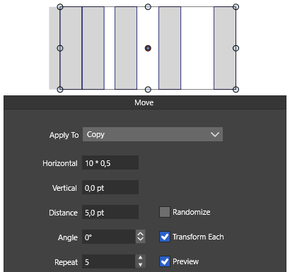
                      Apply a transform Move to an object.
                      Set the number of copies and a distance
                      ( so far so normal )
                      now activate the option "Transform each"

                      VS adds then the object distance value upon each copy step
                      (e.g.) distance 10
                      first 10, second 10+10 (20), third 20+10 (30) and so on...

                      recorded a video

                      0_1687635226981_Distance-adding.png

                      Win 11
                      CPU: AMD Ryzen 5 9600X, 6-core.
                      GPU: Nvidia Geforce RTX 5070.

                      1 Reply Last reply Reply Quote 3
                      • IgullI Offline
                        Igull
                        last edited by

                        @Subpath I'll add that one to my knowledge list 🙂

                        I'm sure a use will turn up at some point !

                        Neil

                        iMac 27" 2015 Catalina 32Gb, MacBook Pro 13" 2016 Monterey 8Gb, Mac Mini M2 2023 8Gb

                        S 1 Reply Last reply Reply Quote 1
                        • S Offline
                          Subpath @Igull
                          last edited by

                          @Igull said in Distribute objects with value?:

                          I'm sure a use will turn up at some point !

                          i thinking that way too 🙂
                          you never know

                          Win 11
                          CPU: AMD Ryzen 5 9600X, 6-core.
                          GPU: Nvidia Geforce RTX 5070.

                          1 Reply Last reply Reply Quote 0
                          • S Offline
                            Subpath
                            last edited by

                            @Igull

                            is even possible to do some Math here

                            0_1687773998024_Copy each.png

                            Win 11
                            CPU: AMD Ryzen 5 9600X, 6-core.
                            GPU: Nvidia Geforce RTX 5070.

                            1 Reply Last reply Reply Quote 0
                            • First post
                              Last post