VectorStyler
    • Categories
    • Unread
    • Recent
    • Tags
    • Popular
    • Register
    • Login

    How to break a connexion between clone objects

    Scheduled Pinned Locked Moved Questions and Support
    18 Posts 6 Posters 14.8k Views 6 Watching
    Loading More Posts
    • Oldest to Newest
    • Newest to Oldest
    • Most Votes
    Reply
    • Reply as topic
    Log in to reply
    This topic has been deleted. Only users with topic management privileges can see it.
    • B Offline
      B-Vs-V
      last edited by B-Vs-V

      I did transform an object by adding clones or references, & did copy those shapes. They are tied... how can I break any link between them ?
      Thanks.

      W11 Pro 25H2 - 12th Gen Intel(R) i7-12700K 3.61 GHz - RAM 64 Go - NVIDIA GF GTX 4070 Ti - Intuos - Dell UP3216Q / Eizo ColorEdge
      W11 Pro 25H2 - 12th Gen Intel(R) i7-12700KF 3.60 GHz -RAM 64 Go - NVIDIA GF GTX 3080 - IntuosPro- ProArt PA329C

      S VectorStylerV 2 Replies Last reply Reply Quote 0
      • S Offline
        Subpath @B-Vs-V
        last edited by Subpath

        @Pat

        interesting question that never occurs to me πŸ™‚

        for clones, I found the following:
        select the clone(s) and go to
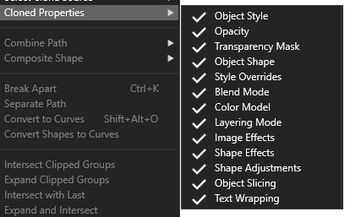
        Menu > Object > Cloned Properties
        and deselect "Object shape
        and the clone will no longer follow the movement

        when you select it again, the link is restored

        as a cheat, export your design as PDF
        or SVG and import it again may also help

        but i am also interested in
        what @VectorStyler says

        Win 11
        CPU: AMD Ryzen 5 9600X, 6-core.
        GPU: Nvidia Geforce RTX 5070.

        1 Reply Last reply Reply Quote 1
        • encartE Offline
          encart
          last edited by

          In the case of Reference, I used Styles>Expand Symbol. The option is disabled when it comes to Copy. Such a bit of searching in the dark.
          There is room for improvement here. It would be nice if there was a disconnect option in the context bar and maybe in the context menu for such objects.

          Windows 11 Home 10.0.22621

          1 Reply Last reply Reply Quote 3
          • IngolfI Offline
            Ingolf
            last edited by

            It get s a little complex when it comes to references, but generally:

            Clones

            • Edit -> Detatch Clone or Detatch Source

            References:

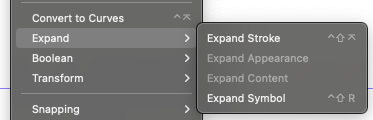
            • Styles -> Expand -> Expand symbol
            • See 'Expanding References' section in VS documentation)

            One should read it thoroughly to understand what VS does during expand.

            I find it hard to jump from menu to menu to look for the right place (Expand symbol) so I customized my right click menu like this, so expand whatever is always available right where I am working, which I recommend if you work with references. Adding a submenu with clone features is easy peasy.
            0_1670971972486_04cf7ec9-a4a6-454b-a8e3-686a4bf37892-image.png

            🍏 macOS Sequoia Apple Silicon

            S 1 Reply Last reply Reply Quote 2
            • VectorStylerV Offline
              VectorStyler @B-Vs-V
              last edited by

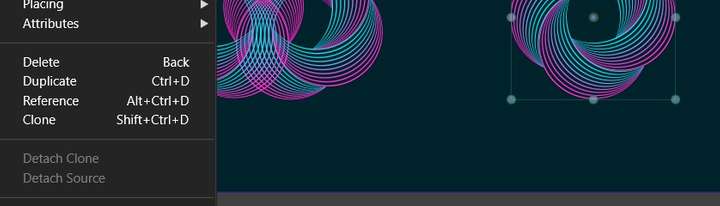
              @Pat To detach a clone: select Edit -> Detach Clone.
              To detach a source object from all its clones: Edit -> Detach Source.

              B b77B 2 Replies Last reply Reply Quote 2
              • B Offline
                B-Vs-V @VectorStyler
                last edited by B-Vs-V

                @VectorStyler these are grey, can't do it:
                0_1671003368092_Detach.jpg

                @Subpath @encart @Ingolf Thank you. I didn't try yet to export but 'expand symbol' doesn't give any result... even worse, some strokes disappeared :

                0_1671003451988_Symbol.jpg

                and impossible to come back, Ctrl+Z became inactive. I had to close and reopen the file:

                0_1671003492217_CtrlZ.jpg

                W11 Pro 25H2 - 12th Gen Intel(R) i7-12700K 3.61 GHz - RAM 64 Go - NVIDIA GF GTX 4070 Ti - Intuos - Dell UP3216Q / Eizo ColorEdge
                W11 Pro 25H2 - 12th Gen Intel(R) i7-12700KF 3.60 GHz -RAM 64 Go - NVIDIA GF GTX 3080 - IntuosPro- ProArt PA329C

                1 Reply Last reply Reply Quote 1
                • S Offline
                  Subpath @Ingolf
                  last edited by

                  @Ingolf , thanks for your the description
                  good to know

                  about the clones, I searched everywhere
                  but didn't get the idea that it's right in
                  front of my eyes in "Edit"

                  Win 11
                  CPU: AMD Ryzen 5 9600X, 6-core.
                  GPU: Nvidia Geforce RTX 5070.

                  IngolfI 1 Reply Last reply Reply Quote 1
                  • IngolfI Offline
                    Ingolf @Subpath
                    last edited by

                    @Subpath said in How to break a connexion between clone objects:

                    @Ingolf , thanks for your the description
                    good to know

                    about the clones, I searched everywhere
                    but didn't get the idea that it's right in
                    front of my eyes in "Edit"

                    I've used clones a lot, so I remembered there was something like that. Apparently I was awake once. 😁

                    🍏 macOS Sequoia Apple Silicon

                    1 Reply Last reply Reply Quote 1
                    • b77B Offline
                      b77 @VectorStyler
                      last edited by b77

                      @VectorStyler I was looking for a command with 'Release' or 'Detach' in the name β€” 'Expand' doesn't
                      come to mind when searching for a way to break an object from its reference.

                      MacBook Pro (Intel) running Monterey 12.6.4

                      VectorStylerV 1 Reply Last reply Reply Quote 0
                      • VectorStylerV Offline
                        VectorStyler @b77
                        last edited by

                        @b77 said in How to break a connexion between clone objects:

                        I was looking for a command with 'Release' or 'Detach' in the name β€” 'Expand' doesn't come to mind when searching for a way to break an object from its reference.

                        For the clone objects, the Detach Clone / Source should work.

                        But when working with symbols, a little bit more is going on than just detaching, since the symbol is "expanded" locally. And the "expand" metaphor is used in other apps too.

                        1 Reply Last reply Reply Quote 0
                        • S Offline
                          Subpath
                          last edited by Subpath

                          I found it a bit confusing that the options for the clones are so distributed
                          Detach Clones in "Edit", Clone properties in "Object"

                          And for the clone properties I was wondering
                          if a panel would be a better choice.
                          Like for example with the snapping options.
                          A Panel could then also be put on the canvas
                          if one need those Options more often.
                          0_1671039073751_clone properties.png

                          Win 11
                          CPU: AMD Ryzen 5 9600X, 6-core.
                          GPU: Nvidia Geforce RTX 5070.

                          VectorStylerV 1 Reply Last reply Reply Quote 0
                          • VectorStylerV Offline
                            VectorStyler @Subpath
                            last edited by

                            @Subpath said in How to break a connexion between clone objects:

                            I found it a bit confusing that the options for the clones are so distributed
                            Detach Clones in "Edit", Clone properties in "Object"

                            Yes, I think the clone properties could be moved to the Edit menu (to balance things a bit).

                            And for the clone properties I was wondering
                            if a panel would be a better choice.

                            This could be done, the problem is that these options are rarely changed, and keeping a panel open for just these is a bit too much.

                            One way around this is to have a button in the context panel, opening a popup menu containing the same options. This button would be visible only when a clone is selected.
                            Same for selecting the source of the clone.

                            Like for example with the snapping options.
                            A Panel could then also be put on the canvas
                            if one need those Options more often.

                            S 1 Reply Last reply Reply Quote 2
                            • S Offline
                              Subpath @VectorStyler
                              last edited by Subpath

                              @VectorStyler said in How to break a connexion between clone objects:

                              the problem is that these options are rarely changed

                              yes see this Problem too.
                              but the way it is by now they are a bit
                              uncomfortable to use
                              and this could contribute to the fact
                              that you rarely use them

                              Win 11
                              CPU: AMD Ryzen 5 9600X, 6-core.
                              GPU: Nvidia Geforce RTX 5070.

                              1 Reply Last reply Reply Quote 1
                              • b77B Offline
                                b77
                                last edited by b77

                                @VectorStyler OK, what I mean specifically is references:

                                When I create a reference (Edit > Reference) and at one point later I want to release the "dependent"
                                object from its reference, I had no idea that the dependent object is now considered a symbol in
                                the VS internal hierarchy/model, so I have no idea that I should look for a command with 'symbol'
                                in the name.

                                And again, 'expand' doesn't click in my head with all of the above. To me at least, 'expand' is
                                tied to expanding shape effects or other BΓ©zier-related stuff. πŸ™‚

                                Sure, my head might be the problem, but I think this is one point where relying on the user to have
                                high IQ / not be tired / be very patient / having read the manual creates a barrier to easy learning
                                (and adoption of) the app.

                                Maybe 'Detach Parent' and 'Detach Children' could work better for both clones and references?
                                (Sorry if somebody else mentioned this already).

                                MacBook Pro (Intel) running Monterey 12.6.4

                                1 Reply Last reply Reply Quote 1
                                • B Offline
                                  B-Vs-V
                                  last edited by

                                  @VectorStyler I've just sent you a file with this "detach" issue. Whatever I do, I can't modify the middle scheme without affecting the left one.

                                  W11 Pro 25H2 - 12th Gen Intel(R) i7-12700K 3.61 GHz - RAM 64 Go - NVIDIA GF GTX 4070 Ti - Intuos - Dell UP3216Q / Eizo ColorEdge
                                  W11 Pro 25H2 - 12th Gen Intel(R) i7-12700KF 3.60 GHz -RAM 64 Go - NVIDIA GF GTX 3080 - IntuosPro- ProArt PA329C

                                  VectorStylerV 2 Replies Last reply Reply Quote 0
                                  • VectorStylerV Offline
                                    VectorStyler @B-Vs-V
                                    last edited by

                                    @Pat Got the file and added this to the backlog.

                                    1 Reply Last reply Reply Quote 0
                                    • VectorStylerV Offline
                                      VectorStyler @B-Vs-V
                                      last edited by

                                      @Pat Yes, the problems can be replicated with the file.
                                      Looks like there are still issues with blends inside symbols (references).
                                      Will try to fix this ASAP.

                                      B 1 Reply Last reply Reply Quote 0
                                      • B Offline
                                        B-Vs-V @VectorStyler
                                        last edited by

                                        @VectorStyler Thank you ☺

                                        W11 Pro 25H2 - 12th Gen Intel(R) i7-12700K 3.61 GHz - RAM 64 Go - NVIDIA GF GTX 4070 Ti - Intuos - Dell UP3216Q / Eizo ColorEdge
                                        W11 Pro 25H2 - 12th Gen Intel(R) i7-12700KF 3.60 GHz -RAM 64 Go - NVIDIA GF GTX 3080 - IntuosPro- ProArt PA329C

                                        1 Reply Last reply Reply Quote 0
                                        • First post
                                          Last post
