How to break a connexion between clone objects
-
@Subpath said in How to break a connexion between clone objects:
@Ingolf , thanks for your the description
good to knowabout the clones, I searched everywhere
but didn't get the idea that it's right in
front of my eyes in "Edit"I've used clones a lot, so I remembered there was something like that. Apparently I was awake once.

-
@VectorStyler I was looking for a command with 'Release' or 'Detach' in the name — 'Expand' doesn't
come to mind when searching for a way to break an object from its reference. -
@b77 said in How to break a connexion between clone objects:
I was looking for a command with 'Release' or 'Detach' in the name — 'Expand' doesn't come to mind when searching for a way to break an object from its reference.
For the clone objects, the Detach Clone / Source should work.
But when working with symbols, a little bit more is going on than just detaching, since the symbol is "expanded" locally. And the "expand" metaphor is used in other apps too.
-
I found it a bit confusing that the options for the clones are so distributed
Detach Clones in "Edit", Clone properties in "Object"And for the clone properties I was wondering
if a panel would be a better choice.
Like for example with the snapping options.
A Panel could then also be put on the canvas
if one need those Options more often.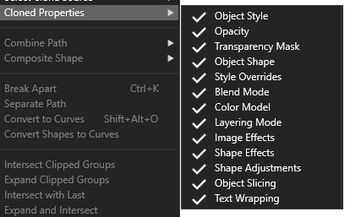
-
@Subpath said in How to break a connexion between clone objects:
I found it a bit confusing that the options for the clones are so distributed
Detach Clones in "Edit", Clone properties in "Object"Yes, I think the clone properties could be moved to the Edit menu (to balance things a bit).
And for the clone properties I was wondering
if a panel would be a better choice.This could be done, the problem is that these options are rarely changed, and keeping a panel open for just these is a bit too much.
One way around this is to have a button in the context panel, opening a popup menu containing the same options. This button would be visible only when a clone is selected.
Same for selecting the source of the clone.Like for example with the snapping options.
A Panel could then also be put on the canvas
if one need those Options more often. -
@VectorStyler said in How to break a connexion between clone objects:
the problem is that these options are rarely changed
yes see this Problem too.
but the way it is by now they are a bit
uncomfortable to use
and this could contribute to the fact
that you rarely use them -
@VectorStyler OK, what I mean specifically is references:
When I create a reference (Edit > Reference) and at one point later I want to release the "dependent"
object from its reference, I had no idea that the dependent object is now considered a symbol in
the VS internal hierarchy/model, so I have no idea that I should look for a command with 'symbol'
in the name.And again, 'expand' doesn't click in my head with all of the above. To me at least, 'expand' is
tied to expanding shape effects or other Bézier-related stuff.
Sure, my head might be the problem, but I think this is one point where relying on the user to have
high IQ / not be tired / be very patient / having read the manual creates a barrier to easy learning
(and adoption of) the app.Maybe 'Detach Parent' and 'Detach Children' could work better for both clones and references?
(Sorry if somebody else mentioned this already). -
@VectorStyler I've just sent you a file with this "detach" issue. Whatever I do, I can't modify the middle scheme without affecting the left one.
W11 Pro 25H2 - 12th Gen Intel(R) i7-12700K 3.61 GHz - RAM 64 Go - NVIDIA GF GTX 4070 Ti - Intuos - Dell UP3216Q / Eizo ColorEdge
W11 Pro 25H2 - 12th Gen Intel(R) i7-12700KF 3.60 GHz -RAM 64 Go - NVIDIA GF GTX 3080 - IntuosPro- ProArt PA329C -
@Pat Got the file and added this to the backlog.
-
@Pat Yes, the problems can be replicated with the file.
Looks like there are still issues with blends inside symbols (references).
Will try to fix this ASAP. -
@VectorStyler Thank you


