VectorStyler
    • Categories
    • Unread
    • Recent
    • Tags
    • Popular
    • Register
    • Login

    Rendering artifacts with VS


    Scheduled Pinned Locked Moved Questions and Support
    19 Posts 5 Posters 14.9k Views 5 Watching
    Loading More Posts
    • Oldest to Newest
    • Newest to Oldest
    • Most Votes
    Reply
    • Reply as topic
    Log in to reply
    This topic has been deleted. Only users with topic management privileges can see it.
    • VectorStylerV Offline
      VectorStyler @Harry
      last edited by

      @Harry I opened a bug on this one.
      What is the screen resolution (size) in pixels, and is the VS window maximized?

      B H 3 Replies Last reply Reply Quote 0
      • B Offline
        B-Vs-V @VectorStyler
        last edited by

        @VectorStyler Resolution: 3840 x 2160 (scaling 125%).

        W11 Pro 25H2 - 12th Gen Intel(R) i7-12700K 3.61 GHz - RAM 64 Go - NVIDIA GF GTX 4070 Ti - Intuos - Dell UP3216Q / Eizo ColorEdge
        W11 Pro 25H2 - 12th Gen Intel(R) i7-12700KF 3.60 GHz -RAM 64 Go - NVIDIA GF GTX 3080 - IntuosPro- ProArt PA329C

        VectorStylerV 1 Reply Last reply Reply Quote 1
        • B Offline
          B-Vs-V @Harry
          last edited by

          @Harry I always get those artefacts and indeed, pdf export is fine.

          0_1670778138301_rend.jpg

          PDF:

          0_1670778159255_rend_pdf.jpg

          W11 Pro 25H2 - 12th Gen Intel(R) i7-12700K 3.61 GHz - RAM 64 Go - NVIDIA GF GTX 4070 Ti - Intuos - Dell UP3216Q / Eizo ColorEdge
          W11 Pro 25H2 - 12th Gen Intel(R) i7-12700KF 3.60 GHz -RAM 64 Go - NVIDIA GF GTX 3080 - IntuosPro- ProArt PA329C

          1 Reply Last reply Reply Quote 0
          • VectorStylerV Offline
            VectorStyler @B-Vs-V
            last edited by

            @Pat said in Rendering artifacts with VS:

            (scaling 125%).

            Does this refer to a Windows display settings?

            B 1 Reply Last reply Reply Quote 0
            • B Offline
              B-Vs-V @VectorStyler
              last edited by

              @VectorStyler Yes & no other monitor on this pc.
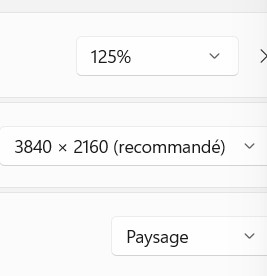
              0_1670778514921_Setup.jpg

              W11 Pro 25H2 - 12th Gen Intel(R) i7-12700K 3.61 GHz - RAM 64 Go - NVIDIA GF GTX 4070 Ti - Intuos - Dell UP3216Q / Eizo ColorEdge
              W11 Pro 25H2 - 12th Gen Intel(R) i7-12700KF 3.60 GHz -RAM 64 Go - NVIDIA GF GTX 3080 - IntuosPro- ProArt PA329C

              VectorStylerV 1 Reply Last reply Reply Quote 0
              • VectorStylerV Offline
                VectorStyler @B-Vs-V
                last edited by

                @Pat said in Rendering artifacts with VS:

                Yes & no other monitor on this pc.

                Try with 100% scaling. This might be the issue.
                And if it is, it is still a VS bug.

                B 1 Reply Last reply Reply Quote 0
                • B Offline
                  B-Vs-V @VectorStyler
                  last edited by

                  @VectorStyler No, I still get these rendering issues, more or less pronounced according to the zoom factor


                  0_1670778991024_rend2.jpg
                  0_1670778995621_rend3.jpg

                  W11 Pro 25H2 - 12th Gen Intel(R) i7-12700K 3.61 GHz - RAM 64 Go - NVIDIA GF GTX 4070 Ti - Intuos - Dell UP3216Q / Eizo ColorEdge
                  W11 Pro 25H2 - 12th Gen Intel(R) i7-12700KF 3.60 GHz -RAM 64 Go - NVIDIA GF GTX 3080 - IntuosPro- ProArt PA329C

                  1 Reply Last reply Reply Quote 0
                  • B Offline
                    B-Vs-V @VectorStyler
                    last edited by

                    @VectorStyler said in Rendering artifacts with VS:

                    @Harry I opened a bug on this one.

                    Thank you, it is rather annoying sometimes ☺

                    W11 Pro 25H2 - 12th Gen Intel(R) i7-12700K 3.61 GHz - RAM 64 Go - NVIDIA GF GTX 4070 Ti - Intuos - Dell UP3216Q / Eizo ColorEdge
                    W11 Pro 25H2 - 12th Gen Intel(R) i7-12700KF 3.60 GHz -RAM 64 Go - NVIDIA GF GTX 3080 - IntuosPro- ProArt PA329C

                    1 Reply Last reply Reply Quote 0
                    • H Offline
                      Harry @VectorStyler
                      last edited by

                      @VectorStyler said in Rendering artifacts with VS:

                      @Harry I opened a bug on this one.
                      What is the screen resolution (size) in pixels, and is the VS window maximized?

                      I tried the following:

                      • newest Nvidia drivers
                      • 100 and 125 % scaling in Windows
                      • screen resolution 1920 x 1080
                      • VS window maximized and not

                      Artifacts still exist. The worst are by 100 % scaling in Windows and VS window maximized.

                      Win 11, XP Pen Deco 01 V2 graphic tablet

                      VectorStylerV 1 Reply Last reply Reply Quote 2
                      • VectorStylerV Offline
                        VectorStyler @Harry
                        last edited by

                        @Harry Can be replicated.

                        1 Reply Last reply Reply Quote 1
                        • First post
                          Last post